Operations with git
Table of Contents
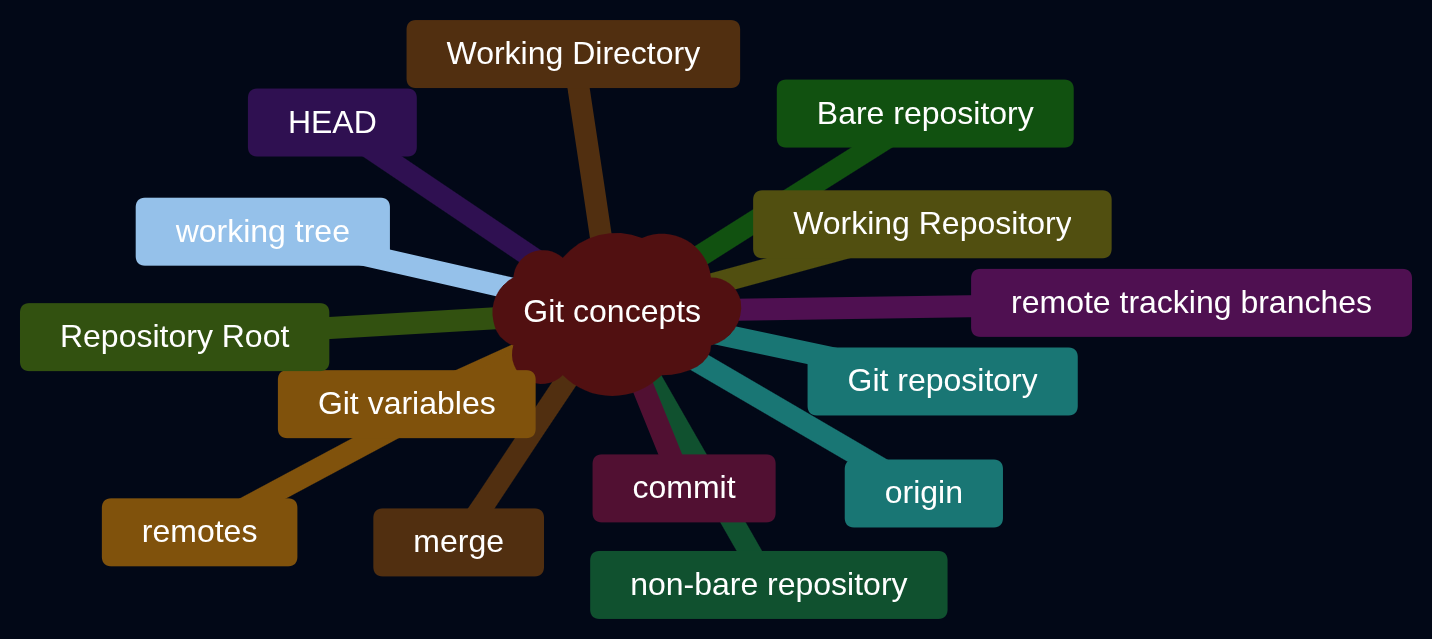
Git vs SVC#
An SVC is a type of Software Configuration Management (SCM) git is the most popular distributed software version control (dsvc)
Git vs Github#
Git is the DSVC (Distributed Software Version Control). Github is a cloud platform that uses Git as its core technology plus additional features like Discussions and Pull Requests.
Using Git#
There are CLI tools like Git Desktop and GUI tools like Microsoft Visual Studio Code to use Git. GUI tools have their own limitations.
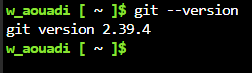
Check Git Version#
git log#
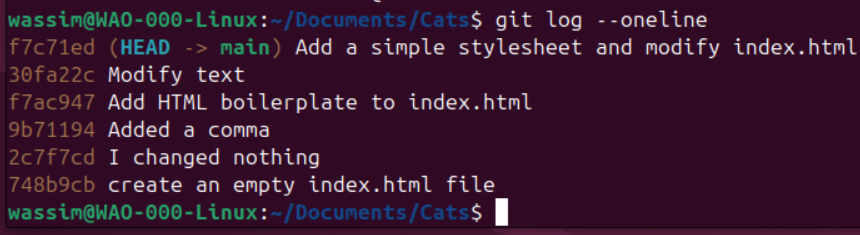
Display the history of commit objects in single lines:
Display the last one, two, three commit objects:
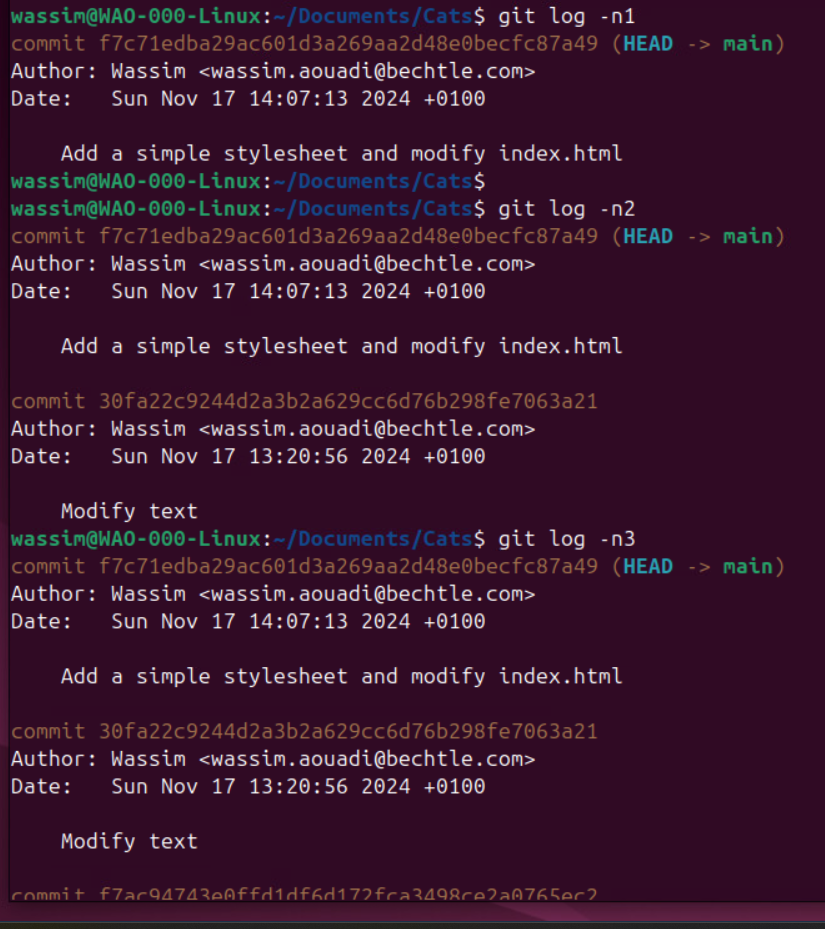
display last n commit logs#
Wassim@linux:~/Documents/ObNotes$ git log -n 3 --oneline
a980df6 (HEAD -> Dec2025, main) Restore unintentionally deleted ACI TEP Pools and TEP Addresses.md
a7c6c3d Review ACI Notes 0002
81f0de3 Study JNCIA01 0008
Wassim@linux:~/Documents/ObNotes$
It displayed the history of the latest 3 commit objects whose hashes are a980df6, a7c6c3d and 81f0de3 respectively.
display the names of files that changed in the last n commits#
Wassim@linux:~/Documents/ObNotes$ git log -n 3 --oneline --name-only
a980df6 (HEAD -> Dec2025, main) Restore unintentionally deleted ACI TEP Pools and TEP Addresses.md
My Vault/.obsidian/workspace.json
a7c6c3d Review ACI Notes 0002
My Vault/.obsidian/app.json
My Vault/.obsidian/community-plugins.json
My Vault/.obsidian/image-converter-image-alignments.json
My Vault/.obsidian/plugins/obsidian-style-settings/data.json
My Vault/.obsidian/workspace.json
My Vault/Individual Notes/ACI Main Note.md
My Vault/Individual Notes/ACI TEP Pools and TEP Addresses.md
My Vault/Individual Notes/Juniper DevOps Track (JNCIA, JNCIS).md
My Vault/Individual Notes/XML Samples for labbing.md
My Vault/Templates/Template Mermaid Code.md
81f0de3 Study JNCIA01 0008
My Vault/.obsidian/workspace.json
My Vault/Individual Notes/JNCIA-DevOps.md
Wassim@linux:~/Documents/ObNotes$
it displayed the names of the files that changed in the commits whose hashes are a980df6, a7c6c3d and 81f0de3 respectively.
git remote#
a remote in Git is a concept that means “another Git repository to which my local Git repository has a relationship”.
I can manually define a git remote using git remote add or Git creates the relationship with a remote when I do git clone.
The commands git push and git pull rely on the concept of the Git remote.
Git Variables#
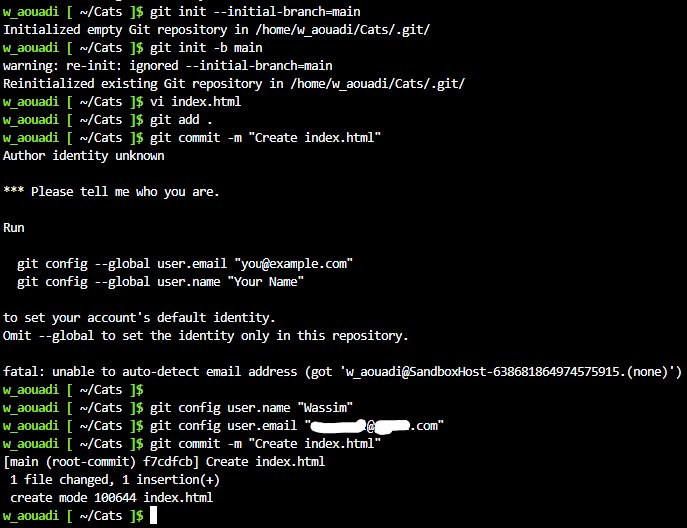
Setting a name and an email are required for me to perform commits.
Types of Git Variables#
Global Variables#
allow to perform Git operations on all Git repositories.
 setting the name of the default branch to ‘main’ (instead of ‘master’ for old git versions):
Wassim@linux:~/Documents/Obsidian Notes$ git version
git version 2.47.3
Wassim@linux:~/Documents/Obsidian Notes$ git config --global init.defaultBranch main
Wassim@linux:~/Documents/Obsidian Notes$
Wassim@linux:~/Documents/Obsidian Notes$ git config --list
user.name=Wassim
[email protected]
init.defaultbranch=main
Wassim@linux:~/Documents/Obsidian Notes$
Local Variables#
allow to perform Git operations only on the Git repo where the local variables are defined:
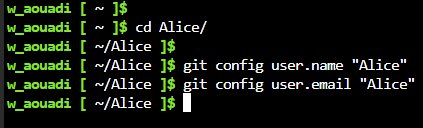
Outside of a Git repository, Git does not allow creating such variables:
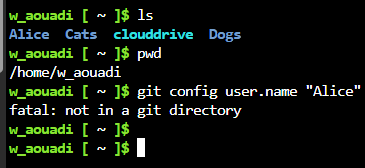
So I need a Git repository first, then define the variables.
Are Git Variables Required?#
Git does not allow to commit without setting Git variables:
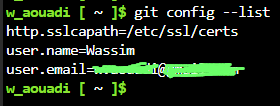
Verify Variables#
Managing conflicts in git#
Example 1#
Each time I open Obsidian, two files are automatically modified but not placed in the git staging area: .obsidian/appearance.json and .obsidian/workspace.json.
Wassim@linux:~/privateworksync$ git status
On branch main
Your branch is up to date with 'origin/main'.

Changes not staged for commit:
  (use "git add <file>..." to update what will be committed)
  (use "git restore <file>..." to discard changes in working directory)
	modified:   .obsidian/appearance.json
	modified:   .obsidian/workspace.json

no changes added to commit (use "git add" and/or "git commit -a")
Wassim@linux:~/privateworksync$
Pulling from origin creates a conflict and is aborted:
Wassim@linux:~/privateworksync$ git pull origin main
Username for 'https://gitlab.com': wasssync1
Password for 'https://[email protected]':
remote: Enumerating objects: 29, done.
remote: Counting objects: 100% (29/29), done.
remote: Compressing objects: 100% (20/20), done.
remote: Total 20 (delta 15), reused 0 (delta 0), pack-reused 0 (from 0)
Unpacking objects: 100% (20/20), 9.96 KiB | 1.24 MiB/s, done.
From https://gitlab.com/waouadi/privateworksync
 * branch            main       -> FETCH_HEAD
   1e5cbea..84100e0  main       -> origin/main
Updating 1e5cbea..84100e0
error: Your local changes to the following files would be overwritten by merge:
	.obsidian/appearance.json
	.obsidian/workspace.json
Please commit your changes or stash them before you merge.
Aborting
Wassim@linux:~/privateworksync$
Using git rm -f marks the files for deletion and places them in the git staging area. But a pull after it still does not succeed:
Wassim@linux:~/privateworksync$ git rm -f .obsidian/appearance.json
rm '.obsidian/appearance.json'
Wassim@linux:~/privateworksync$ git rm -f .obsidian/workspace.json
rm '.obsidian/workspace.json'
Wassim@linux:~/privateworksync$ git status
On branch main
Your branch is behind 'origin/main' by 3 commits, and can be fast-forwarded.
  (use "git pull" to update your local branch)

Changes to be committed:
  (use "git restore --staged <file>..." to unstage)
	deleted:    .obsidian/appearance.json
	deleted:    .obsidian/workspace.json

Wassim@linux:~/privateworksync$ git pull origin main
From https://gitlab.com/waouadi/privateworksync
 * branch            main       -> FETCH_HEAD
Updating 1e5cbea..84100e0
error: Your local changes to the following files would be overwritten by merge:
	.obsidian/appearance.json
	.obsidian/workspace.json
Please commit your changes or stash them before you merge.
Aborting
Wassim@linux:~/privateworksync$
Committing the changes then pulling also is not successful:
Wassim@linux:~/privateworksync$ git commit -m "delete local obsidian duplicate files"
[main 9107e1b] delete local obsidian duplicate files
 2 files changed, 277 deletions(-)
 delete mode 100644 .obsidian/appearance.json
 delete mode 100644 .obsidian/workspace.json
Wassim@linux:~/privateworksync$ git pull origin main
From https://gitlab.com/waouadi/privateworksync
 * branch            main       -> FETCH_HEAD
CONFLICT (modify/delete): .obsidian/appearance.json deleted in HEAD and modified in 84100e0e32a5eb28c60e62d61ddc01b1b6db72f0.  Version 84100e0e32a5eb28c60e62d61ddc01b1b6db72f0 of .obsidian/appearance.json left in tree.
CONFLICT (modify/delete): .obsidian/workspace.json deleted in HEAD and modified in 84100e0e32a5eb28c60e62d61ddc01b1b6db72f0.  Version 84100e0e32a5eb28c60e62d61ddc01b1b6db72f0 of .obsidian/workspace.json left in tree.
Automatic merge failed; fix conflicts and then commit the result.
Wassim@linux:~/privateworksync$
git reset --hard of the latest commit did not help either:
Wassim@linux:~/privateworksync$ git log --oneline
9107e1b (HEAD -> main) delete local obsidian duplicate files
1e5cbea progress in juniper track
45b728c update linux sheet
58fa3bc update linux post
a3df847 update linux file
e310916 update at home

<---- output omitted ---->

Wassim@linux:~/privateworksync$ git reset --hard 9107e1b
HEAD is now at 9107e1b delete local obsidian duplicate files
Wassim@linux:~/privateworksync$
Wassim@linux:~/privateworksync$ git status
On branch main
Your branch and 'origin/main' have diverged,
and have 1 and 3 different commits each, respectively.
  (use "git pull" if you want to integrate the remote branch with yours)

nothing to commit, working tree clean
Wassim@linux:~/privateworksync$
Wassim@linux:~/privateworksync$ git pull origin main
From https://gitlab.com/waouadi/privateworksync
 * branch            main       -> FETCH_HEAD
CONFLICT (modify/delete): .obsidian/appearance.json deleted in HEAD and modified in 84100e0e32a5eb28c60e62d61ddc01b1b6db72f0.  Version 84100e0e32a5eb28c60e62d61ddc01b1b6db72f0 of .obsidian/appearance.json left in tree.
CONFLICT (modify/delete): .obsidian/workspace.json deleted in HEAD and modified in 84100e0e32a5eb28c60e62d61ddc01b1b6db72f0.  Version 84100e0e32a5eb28c60e62d61ddc01b1b6db72f0 of .obsidian/workspace.json left in tree.
Automatic merge failed; fix conflicts and then commit the result.
Wassim@linux:~/privateworksync$ git pull origin main --force
error: Pulling is not possible because you have unmerged files.
hint: Fix them up in the work tree, and then use 'git add/rm <file>'
hint: as appropriate to mark resolution and make a commit.
fatal: Exiting because of an unresolved conflict.
Wassim@linux:~/privateworksync$
git complains that there are unmerged paths, while the changes from the git pull origin main were staged correctly.
Wassim@linux:~/privateworksync$ git status
On branch main
Your branch and 'origin/main' have diverged,
and have 1 and 3 different commits each, respectively.
  (use "git pull" if you want to integrate the remote branch with yours)

You have unmerged paths.
  (fix conflicts and run "git commit")
  (use "git merge --abort" to abort the merge)

Changes to be committed:
	modified:   Learninglog01.md
	modified:   Miscellaneous Junos Operations.md
	modified:   Routing Instances on Junos.md
	modified:   Virtual Networks on Junos.md
	new file:   absorb/sampleDCpracticeLeadjobprofile.txt

Unmerged paths:
  (use "git add/rm <file>..." as appropriate to mark resolution)
	deleted by us:   .obsidian/appearance.json
	deleted by us:   .obsidian/workspace.json
So I git rm -f the files again:
Wassim@linux:~/privateworksync$ git rm -f .obsidian/appearance.json
rm '.obsidian/appearance.json'
Wassim@linux:~/privateworksync$ git rm -f .obsidian/workspace.json
rm '.obsidian/workspace.json'
Now the staging area looks better.
Wassim@linux:~/privateworksync$ git status
On branch main
Your branch and 'origin/main' have diverged,
and have 1 and 3 different commits each, respectively.
  (use "git pull" if you want to integrate the remote branch with yours)

All conflicts fixed but you are still merging.
  (use "git commit" to conclude merge)

Changes to be committed:
	modified:   Learninglog01.md
	modified:   Miscellaneous Junos Operations.md
	modified:   Routing Instances on Junos.md
	modified:   Virtual Networks on Junos.md
	new file:   absorb/sampleDCpracticeLeadjobprofile.txt

Wassim@linux:~/privateworksync$
So I commit:
Wassim@linux:~/privateworksync$ git commit "solve conflict"
fatal: cannot do a partial commit during a merge.
Wassim@linux:~/privateworksync$ git commit -m "solve conflict"
[main 4866316] solve conflict
Wassim@linux:~/privateworksync$ git status
On branch main
Your branch is ahead of 'origin/main' by 2 commits.
  (use "git push" to publish your local commits)

nothing to commit, working tree clean
Wassim@linux:~/privateworksync$
and perform a git pull remote origin main again. This time the pull succeeded.
Wassim@linux:~/privateworksync$ git pull origin main
From https://gitlab.com/waouadi/privateworksync
 * branch            main       -> FETCH_HEAD
Already up to date.
Wassim@linux:~/privateworksync$ git log --oneline
4866316 (HEAD -> main) solve conflict
9107e1b delete local obsidian duplicate files
84100e0 (origin/main, origin/HEAD) update Juniper sheet
9ba136b DC Practice Lead
a7bfb44 update juniper
1e5cbea progress in juniper track
45b728c update linux sheet

<---- output omitted ---->
git pull#
use git pull to pull changes from a remote Git repository, called a remote, to a local one. git pull looks only at the commits and the objects they point to.
Use Case#
Let us suppose we [[git clone|cloned a Git repository]] and we want to pull from it the latest changes into our local Git repo.
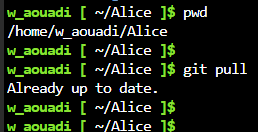
No Changes in Origin#
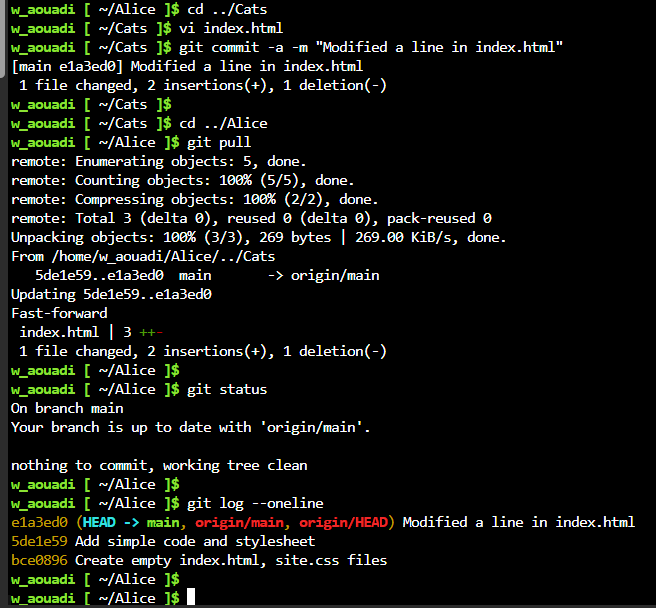
There Are Changes in Origin#
We make changes to the source Git repo (the remote named origin), stage and commit. Then we go to the clone and pull; git pull will detect there is either a modified commit or a new commit; It perform the following operations in a single batch:
- Git compresses the commits and the objects they point to in a file called pack,
- Git copies the commits and the objects to the working tree of the clone repository,
- Git unpacks them.
git merge#
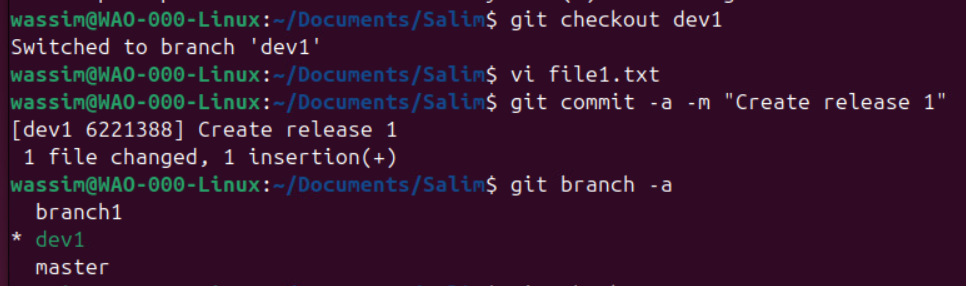
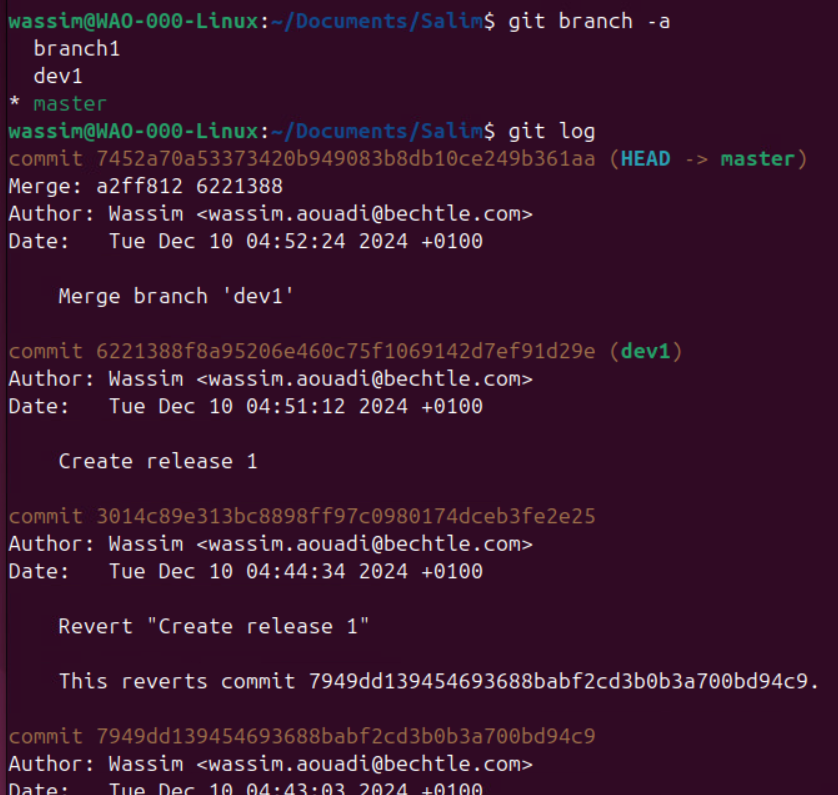
I can merge another branch with my local branch. In the below example, I created a new commit in branch ‘dev1’ and I want to merge branch ‘dev1’ with branch ‘master’.
I need to switch to the target branch first - branch ‘master’- and initiate the git merge from there:
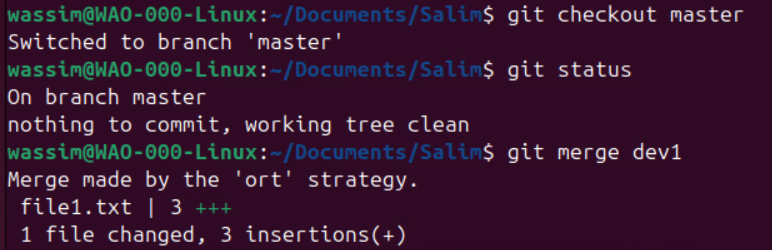
In the git log, I see the new commit in the ‘master’ branch:
Git and GitLab#
I had a multi-Gigabyte git project that I wanted to push to my GitLab. I created the GitLab project, the access token, defined the roles, created a branch rule for it (GitLab is moving the Protected Branch feature into Branch Rules sub-menu), installed LFS, LFS-tracked the necessary extensions, added .gitattributes to Git, defined the Git remote. The git push to GitLab failed with this error:
fatal: The remote end hung up unexpectedly
I thought it was a network connection issue or a session timeout. I learned that it could be related to a HTTP buffer size used by Git during the git push operation. So I increased it with this command:
git config http.postBuffer 524288000
I retried the git push. It failed again. I investigated deeper. I learned that it could be an issue with HTTP. So I switched to SSH; I generated a public-private keypair, uploaded the public key to my GitLab project, verified with ssh -T [email protected], changed the git remote to using SSH by entering this command:
git remote add origin [email protected]:MyAccount\myproject.git
Then I executed git push. I received another fault message mentioning a limit of 100 MiB being exceeded. The fault message included a command to verify the file name that’s causing the error. I converted the files to tar archives with tar cvzf and made sure their sizes do not exceed 100 MiB. That did not help with the git push. I then moved them out of the working directory, created a dummy file, staged and committed. That did not help too. Then I learned that a Git rebase might solve the issue. I did git rebase -i to the initial commit, which also did not help. So I decided to restart from scratch, copy the working directory somewhere else as a backup, started moving blocks of files which do not exceed 100 MiB in size and incrementally committing and doing git push. That worked.
The initial struggle to prepare a GitLab project and connect it with a local working directory was a reminder to me that automation is not merely a bunch of scripts but an environment and a thought process that requires patience.
git rebase#
sample scenario: I have a feature branch where I just committed. And files have been created meanwhile in the main branch or some developer pushed some updates to main.
The trick: instead of merge, I commit the changes in the feature branch, I checkout to main, I commit the changes in main, I checkout to the feature branch and do git rebase main #lab
This will:
- put the commits ( #QA only the last two?) from the main in the history of commits of the feature branch,
- create a rebase commit in the feature branch on top.
Then I must checkout to main and merge the updates from the feature branch with
git merge{feature-branch}
assim@linux:~/Documents/ObNotes$ git log --oneline
7743b7f (HEAD -> Dec2025) Update SNMP and DevOps note
3365c58 Read and Practice config import/export
e1a64b5 detailed practicing APIC Config export and import
61b898f Consolidate APIC note 01
ff24b75 Review Telemetry note
0edb7df Review APIC note 01
af5c7a9 Dec 2 early
2e7301c Merge branch 'Nov2025'
2418231 (Nov2025) Dec1
Wassim@linux:~/Documents/ObNotes$ git status
On branch Dec2025
Changes not staged for commit:
  (use "git add <file>..." to update what will be committed)
  (use "git restore <file>..." to discard changes in working directory)
    modified:   My Vault/.obsidian/workspace.json
    modified:   My Vault/Individual Notes/git Terminology.md

no changes added to commit (use "git add" and/or "git commit -a")
Wassim@linux:~/Documents/ObNotes$ git add .
Wassim@linux:~/Documents/ObNotes$ git commit -m "test rebase"
[Dec2025 144c045] test rebase
 2 files changed, 10 insertions(+), 5 deletions(-)

 ### checkout to main, emulating a change, staging it and committing it.
Wassim@linux:~/Documents/ObNotes$ git checkout main
Switched to branch 'main'
Your branch is up to date with 'backup/main'.
Wassim@linux:~/Documents/ObNotes$ git status
On branch main
Your branch is up to date with 'backup/main'.

nothing to commit, working tree clean
Wassim@linux:~/Documents/ObNotes$ git status
On branch main
Your branch is up to date with 'backup/main'.

Untracked files:
  (use "git add <file>..." to include in what will be committed)
    dummyfile

nothing added to commit but untracked files present (use "git add" to track)
Wassim@linux:~/Documents/ObNotes$ git add dummyfile
Wassim@linux:~/Documents/ObNotes$ git commit -m "create dummyfile after feature branch modifs"
[main 1bc4c98] create dummyfile after feature branch modifs
 1 file changed, 0 insertions(+), 0 deletions(-)
 create mode 100644 dummyfile

 ### initiating the rebase
Wassim@linux:~/Documents/ObNotes$ git checkout Dec2025
Switched to branch 'Dec2025'
Wassim@linux:~/Documents/ObNotes$ git rebase main
Successfully rebased and updated refs/heads/Dec2025.
Wassim@linux:~/Documents/ObNotes$ git log --oneline
1628857 (HEAD -> Dec2025) test rebase
1bc4c98 (main) create dummyfile after feature branch modifs
4a737cc (backup/main) Updates from branch Dec2025
7743b7f Update SNMP and DevOps note
e4753ca Merge branch 'Dec2025'
3365c58 Read and Practice config import/export
d3e4048 Merge branch 'Dec2025'
e1a64b5 detailed practicing APIC Config export and import
8954683 delete .gitignore
c363b2c Correct workspace.json issue
61b898f Consolidate APIC note 01
9f1ab59 Telemetry
ff24b75 Review Telemetry note
3996a41 APIC note update 02
0edb7df Review APIC note 01
af5c7a9 Dec 2 early
2e7301c Merge branch 'Nov2025'
2418231 (Nov2025) Dec1

Wassim@linux:~/Documents/ObNotes$ git status
On branch Dec2025
nothing to commit, working tree clean
Wassim@linux:~/Documents/ObNotes$ git checkout main
Switched to branch 'main'
Your branch is ahead of 'backup/main' by 1 commit.
  (use "git push" to publish your local commits)
Wassim@linux:~/Documents/ObNotes$ git log --oneline
1bc4c98 (HEAD -> main) create dummyfile after feature branch modifs
4a737cc (backup/main) Updates from branch Dec2025
7743b7f Update SNMP and DevOps note
e4753ca Merge branch 'Dec2025'
3365c58 Read and Practice config import/export
d3e4048 Merge branch 'Dec2025'
e1a64b5 detailed practicing APIC Config export and import
8954683 delete .gitignore
c363b2c Correct workspace.json issue
61b898f Consolidate APIC note 01
9f1ab59 Telemetry
ff24b75 Review Telemetry note
3996a41 APIC note update 02
0edb7df Review APIC note 01
af5c7a9 Dec 2 early
2e7301c Merge branch 'Nov2025'
2418231 (Nov2025) Dec1

Wassim@linux:~/Documents/ObNotes$ git merge Dec2025
Updating 1bc4c98..1628857
Fast-forward
 My Vault/.obsidian/workspace.json            | 10 +++++-----
 My Vault/Individual Notes/git Terminology.md |  5 +++++
 2 files changed, 10 insertions(+), 5 deletions(-)
Wassim@linux:~/Documents/ObNotes$ git log --oneline
1628857 (HEAD -> main, Dec2025) test rebase
1bc4c98 create dummyfile after feature branch modifs
4a737cc (backup/main) Updates from branch Dec2025
7743b7f Update SNMP and DevOps note
e4753ca Merge branch 'Dec2025'
3365c58 Read and Practice config import/export
d3e4048 Merge branch 'Dec2025'
e1a64b5 detailed practicing APIC Config export and import
8954683 delete .gitignore
c363b2c Correct workspace.json issue
61b898f Consolidate APIC note 01
9f1ab59 Telemetry
ff24b75 Review Telemetry note
3996a41 APIC note update 02
0edb7df Review APIC note 01
af5c7a9 Dec 2 early
2e7301c Merge branch 'Nov2025'
2418231 (Nov2025) Dec1
I learned that is what most developers do.
git checkout#
I can git checkout a branch and I can git checkout a commit object.
Git checkout of a branch:
- Git searches for the latest commit object and finds out which files existed at that point of project history,
- Git decompresses data (the data that matches the found files) from the blob objects of the Git repository and creates the file structure in the working directory
- Git updates HEAD to reference that branch. –> == reconstruct the working directory file structure + update HEAD. HEAD is a file that contains a reference to a branch. For simplification, HEAD is considered as a pointer to a branch. This is the default state of HEAD. Git checkout of a commit object:
- in tis commit object, Git finds out which files existed at that point of project history,
- Git decompresses data (the data that matches the found files in the previous step) from the blob objects of the Git repository and creates the file structure in the working directory
- Git updates HEAD to reference this commit object (example
git checkout a1b2c3dorgit checkout HEAD-2); HEAD is said to be in a ==detached state==. This is a dangerous place because HEAD is no longer pointing to any branches, and any subsequent commit will become an orphan commit object!
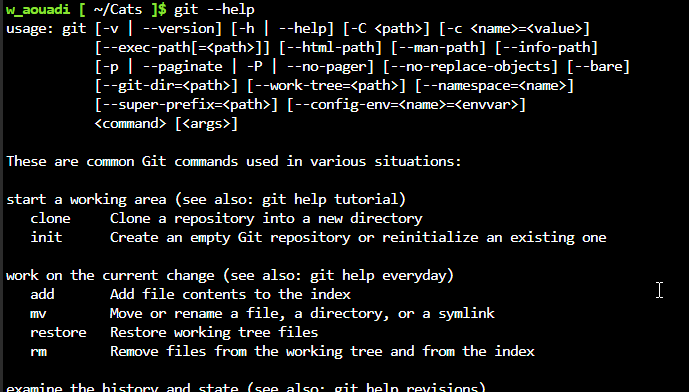
git help#
references#
- stackoverflow.com/questions/15240815/git-fatal-the-remote-end-hung-up-unexpectedly
- docs.gitlab.com/ci/jobs/ssh_keys/