Domain Name Resolution
Table of Contents
name resolution in Linux#
Name resolution in Linux is a pipeline of verification jobs, not a single file: a process consults the Name Service Switch, which has a configuration file at /etc/nsswitchconf. This file contains a list of entries. Each entry describes a database and the list of sources to refer to in the order of their appearance in the entry.
An entry is written in this format: DatabaseName NameService1 [Status=Action] NameService2
In the topic of name resolution, the relevant entry starts with hosts:
user01@rhel10-vm5:~$ cat /etc/nsswitch.conf
# Generated by authselect
# Do not modify this file manually, use authselect instead. Any user changes will be overwritten.
# You can stop authselect from managing your configuration by calling 'authselect opt-out'.
# See authselect(8) for more details.

# In order of likelihood of use to accelerate lookup.
passwd:     files systemd
shadow:     files
group:      files [SUCCESS=merge] systemd
hosts:      files  dns myhostname
services:   files
netgroup:   files
automount:  files

aliases:    files
ethers:     files
gshadow:    files
networks:   files dns
protocols:  files
publickey:  files
rpc:        files
user01@rhel10-vm5:~$
The hosts entry has three columns: files, dns and myhostname.
According to the man pages of nsswitch.conf, the files source references the /etc/hosts file:
<---- output omitted ---->

The following files are read when "files" source is specified for respective databases:

           aliases     /etc/aliases
           ethers      /etc/ethers
           group       /etc/group
           hosts       /etc/hosts

<---- output omitted ---->
Here is what /etc/hosts look like:
user01@rhel10-vm5:~$ cat /etc/hosts
# Loopback entries; do not change.
# For historical reasons, localhost precedes localhost.localdomain:
127.0.0.1   localhost localhost.localdomain localhost4 localhost4.localdomain4
::1         localhost localhost.localdomain localhost6 localhost6.localdomain6
# See hosts(5) for proper format and other examples:
# 192.168.1.10 foo.example.org foo
# 192.168.1.13 bar.example.org bar
# added by me
192.168.178.38  rhel10-vm4
user01@rhel10-vm5:~$
The second source is dns. It references /etc/resolv.conf, which is a pointer; It contains a list of name servers:
user01@rhel10-vm5:~$ cat /etc/resolv.conf
# Generated by NetworkManager
search fritz.box
nameserver 8.8.8.8
nameserver 192.168.178.1
nameserver fd00::464e:6dff:fefd:105c
user01@rhel10-vm5:~$
The third source is myhostname. I guess it has to do with the hostname. #QA
editing /etc/hosts#
I append an entry to the /etc/hosts file using tee:
user01@rhel10-vm5:~$ echo '192.168.56.1 hpLaptop.example.local hplaptop' | sudo tee -a /etc/hosts
[sudo] password for user01:
192.168.56.1 hpLaptop.example.local hplaptop
user01@rhel10-vm5:~$
user01@rhel10-vm5:~$ tail -n 1 /etc/hosts
192.168.56.1 hpLaptop.example.local hplaptop
Then see if the hostname is resolved to an IP address when I try to ping the node for example:
ser01@rhel10-vm5:~$ grep ^hosts /etc/nsswitch.conf
hosts:      files  dns myhostname
user01@rhel10-vm5:~$ ping hplaptop
PING hpLaptop.example.local (192.168.56.1) 56(84) bytes of data.
^C
/etc/resolv.conf#
The entries in /etc/resolv.conf are populated by NetworkManager on RHEL:
user01@rhel10-vm5:~$ cat /etc/resolv.conf
# Generated by NetworkManager
nameserver 8.8.8.8
user01@rhel10-vm5:~$ nmcli conn show
NAME    UUID                                  TYPE      DEVICE
enp0s3  b3e92c22-8cf7-3bf5-bce2-6bdd208fcca7  ethernet  enp0s3
lo      d5300a98-8445-4ce9-a0fb-2d61eba4a9e0  loopback  lo
user01@rhel10-vm5:~$ nmcli conn show enp0s3 | grep ipv4.dns
ipv4.dns:                               8.8.8.8
ipv4.dns-search:                        --
ipv4.dns-options:                       --
ipv4.dns-priority:                      0
user01@rhel10-vm5:~$
changing DNS settings for a connection with NetworkManager#
In RHEL, NetworkManager is responsible for the DNS settings of a network connection. The proof for that is the comment in the /etc/resolv.conf:
user01@rhel10-vm3:~$ cat /etc/resolv.conf
# Generated by NetworkManager

<---- output omitted ---->
user01@rhel10-vm3:~$ nmcli connection show
NAME    UUID                                  TYPE      DEVICE
enp0s3  b3e92c22-8cf7-3bf5-bce2-6bdd208fcca7  ethernet  enp0s3
lo      74121212-ec60-4bc1-90b2-2a241f755a75  loopback  lo
user01@rhel10-vm3:~$ nmcli conn show enp0s3 | grep ipv4.dns
ipv4.dns:                               8.8.8.8
ipv4.dns-search:                        --
ipv4.dns-options:                       --
ipv4.dns-priority:                      0
user01@rhel10-vm3:~$
user01@rhel10-vm3:~$ sudo nmcli conn modify 'enp0s3' \
> ipv4.dns '1.1.1.1' \
> ipv4.dns-search 'rhcsa.lab' \
>
[sudo] password for user01:
user01@rhel10-vm3:~$ nmcli conn up 'enp0s3'
Connection successfully activated (D-Bus active path: /org/freedesktop/NetworkManager/ActiveConnection/3)
user01@rhel10-vm3:~$ nmcli conn show 'enp0s3' | grep ipv4.dns
ipv4.dns:                               1.1.1.1
ipv4.dns-search:                        rhcsa.lab
ipv4.dns-options:                       --
ipv4.dns-priority:                      0
user01@rhel10-vm3:~$
The changes are reflected automatically in /etc/resolv.conf after I initiated an activation of the connection profile (although it was up before):
user01@rhel10-vm3:~$ cat /etc/resolv.conf
# Generated by NetworkManager
search rhcsa.lab
nameserver 1.1.1.1
user01@rhel10-vm3:~$
Note that nmcli DNS changes are not propagated to /etc/resolv.conf if I did not do that:
user01@rhel10-vm3:~$ nmcli con show
NAME    UUID                                  TYPE      DEVICE
enp0s3  b3e92c22-8cf7-3bf5-bce2-6bdd208fcca7  ethernet  enp0s3
lo      74121212-ec60-4bc1-90b2-2a241f755a75  loopback  lo
user01@rhel10-vm3:~$ sudo nmcli con show enp0s3 | grep ipv4.dns
[sudo] password for user01:
ipv4.dns:                               1.1.1.1
ipv4.dns-search:                        rhcsa.lab
ipv4.dns-options:                       --
ipv4.dns-priority:                      0
user01@rhel10-vm3:~$ sudo nmcli con modify 'enp0s3' \
> ipv4.dns '8.8.8.8' \
> ipv4.dns-search 'home.lab'
user01@rhel10-vm3:~$
user01@rhel10-vm3:~$ cat /etc/resolv.conf
# Generated by NetworkManager
search rhcsa.lab
nameserver 1.1.1.1
user01@rhel10-vm3:~$
Emulating a bounce action propagates the changes to /etc/resolv.conf:
user01@rhel10-vm3:~$ sudo nmcli conn up 'enp0s3'
Connection successfully activated (D-Bus active path: /org/freedesktop/NetworkManager/ActiveConnection/4)
user01@rhel10-vm3:~$
user01@rhel10-vm3:~$ cat /etc/resolv.conf
# Generated by NetworkManager
search home.lab rhcsa.lab
nameserver 8.8.8.8
user01@rhel10-vm3:~$
Notice that when a new DNS search domain is pushed by NetworkManager, /etc/resolv.conf does not overwrite the existing value. I now have two search domains:
user01@rhel10-vm3:~$ cat /etc/resolv.conf
# Generated by NetworkManager
search home.lab rhcsa.lab
nameserver 8.8.8.8
user01@rhel10-vm3:~$
It seems that the search directive of the /etc/resolv.conf can have up to two DNS search domains. Any change with nmcli lands in the first value of the search directive and verwrites whatever configured there:
user01@rh10-vm5:~$ nmcli conn show 'enp0s3' | grep ipv4.dns
ipv4.dns:                               1.1.1.1
ipv4.dns-search:                        home.lab
ipv4.dns-options:                       --
ipv4.dns-priority:                      0
user01@rh10-vm5:~$ sudo nmcli con modify 'enp0s3' \
> ipv4.dns-search test.lab
[sudo] password for user01:
user01@rh10-vm5:~$ sudo nmcli con up 'enp0s3'
Connection successfully activated (D-Bus active path: /org/freedesktop/NetworkManager/ActiveConnection/3)
user01@rh10-vm5:~$
user01@rh10-vm5:~$ grep ^search /etc/resolv.conf
search test.lab rhcsa.lab
user01@rh10-vm5:~$
user01@rh10-vm5:~$ sudo nmcli conn modify 'enp0s3' \
> ipv4.dns-search "test2.lab"
user01@rh10-vm5:~$ sudo nmcli con up 'enp0s3'
Connection successfully activated (D-Bus active path: /org/freedesktop/NetworkManager/ActiveConnection/4)
user01@rh10-vm5:~$ grep ^search /etc/resolv.conf
search test2.lab rhcsa.lab
user01@rh10-vm5:~$
What if I added more search domains in the nmcli query?
user01@rh10-vm5:~$ sudo nmcli conn modify 'enp0s3' \
> ipv4.dns-search "test3.lab test4.lab"
user01@rh10-vm5:~$ sudo nmcli con up 'enp0s3'
Connection successfully activated (D-Bus active path: /org/freedesktop/NetworkManager/ActiveConnection/5)
user01@rh10-vm5:~$ grep ^search /etc/resolv.conf
search test3.lab test4.lab rhcsa.lab
user01@rh10-vm5:~$
So it seems I can push a series of search domains to /etc/resolv.conf. But still, even a series of search domain values replaces the first search domain in the file. What about pushing an empty list?
user01@rh10-vm5:~$ sudo nmcli con modify 'enp0s3' \
> ipv4.dns-search ''
user01@rh10-vm5:~$ sudo nmcli con up 'enp0s3'
Connection successfully activated (D-Bus active path: /org/freedesktop/NetworkManager/ActiveConnection/6)
user01@rh10-vm5:~$ grep ^search /etc/resolv.conf
search rhcsa.lab
user01@rh10-vm5:~$
The previous values were erased but the last search domain in the previous list became the only one remaining now. Why hasn’t it been deleted?
I noticed that the domain name of the lab VM contained rhcsa.lab. And since I configured the domain name as part of setting up the hostname with hostnamectl, I suspected that hostnamectl has some access to /etc/resolv.conf. To prove that, I changed the VM hostname again and watched what changed in /etc/resolv.conf:
user01@rh10-vm5:~$ sudo hostnamectl hostname vm.intra.net
user01@rh10-vm5:~$ hostname
vm.intra.net
user01@rh10-vm5:~$ cat /etc/resolv.conf
# Generated by NetworkManager
search intra.net
nameserver 1.1.1.1
This is new to me. It seems that NetworkManager readed the new hostname value, extracted the second and top level domains and pushed them as a search domain to /etc/resolv.conf. What if I pushed an empty list of search domains again with NetworkManager:
user01@rh10-vm5:~$ sudo nmcli conn modify 'enp0s3' \
> ipv4.dns-search ''
user01@rh10-vm5:~$ sudo nmcli conn up 'enp0s3'
Connection successfully activated (D-Bus active path: /org/freedesktop/NetworkManager/ActiveConnection/7)
user01@rh10-vm5:~$ grep ^search /etc/resolv.conf
search intra.net
user01@rh10-vm5:~$
No impact. What if I pushed a non-zero list of search domains again:
user01@rh10-vm5:~$ sudo nmcli con modify 'enp0s3' ipv4.dns-search 'hola.muchacho'
[sudo] password for user01:
user01@rh10-vm5:~$ sudo nmcli con up 'enp0s3'
Connection successfully activated (D-Bus active path: /org/freedesktop/NetworkManager/ActiveConnection/8)
user01@rh10-vm5:~$ grep ^search /etc/resolv.conf
search hola.muchacho intra.net
user01@rh10-vm5:~$
The new list is pushed at the front.
These tests confirmed to me that, in RHEL10:
- any hostname configured with
hostnamectltriggers nmcli to create a search domain value in /etc/resolv.conf, - search domain values that are manually configured with NetworkManager are always pushed to the front of the value list of the search directive in /etc/resolv.conf. They never overwrite the search domain that was pushed as result of
hostnamectl hostnamecommand.
changing the hostname#
user01@rhel10-vm5:~$ hostnamectl --status
hostnamectl: unrecognized option '--status'
user01@rhel10-vm5:~$ hostnamectl status
 Static hostname: rhel10-vm5
       Icon name: computer-vm
         Chassis: vm 🖴
      Machine ID: a995bf53ed8046cfa1622f720db671a0
         Boot ID: c3711a1efa5f40de901abe5f45590331
  Virtualization: oracle
Operating System: Red Hat Enterprise Linux 10.0 (Coughlan)
     CPE OS Name: cpe:/o:redhat:enterprise_linux:10::baseos
          Kernel: Linux 6.12.0-55.9.1.el10_0.x86_64
    Architecture: x86-64
 Hardware Vendor: innotek GmbH
  Hardware Model: VirtualBox
Firmware Version: VirtualBox
   Firmware Date: Fri 2006-12-01
    Firmware Age: 19y 10month 2w
user01@rhel10-vm5:~$ cat /etc/hostname
rhel10-vm5
user01@rhel10-vm5:~$
user01@rhel10-vm3:~$ sudo hostnamectl hostname t.rhcsa.lab
[sudo] password for user01:
user01@rhel10-vm3:~$ hostname
t.rhcsa.lab
user01@rhel10-vm3:~$ sudo hostnamectl hostname rhel10-vm3.rhcsa.lab
I wanted to verify the status of the hostname with hostname status. I was not aware that the hostname command changes the hostname value. I realized that I changed the hostname of my lab VM to status:
user01@rhel10-vm3:~$ hostname status
hostname: you must be root to change the host name
user01@rhel10-vm3:~$ sudo hostname status
user01@rhel10-vm3:~$ hostname
status
I then reverted the change back:
user01@rhel10-vm3:~$ sudo hostnamectl hostname rh10-vm5.rhcsa.lab
user01@rhel10-vm3:~$ hostnamectl status
 Static hostname: rh10-vm5.rhcsa.lab
       Icon name: computer-vm
         Chassis: vm 🖴
      Machine ID: a995bf53ed8046cfa1622f720db671a0
         Boot ID: bd4fa4f43ef2441f9ecb7db078cc9614
  Virtualization: oracle
Operating System: Red Hat Enterprise Linux 10.0 (Coughlan)
     CPE OS Name: cpe:/o:redhat:enterprise_linux:10::baseos
          Kernel: Linux 6.12.0-55.9.1.el10_0.x86_64
    Architecture: x86-64
 Hardware Vendor: innotek GmbH
  Hardware Model: VirtualBox
Firmware Version: VirtualBox
   Firmware Date: Fri 2006-12-01
    Firmware Age: 19y 10month 2w
user01@rhel10-vm3:~$
Useful variations of hostnamectl status:
user01@rhel10-vm3:~$ hostnamectl status
 Static hostname: rh10-vm5.rhcsa.lab
       Icon name: computer-vm
         Chassis: vm 🖴
      Machine ID: a995bf53ed8046cfa1622f720db671a0
         Boot ID: bd4fa4f43ef2441f9ecb7db078cc9614
  Virtualization: oracle
Operating System: Red Hat Enterprise Linux 10.0 (Coughlan)
     CPE OS Name: cpe:/o:redhat:enterprise_linux:10::baseos
          Kernel: Linux 6.12.0-55.9.1.el10_0.x86_64
    Architecture: x86-64
 Hardware Vendor: innotek GmbH
  Hardware Model: VirtualBox
Firmware Version: VirtualBox
   Firmware Date: Fri 2006-12-01
    Firmware Age: 19y 10month 2w
user01@rhel10-vm3:~$ hostnamectl status --static
rh10-vm5.rhcsa.lab
user01@rhel10-vm3:~$ hostnamectl status --pretty

user01@rhel10-vm3:~$
Tools and name resolution#
I can use getent to validate the name resolution pipeline, either for all hosts:
user01@rhel10-vm4:~$ getent hosts
127.0.0.1       localhost localhost.localdomain localhost4 localhost4.localdomain4
127.0.0.1       localhost localhost.localdomain localhost6 localhost6.localdomain6
192.168.56.103  remoteMachine
user01@rhel10-vm4:~$
or for a specific IP address or hostname:
user01@rhel10-vm5:~$
user01@rhel10-vm5:~$ getent hosts hplaptop
192.168.56.1    hpLaptop.example.local hplaptop
user01@rhel10-vm5:~$ getent hosts hplaptop.example.local
192.168.56.1    hpLaptop.example.local hplaptop
user01@rhel10-vm5:~$
Like getent, ping seems to use the name resolution pipeline too:
user01@vm:~$ cat /etc/hosts
# Loopback entries; do not change.
# For historical reasons, localhost precedes localhost.localdomain:
127.0.0.1   localhost localhost.localdomain localhost4 localhost4.localdomain4
::1         localhost localhost.localdomain localhost6 localhost6.localdomain6
# See hosts(5) for proper format and other examples:
# 192.168.1.10 foo.example.org foo
# 192.168.1.13 bar.example.org bar
# added by me
192.168.178.38  rhel10-vm4
192.168.56.1 hpLaptop.example.local hplaptop
user01@vm:~$ ping hplaptop
PING hpLaptop.example.local (192.168.56.1) 56(84) bytes of data.
^C
--- hpLaptop.example.local ping statistics ---
1 packets transmitted, 0 received, 100% packet loss, time 0ms

user01@vm:~$
Using dig to perform a forward lookup of a domain name, by querying the name servers listed in /etc/resolv.conf. This is the default behavior if no name server is given in the command arguments:
user01@vm:~$ dig redhat.com

; <<>> DiG 9.18.33 <<>> redhat.com
;; global options: +cmd
;; Got answer:
;; ->>HEADER<<- opcode: QUERY, status: NOERROR, id: 29370
;; flags: qr rd ra; QUERY: 1, ANSWER: 2, AUTHORITY: 0, ADDITIONAL: 1

;; OPT PSEUDOSECTION:
; EDNS: version: 0, flags:; udp: 1232
;; QUESTION SECTION:
;redhat.com.            IN  A

;; ANSWER SECTION:
redhat.com.     3313    IN  A   52.200.142.250
redhat.com.     3313    IN  A   34.235.198.240

;; Query time: 10 msec
;; SERVER: 1.1.1.1#53(1.1.1.1) (UDP)
;; WHEN: Sat Oct 17 13:09:32 EDT 2026
;; MSG SIZE  rcvd: 71

user01@vm:~$
Using dig to reverse lookup an IP to its associated domain name. I was expecting to see redhat.com:
user01@vm:~$ dig -x 52.200.142.250

; <<>> DiG 9.18.33 <<>> -x 52.200.142.250
;; global options: +cmd
;; Got answer:
;; ->>HEADER<<- opcode: QUERY, status: NOERROR, id: 43198
;; flags: qr rd ra; QUERY: 1, ANSWER: 1, AUTHORITY: 0, ADDITIONAL: 1

;; OPT PSEUDOSECTION:
; EDNS: version: 0, flags:; udp: 1232
;; QUESTION SECTION:
;250.142.200.52.in-addr.arpa.   IN  PTR

;; ANSWER SECTION:
250.142.200.52.in-addr.arpa. 300 IN PTR ec2-52-200-142-250.compute-1.amazonaws.com.

;; Query time: 76 msec
;; SERVER: 1.1.1.1#53(1.1.1.1) (UDP)
;; WHEN: Sat Oct 17 13:09:40 EDT 2026
;; MSG SIZE  rcvd: 112

user01@vm:~$
It is a PTR record. I totally forgot that. Mappings for forward DNS lookups and those for reverse DNS lookups are not the same. In the outputs above, redhat.com points to 42.200.142.250. And 52.200.142.250 is known as ec2-52-200-142-250.compute-1.amazonaws.com and owned by Amazon.
A similar result is achieved with the host command or the nslookup command for both forward and reverse lookups:
user01@vm:~$ host redhat.com
redhat.com has address 52.200.142.250
redhat.com has address 34.235.198.240
redhat.com mail is handled by 10 us-smtp-inbound-1.mimecast.com.
redhat.com mail is handled by 10 us-smtp-inbound-2.mimecast.com.
user01@vm:~$
user01@vm:~$ host -v redhat.com
Trying "redhat.com"
;; ->>HEADER<<- opcode: QUERY, status: NOERROR, id: 35956
;; flags: qr rd ra; QUERY: 1, ANSWER: 2, AUTHORITY: 0, ADDITIONAL: 0

;; QUESTION SECTION:
;redhat.com.            IN  A

;; ANSWER SECTION:
redhat.com.     1498    IN  A   52.200.142.250
redhat.com.     1498    IN  A   34.235.198.240

Received 60 bytes from 1.1.1.1#53 in 9 ms
Trying "redhat.com"
;; ->>HEADER<<- opcode: QUERY, status: NOERROR, id: 23484
;; flags: qr rd ra; QUERY: 1, ANSWER: 0, AUTHORITY: 1, ADDITIONAL: 0

;; QUESTION SECTION:
;redhat.com.            IN  AAAA

;; AUTHORITY SECTION:
redhat.com.     3589    IN  SOA dns1.p01.nsone.net. hostmaster.nsone.net. 1684376201 200 7200 1209600 3600

Received 93 bytes from 1.1.1.1#53 in 0 ms
Trying "redhat.com"
;; ->>HEADER<<- opcode: QUERY, status: NOERROR, id: 26862
;; flags: qr rd ra; QUERY: 1, ANSWER: 2, AUTHORITY: 0, ADDITIONAL: 0

;; QUESTION SECTION:
;redhat.com.            IN  MX

;; ANSWER SECTION:
redhat.com.     3589    IN  MX  10 us-smtp-inbound-1.mimecast.com.
redhat.com.     3589    IN  MX  10 us-smtp-inbound-2.mimecast.com.

Received 105 bytes from 1.1.1.1#53 in 20 ms
user01@vm:~$
user01@vm:~$ host -v 52.200.142.250
Trying "250.142.200.52.in-addr.arpa"
;; ->>HEADER<<- opcode: QUERY, status: NOERROR, id: 45440
;; flags: qr rd ra; QUERY: 1, ANSWER: 1, AUTHORITY: 0, ADDITIONAL: 0

;; QUESTION SECTION:
;250.142.200.52.in-addr.arpa.   IN  PTR

;; ANSWER SECTION:
250.142.200.52.in-addr.arpa. 300 IN PTR ec2-52-200-142-250.compute-1.amazonaws.com.

Received 101 bytes from 1.1.1.1#53 in 61 ms
user01@vm:~$
user01@vm:~$ nslookup redhat.com
Server:     1.1.1.1
Address:    1.1.1.1#53

Non-authoritative answer:
Name:   redhat.com
Address: 52.200.142.250
Name:   redhat.com
Address: 34.235.198.240

user01@vm:~$ nslookup redhat.com 8.8.8.8
Server:     8.8.8.8
Address:    8.8.8.8#53

Non-authoritative answer:
Name:   redhat.com
Address: 52.200.142.250
Name:   redhat.com
Address: 34.235.198.240

user01@vm:~$ nslookup 52.200.142.250
250.142.200.52.in-addr.arpa name = ec2-52-200-142-250.compute-1.amazonaws.com.

Authoritative answers can be found from:

user01@vm:~$ nslookup 52.200.142.250 8.8.8.8
250.142.200.52.in-addr.arpa name = ec2-52-200-142-250.compute-1.amazonaws.com.

Authoritative answers can be found from:

user01@vm:~$
nslookup, dig and host seem not to use the name resolution pipeline and consults directly the resolver configuration. Here is a proof for nslookup:
user01@vm:~$ nslookup hplaptop
;; UDP setup with 1.1.1.1#53(1.1.1.1) for hplaptop failed: network unreachable.
;; no servers could be reached
;; UDP setup with 1.1.1.1#53(1.1.1.1) for hplaptop failed: network unreachable.
;; no servers could be reached
;; UDP setup with 1.1.1.1#53(1.1.1.1) for hplaptop failed: network unreachable.
;; no servers could be reached

user01@vm:~$ cat /etc/resolv.conf
# Generated by NetworkManager
search hola.muchacho intra.net
nameserver 1.1.1.1
user01@vm:~$
name resolution in Cisco ACI#
Dual-stack DNS server: a DNS server that runs the DNS service on IPv4 and IPv6. Typically the IPv6 DNS servers are listed before the IPv4 servers in the resolv.conf file.
relevant terminology#
DNS service policy DNS profile DNS profile label DNS label default DNS policy, management EPG DNS providers: the DNS servers. DNS domain DNS Configuration Steps
configuration steps#
- Create a DNS profile or typically use the DNS profile named default
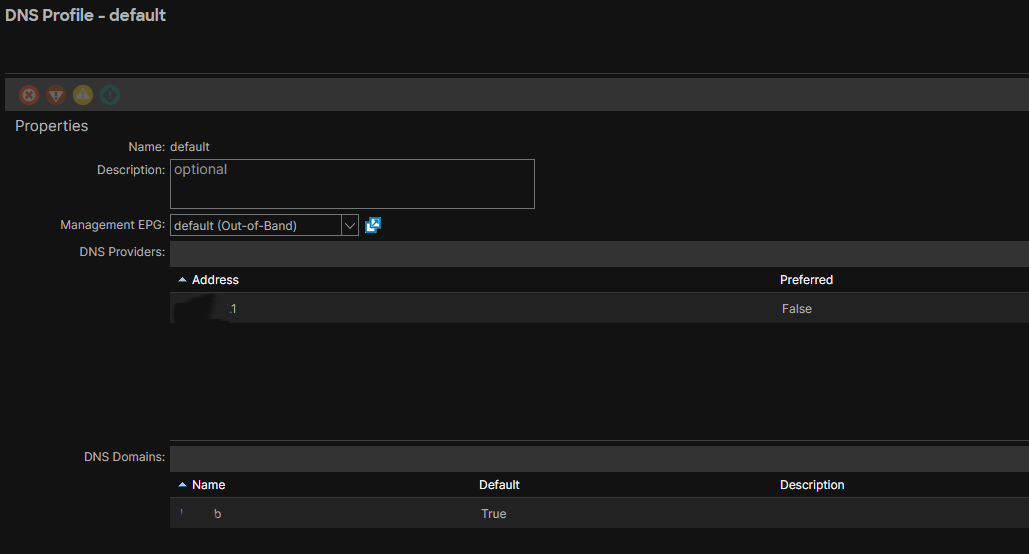
- Configure the DNS profile with DNS providers, Management EPG and DNS domain
- Associate the DNS profile with a tenant VRF
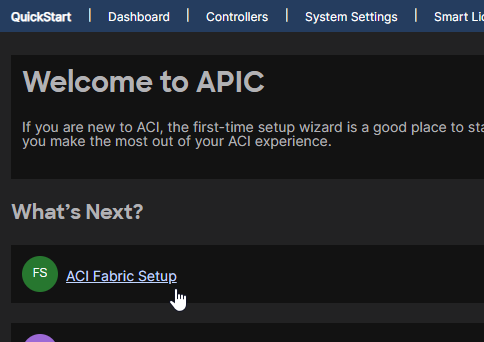
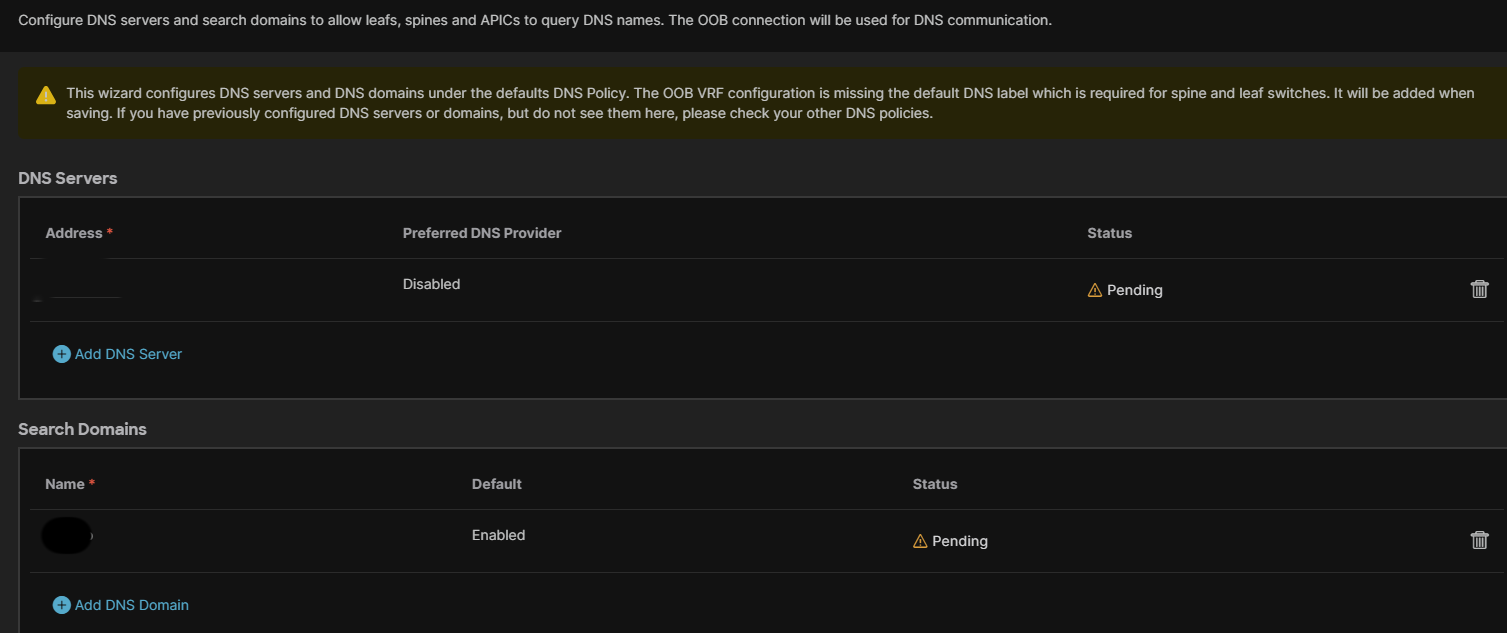
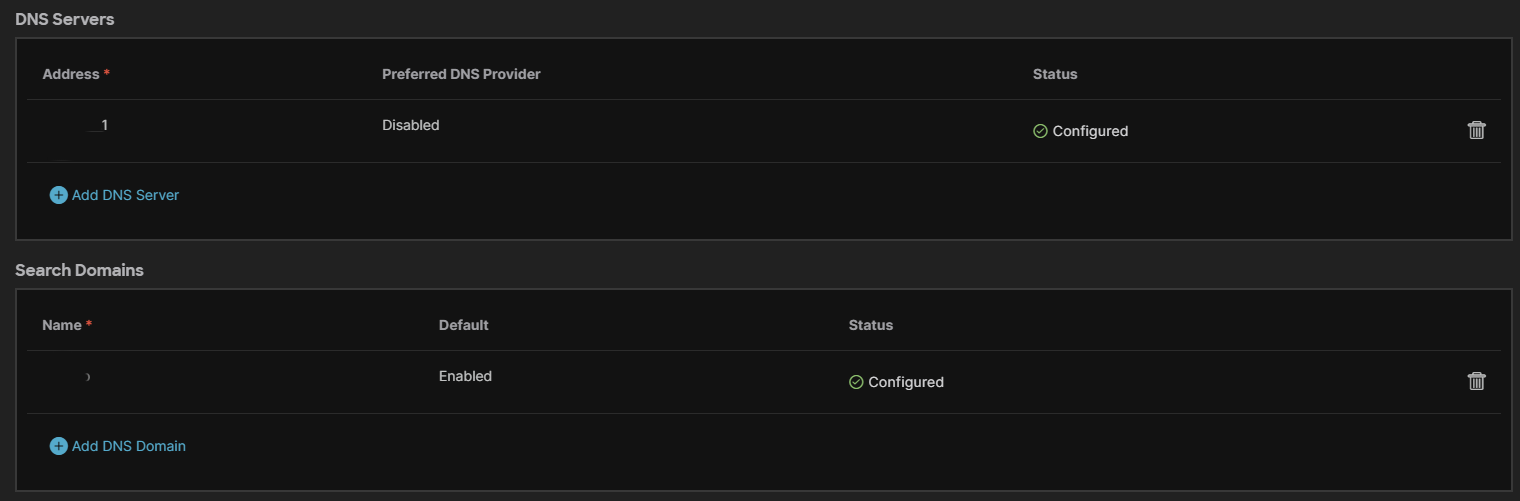
The steps to configure the DNS profile with DNS providers, Management EPG and DNS domain can be performed using the GUI menus or the Quick Setup Wizard.
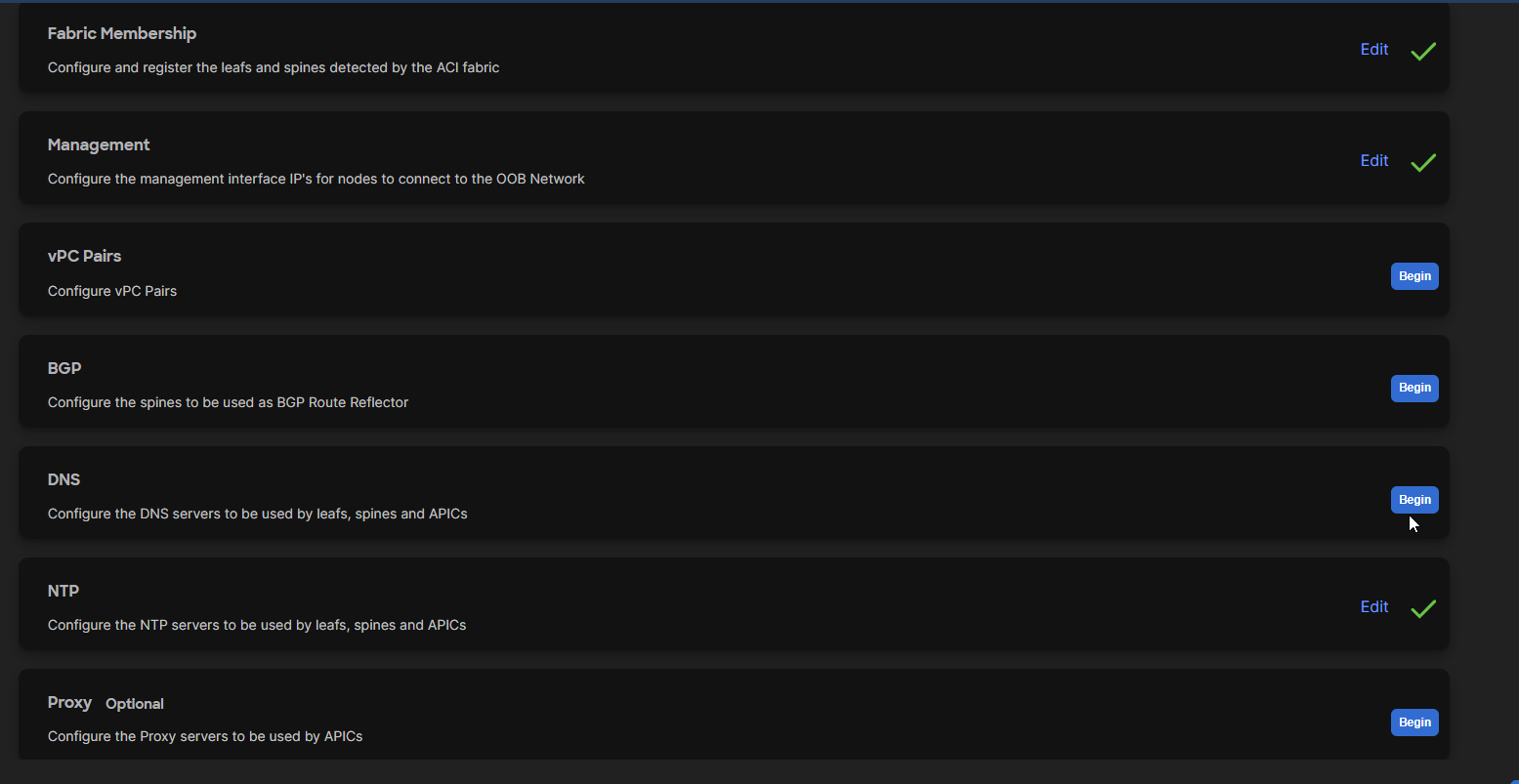
After saving and returning to the menu, the status displays ‘configured’:
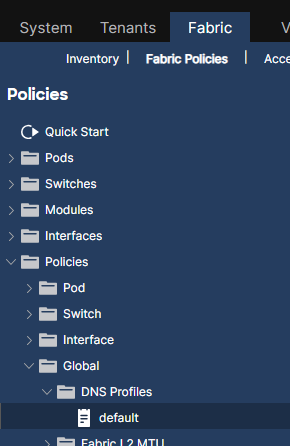
The DNS configuration done with the GUI Wizard is translated into the DNS Profile called default:
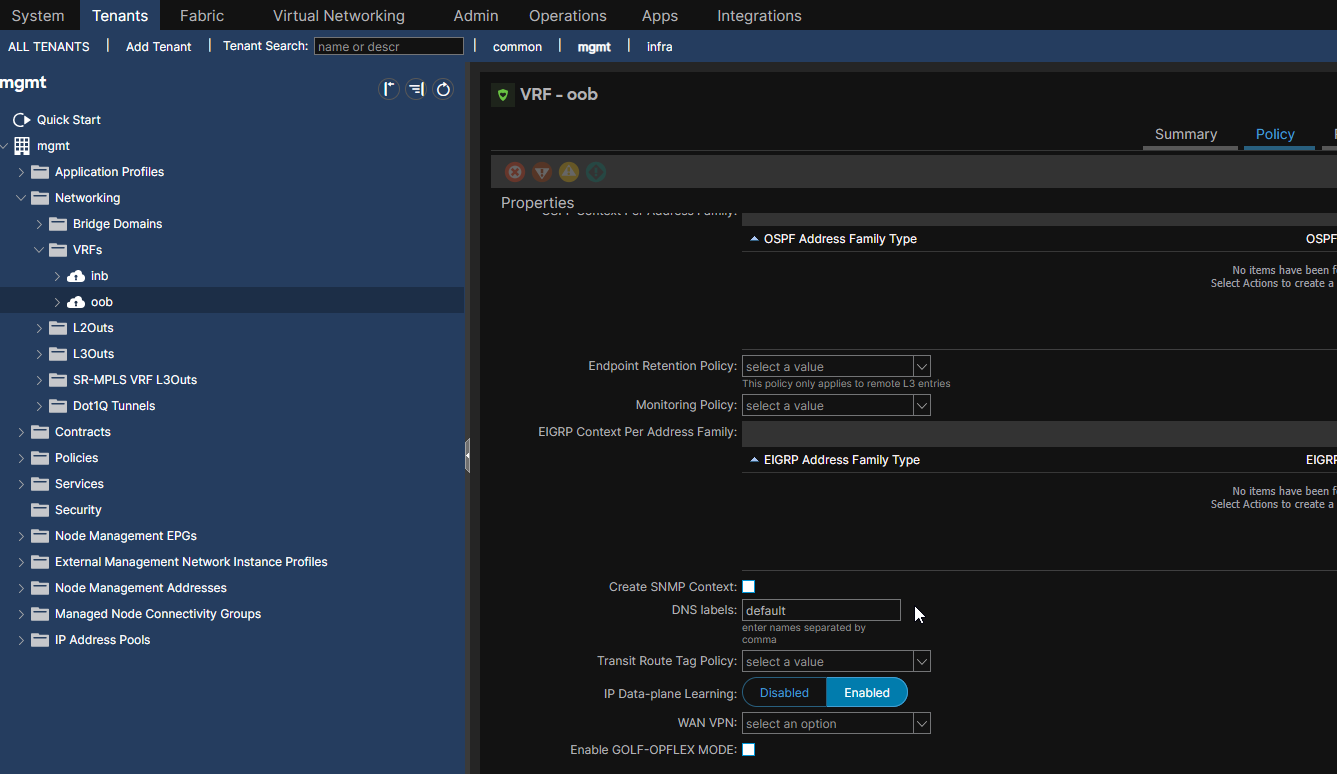
Associate the DNS profile with a Tenant VRF: Since we used the Management EPG Out-of-band, we need to associate the VRF oob with the DNS profile by entering the name of the DNS profile as label in the DNS labels field: