Operations with git
Table of Contents
Git vs SVC#
An SVC is a type of Software Configuration Management (SCM) git is the most popular distributed software version control (dsvc)
Git vs Github#
Git is the DSVC (Distributed Software Version Control). Github is a cloud platform that uses Git as its core technology plus additional features like Discussions and Pull Requests.
Using Git#
There are CLI tools like Git Desktop and GUI tools like Microsoft Visual Studio Code to use Git. GUI tools have their own limitations.
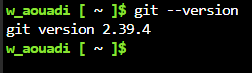
Check Git Version#
git log#
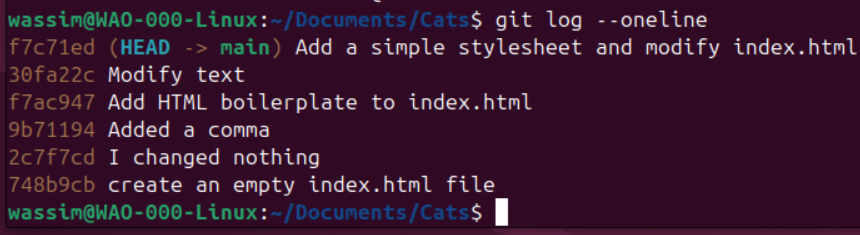
Display the history of commit objects in single lines:
Display the last one, two, three commit objects:
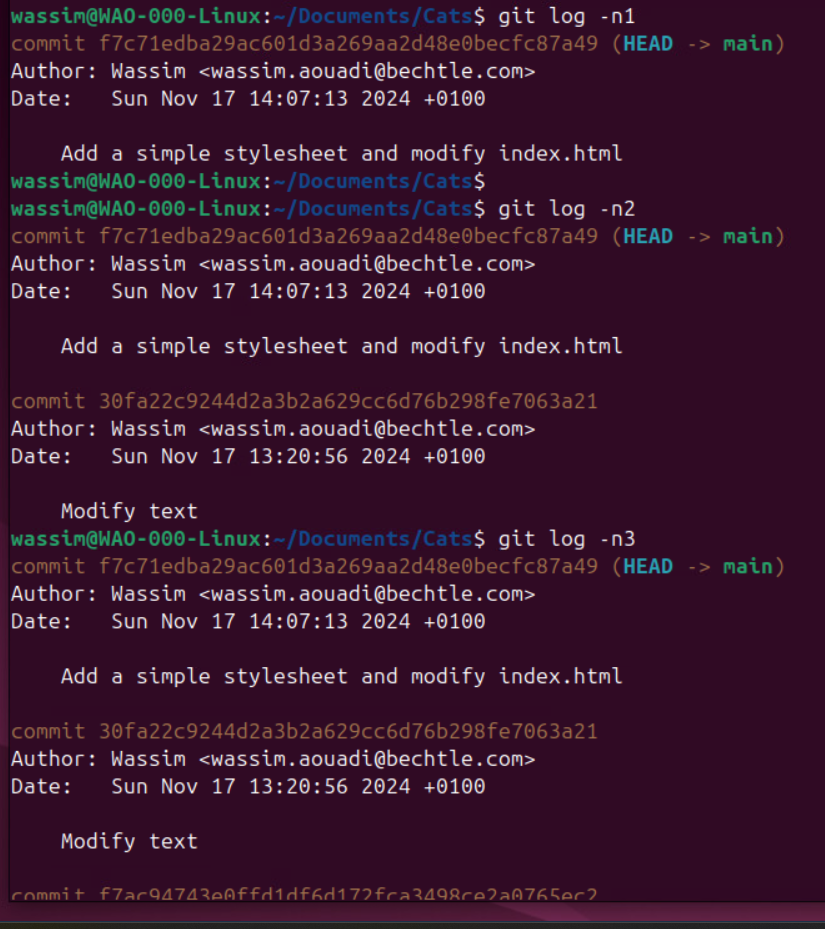
display last n commit logs#
Wassim@linux:~/Documents/ObNotes$ git log -n 3 --oneline
a980df6 (HEAD -> Dec2025, main) Restore unintentionally deleted ACI TEP Pools and TEP Addresses.md
a7c6c3d Review ACI Notes 0002
81f0de3 Study JNCIA01 0008
Wassim@linux:~/Documents/ObNotes$
It displayed the history of the latest 3 commit objects whose hashes are a980df6, a7c6c3d and 81f0de3 respectively.
display the names of files that changed in the last n commits#
Wassim@linux:~/Documents/ObNotes$ git log -n 3 --oneline --name-only
a980df6 (HEAD -> Dec2025, main) Restore unintentionally deleted ACI TEP Pools and TEP Addresses.md
My Vault/.obsidian/workspace.json
a7c6c3d Review ACI Notes 0002
My Vault/.obsidian/app.json
My Vault/.obsidian/community-plugins.json
My Vault/.obsidian/image-converter-image-alignments.json
My Vault/.obsidian/plugins/obsidian-style-settings/data.json
My Vault/.obsidian/workspace.json
My Vault/Individual Notes/ACI Main Note.md
My Vault/Individual Notes/ACI TEP Pools and TEP Addresses.md
My Vault/Individual Notes/Juniper DevOps Track (JNCIA, JNCIS).md
My Vault/Individual Notes/XML Samples for labbing.md
My Vault/Templates/Template Mermaid Code.md
81f0de3 Study JNCIA01 0008
My Vault/.obsidian/workspace.json
My Vault/Individual Notes/JNCIA-DevOps.md
Wassim@linux:~/Documents/ObNotes$
it displayed the names of the files that changed in the commits whose hashes are a980df6, a7c6c3d and 81f0de3 respectively.
git remote#
a remote in Git is a concept that means “another Git repository to which my local Git repository has a relationship”.
I can manually define a git remote using git remote add or Git creates the relationship with a remote when I do git clone.
The commands git push and git pull rely on the concept of the Git remote.
Git Variables#
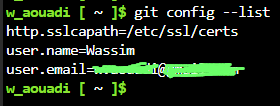
Setting a name and an email are required for me to perform commits.
Types of Git Variables#
Global Variables#
allow to perform Git operations on all Git repositories.
 setting the name of the default branch to ‘main’ (instead of ‘master’ for old git versions):
Wassim@linux:~/Documents/Obsidian Notes$ git version
git version 2.47.3
Wassim@linux:~/Documents/Obsidian Notes$ git config --global init.defaultBranch main
Wassim@linux:~/Documents/Obsidian Notes$
Wassim@linux:~/Documents/Obsidian Notes$ git config --list
user.name=Wassim
[email protected]
init.defaultbranch=main
Wassim@linux:~/Documents/Obsidian Notes$
Local Variables#
allow to perform Git operations only on the Git repo where the local variables are defined:
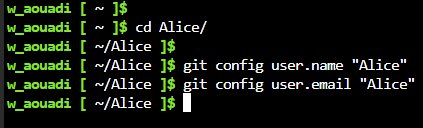
Outside of a Git repository, Git does not allow creating such variables:
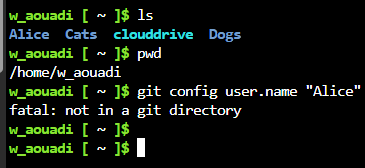
So I need a Git repository first, then define the variables.
Are Git Variables Required?#
Git does not allow to commit without setting Git variables:
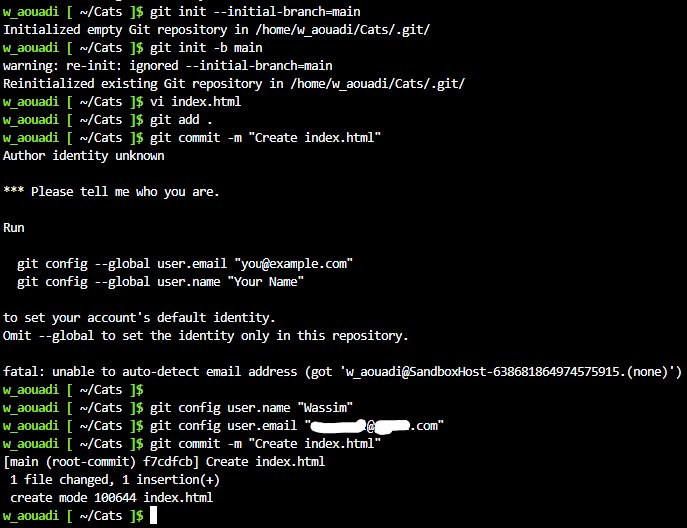
Verify Variables#
Managing conflicts in git#
Example 1#
Each time I open Obsidian, two files are automatically modified but not placed in the git staging area: .obsidian/appearance.json and .obsidian/workspace.json.
Wassim@linux:~/privateworksync$ git status
On branch main
Your branch is up to date with 'origin/main'.

Changes not staged for commit:
  (use "git add <file>..." to update what will be committed)
  (use "git restore <file>..." to discard changes in working directory)
	modified:   .obsidian/appearance.json
	modified:   .obsidian/workspace.json

no changes added to commit (use "git add" and/or "git commit -a")
Wassim@linux:~/privateworksync$
Pulling from origin creates a conflict and is aborted:
Wassim@linux:~/privateworksync$ git pull origin main
Username for 'https://gitlab.com': wasssync1
Password for 'https://[email protected]':
remote: Enumerating objects: 29, done.
remote: Counting objects: 100% (29/29), done.
remote: Compressing objects: 100% (20/20), done.
remote: Total 20 (delta 15), reused 0 (delta 0), pack-reused 0 (from 0)
Unpacking objects: 100% (20/20), 9.96 KiB | 1.24 MiB/s, done.
From https://gitlab.com/waouadi/privateworksync
 * branch            main       -> FETCH_HEAD
   1e5cbea..84100e0  main       -> origin/main
Updating 1e5cbea..84100e0
error: Your local changes to the following files would be overwritten by merge:
	.obsidian/appearance.json
	.obsidian/workspace.json
Please commit your changes or stash them before you merge.
Aborting
Wassim@linux:~/privateworksync$
Using git rm -f marks the files for deletion and places them in the git staging area. But a pull after it still does not succeed:
Wassim@linux:~/privateworksync$ git rm -f .obsidian/appearance.json
rm '.obsidian/appearance.json'
Wassim@linux:~/privateworksync$ git rm -f .obsidian/workspace.json
rm '.obsidian/workspace.json'
Wassim@linux:~/privateworksync$ git status
On branch main
Your branch is behind 'origin/main' by 3 commits, and can be fast-forwarded.
  (use "git pull" to update your local branch)

Changes to be committed:
  (use "git restore --staged <file>..." to unstage)
	deleted:    .obsidian/appearance.json
	deleted:    .obsidian/workspace.json

Wassim@linux:~/privateworksync$ git pull origin main
From https://gitlab.com/waouadi/privateworksync
 * branch            main       -> FETCH_HEAD
Updating 1e5cbea..84100e0
error: Your local changes to the following files would be overwritten by merge:
	.obsidian/appearance.json
	.obsidian/workspace.json
Please commit your changes or stash them before you merge.
Aborting
Wassim@linux:~/privateworksync$
Committing the changes then pulling also is not successful:
Wassim@linux:~/privateworksync$ git commit -m "delete local obsidian duplicate files"
[main 9107e1b] delete local obsidian duplicate files
 2 files changed, 277 deletions(-)
 delete mode 100644 .obsidian/appearance.json
 delete mode 100644 .obsidian/workspace.json
Wassim@linux:~/privateworksync$ git pull origin main
From https://gitlab.com/waouadi/privateworksync
 * branch            main       -> FETCH_HEAD
CONFLICT (modify/delete): .obsidian/appearance.json deleted in HEAD and modified in 84100e0e32a5eb28c60e62d61ddc01b1b6db72f0.  Version 84100e0e32a5eb28c60e62d61ddc01b1b6db72f0 of .obsidian/appearance.json left in tree.
CONFLICT (modify/delete): .obsidian/workspace.json deleted in HEAD and modified in 84100e0e32a5eb28c60e62d61ddc01b1b6db72f0.  Version 84100e0e32a5eb28c60e62d61ddc01b1b6db72f0 of .obsidian/workspace.json left in tree.
Automatic merge failed; fix conflicts and then commit the result.
Wassim@linux:~/privateworksync$
git reset --hard of the latest commit did not help either:
Wassim@linux:~/privateworksync$ git log --oneline
9107e1b (HEAD -> main) delete local obsidian duplicate files
1e5cbea progress in juniper track
45b728c update linux sheet
58fa3bc update linux post
a3df847 update linux file
e310916 update at home

<---- output omitted ---->

Wassim@linux:~/privateworksync$ git reset --hard 9107e1b
HEAD is now at 9107e1b delete local obsidian duplicate files
Wassim@linux:~/privateworksync$
Wassim@linux:~/privateworksync$ git status
On branch main
Your branch and 'origin/main' have diverged,
and have 1 and 3 different commits each, respectively.
  (use "git pull" if you want to integrate the remote branch with yours)

nothing to commit, working tree clean
Wassim@linux:~/privateworksync$
Wassim@linux:~/privateworksync$ git pull origin main
From https://gitlab.com/waouadi/privateworksync
 * branch            main       -> FETCH_HEAD
CONFLICT (modify/delete): .obsidian/appearance.json deleted in HEAD and modified in 84100e0e32a5eb28c60e62d61ddc01b1b6db72f0.  Version 84100e0e32a5eb28c60e62d61ddc01b1b6db72f0 of .obsidian/appearance.json left in tree.
CONFLICT (modify/delete): .obsidian/workspace.json deleted in HEAD and modified in 84100e0e32a5eb28c60e62d61ddc01b1b6db72f0.  Version 84100e0e32a5eb28c60e62d61ddc01b1b6db72f0 of .obsidian/workspace.json left in tree.
Automatic merge failed; fix conflicts and then commit the result.
Wassim@linux:~/privateworksync$ git pull origin main --force
error: Pulling is not possible because you have unmerged files.
hint: Fix them up in the work tree, and then use 'git add/rm <file>'
hint: as appropriate to mark resolution and make a commit.
fatal: Exiting because of an unresolved conflict.
Wassim@linux:~/privateworksync$
git complains that there are unmerged paths, while the changes from the git pull origin main were staged correctly.
Wassim@linux:~/privateworksync$ git status
On branch main
Your branch and 'origin/main' have diverged,
and have 1 and 3 different commits each, respectively.
  (use "git pull" if you want to integrate the remote branch with yours)

You have unmerged paths.
  (fix conflicts and run "git commit")
  (use "git merge --abort" to abort the merge)

Changes to be committed:
	modified:   Learninglog01.md
	modified:   Miscellaneous Junos Operations.md
	modified:   Routing Instances on Junos.md
	modified:   Virtual Networks on Junos.md
	new file:   absorb/sampleDCpracticeLeadjobprofile.txt

Unmerged paths:
  (use "git add/rm <file>..." as appropriate to mark resolution)
	deleted by us:   .obsidian/appearance.json
	deleted by us:   .obsidian/workspace.json
So I git rm -f the files again:
Wassim@linux:~/privateworksync$ git rm -f .obsidian/appearance.json
rm '.obsidian/appearance.json'
Wassim@linux:~/privateworksync$ git rm -f .obsidian/workspace.json
rm '.obsidian/workspace.json'
Now the staging area looks better.
Wassim@linux:~/privateworksync$ git status
On branch main
Your branch and 'origin/main' have diverged,
and have 1 and 3 different commits each, respectively.
  (use "git pull" if you want to integrate the remote branch with yours)

All conflicts fixed but you are still merging.
  (use "git commit" to conclude merge)

Changes to be committed:
	modified:   Learninglog01.md
	modified:   Miscellaneous Junos Operations.md
	modified:   Routing Instances on Junos.md
	modified:   Virtual Networks on Junos.md
	new file:   absorb/sampleDCpracticeLeadjobprofile.txt

Wassim@linux:~/privateworksync$
So I commit:
Wassim@linux:~/privateworksync$ git commit "solve conflict"
fatal: cannot do a partial commit during a merge.
Wassim@linux:~/privateworksync$ git commit -m "solve conflict"
[main 4866316] solve conflict
Wassim@linux:~/privateworksync$ git status
On branch main
Your branch is ahead of 'origin/main' by 2 commits.
  (use "git push" to publish your local commits)

nothing to commit, working tree clean
Wassim@linux:~/privateworksync$
and perform a git pull remote origin main again. This time the pull succeeded.
Wassim@linux:~/privateworksync$ git pull origin main
From https://gitlab.com/waouadi/privateworksync
 * branch            main       -> FETCH_HEAD
Already up to date.
Wassim@linux:~/privateworksync$ git log --oneline
4866316 (HEAD -> main) solve conflict
9107e1b delete local obsidian duplicate files
84100e0 (origin/main, origin/HEAD) update Juniper sheet
9ba136b DC Practice Lead
a7bfb44 update juniper
1e5cbea progress in juniper track
45b728c update linux sheet

<---- output omitted ---->
git pull#
use git pull to pull changes from a remote Git repository, called a remote, to a local one. git pull looks only at the commits and the objects they point to.
Use Case#
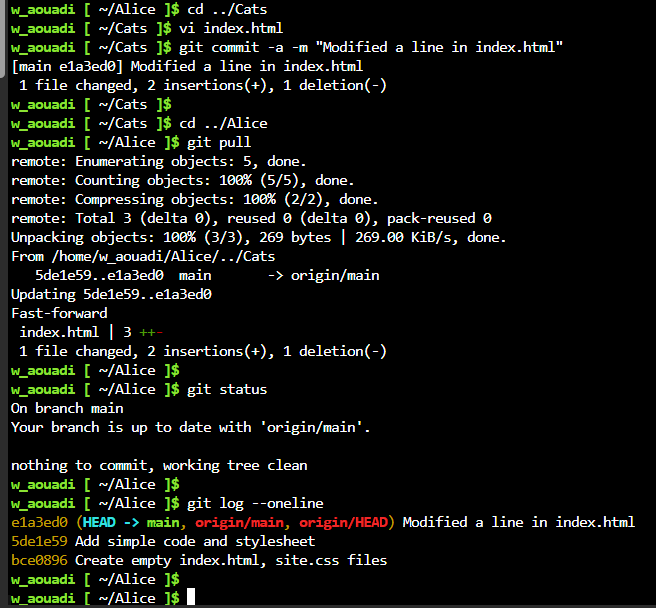
Let us suppose we [[git clone|cloned a Git repository]] and we want to pull from it the latest changes into our local Git repo.
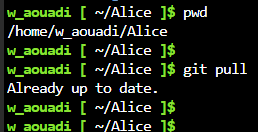
No Changes in Origin#
There Are Changes in Origin#
We make changes to the source Git repo (the remote named origin), stage and commit. Then we go to the clone and pull; git pull will detect there is either a modified commit or a new commit; It perform the following operations in a single batch:
- Git compresses the commits and the objects they point to in a file called pack,
- Git copies the commits and the objects to the working tree of the clone repository,
- Git unpacks them.
git merge#
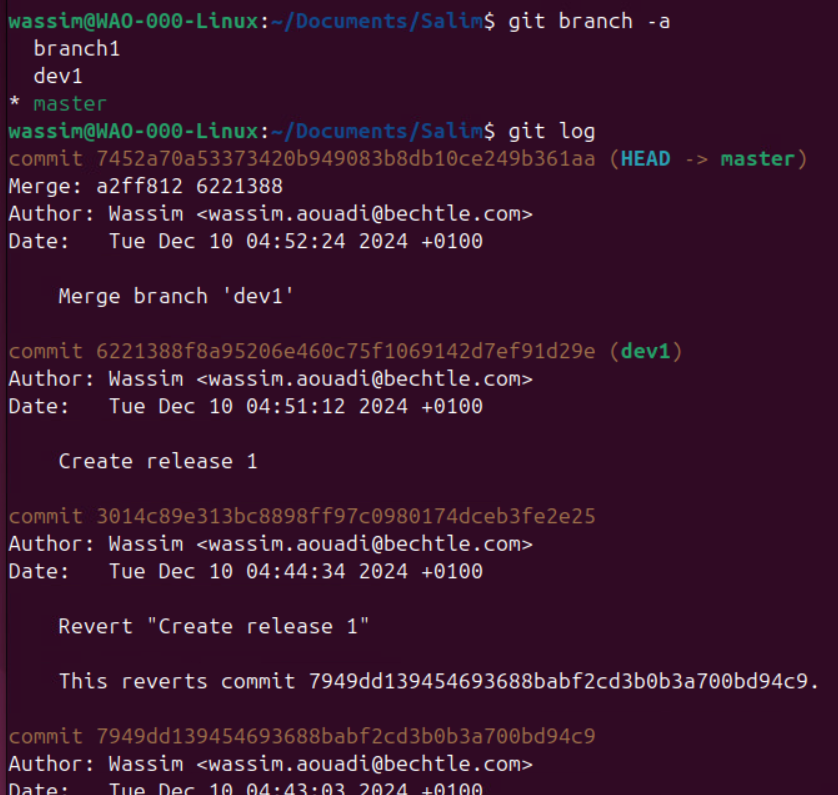
I can merge another branch with my local branch. In the below example, I created a new commit in branch ‘dev1’ and I want to merge branch ‘dev1’ with branch ‘master’.
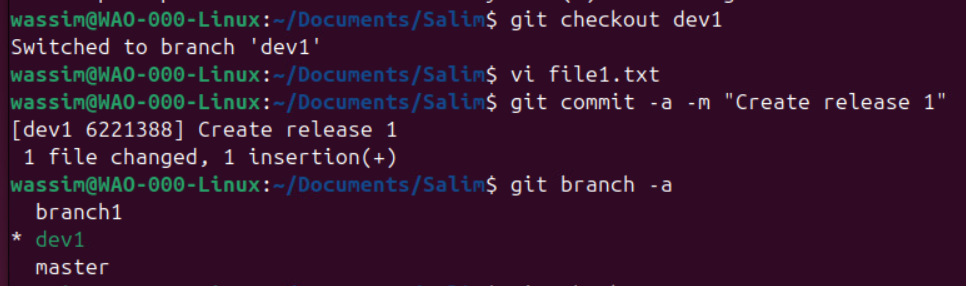
I need to switch to the target branch first - branch ‘master’- and initiate the git merge from there:
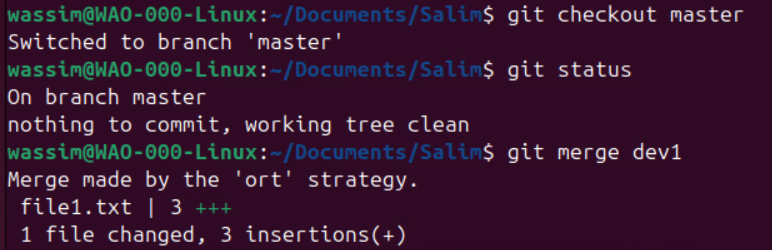
In the git log, I see the new commit in the ‘master’ branch: