Application Management with Flatpak
Table of Contents
Installing and Removing Flatpak#
Read this technote
Flatpak and Remotes#
A Flatpak remote is a local representation of an online Flatpak repository. It can be a statically defined ‘.flatpakrepo’ file, manually placed under ‘/etc/flatpak/repos.d/’, or a dynamically defined section of the active configuration file, which is the ‘/var/lib/flatpak/repo/config’ file.
The addition of a description of a Flatpak remote in the active configuration file is performed by the Flatpak tool, when the command flatpak remote-add is executed.
The local representation provides enough data for the Flatpak tool to search and download flatpak apps and runtimes.
A RHEL machine, registered and subscribed to the Red Hat Customer Portal has access to the official Red Hat repositories, including the RHEL Flatpak repository. The official Red Hat Flatpak repository is different from Flathub, Elementary, etc.; These are official Flatpak repositories but not released by Red Hat.
The lab VM is a fresh RHEL10 image and is registered and subscribed to the Red Hat Customer Portal:
user1@rhel10-vm2:~$ flatpak remotes

user1@rhel10-vm2:~$
user1@rhel10-vm2:~$ ls /etc/flatpak/remotes.d/rhel.flatpakrepo
ls: cannot access '/etc/flatpak/remotes.d/rhel.flatpakrepo': No such file or directory
user1@rhel10-vm2:~$
user1@rhel10-vm2:~$ find / -mindepth 1 -iname "*flatpakrepo*" -type f 2>/dev/null
/usr/share/man/man5/flatpakrepo.5.gz
user1@rhel10-vm2:~$
user1@rhel10-vm2:~$ sudo subscription-manager status
[sudo] password for user1:
+-------------------------------------------+
   System Status Details
+-------------------------------------------+
Overall Status: Registered

user1@rhel10-vm2:~$
user1@rhel10-vm2:~$ sudo subscription-manager identity
[sudo] password for user1:
system identity: 1b32fa61-ed71-44ed-8471-922d70b57b49
name: rhel10-vm2
org name: <output masked>
org ID: <output masked>
user1@rhel10-vm2:~$
Adding a Flatpak remote#
Verify the local definition of the Flatpak remotes:
user1@rhel10-vm2:~$ flatpak remotes

user1@rhel10-vm2:~$
Add a Flatpak remote for the ‘Flathub’ repository#
Add a Flatpak remote. In the example, the remote is given the name ‘flathub’. Any name can be used though. The URL specifies the real location of the Flatpak remote, for instance the URL of the Flathub official remote.
user1@rhel10-vm2:~$ sudo flatpak remote-add flathub
error: LOCATION must be specified

See 'flatpak remote-add --help'
user1@rhel10-vm2:~$
user1@rhel10-vm2:~$ sudo flatpak remote-add flathub https://flathub.org/repo.flathub.flatpakrepo
error: Can't load uri https://flathub.org/repo.flathub.flatpakrepo: Server returned status 404

user1@rhel10-vm2:~$ sudo flatpak remote-add flathub https://flathub.org/repo/flathub.flatpakrepo
user1@rhel10-vm2:~$
user1@rhel10-vm2:~$ flatpak remote
error: 'remote' is not a flatpak command. Did you mean 'remove'?

See 'flatpak --help'
user1@rhel10-vm2:~$ flatpak remotes
Name    Options
flathub system
user1@rhel10-vm2:~$
user1@rhel10-vm2:~$ sudo flatpak remote-add flathub \
> https://flathub.org/repo/flathub.flatpakrepo
error: Remote flathub already exists
user1@rhel10-vm2:~$
user1@rhel10-vm2:~$ flatpak remotes -d
Name    Title   URL                          Collection ID Subset Filter Priority Options Comment             Description            Homepage             Icon
flathub Flathub https://dl.flathub.org/repo/ -             -      -      1        system  Central repository… Central repository of… https://flathub.org/ https://dl.flathub.org/repo/logo.svg
user1@rhel10-vm2:~$
user1@rhel10-vm2:~$
Verify the Flatpak remotes again. Distinguish user remotes from system remotes. The new remote is added by default as a system remote, since neither argument, --user and --system, was specified in the command:
user1@rhel10-vm2:~$ flatpak remotes --user

user1@rhel10-vm2:~$ flatpak remotes --system
Name        Options
flathub
user1@rhel10-vm2:~$
The ‘flathub’ Flatpak remote was manually added. Thus, its definition is stored in the active configuration file, namely ‘/var/lib/flatpak/repo/config’:
user1@rhel10-vm2:~$ cat /var/lib/flatpak/repo/config
[core]
repo_version=1
mode=bare-user-only
min-free-space-size=500MB

[remote "flathub"]
url=https://dl.flathub.org/repo/
xa.title=Flathub
gpg-verify=true
gpg-verify-summary=true
xa.comment=Central repository of Flatpak applications
xa.description=Central repository of Flatpak applications
xa.icon=https://dl.flathub.org/repo/logo.svg
xa.homepage=https://flathub.org/

user1@rhel10-vm2:~$
Manually creating additional Flatpak remotes with flatpak remote-add appends the new definitions to the ‘/var/lib/flatpak/repo/config’ file.
Add another Flatpak remote but with the --user argument. No ‘sudo’ was necessary:
user1@rhel10-vm2:~$ flatpak remote-add --user fedora oci+https://registry.fedoraproject.org
user1@rhel10-vm2:~$
user1@rhel10-vm2:~$ flatpak remotes
Name            Options
flathub         system
rhel            system,oci,no-gpg-verify
test-elementary system
fedora          user,oci
user1@rhel10-vm2:~$
user1@rhel10-vm2:~$ flatpak remotes --user
Name   Options
fedora oci
user1@rhel10-vm2:~$
Note that the definition of user remotes will not be appended to the active configuration file, ‘/var/lib/flatpak/repo/config’:
user1@rhel10-vm2:~$ flatpak remotes
Name            Options
flathub         system
rhel            system,oci,no-gpg-verify
test-elementary system
fedora          user,oci
user1@rhel10-vm2:~$
user1@rhel10-vm2:~$ grep -e fedora /var/lib/flatpak/repo/config
user1@rhel10-vm2:~$
It will be stored in the user home directory, under ‘~/.local/share/flatpak’:
user1@rhel10-vm2:~$ cd ~
user1@rhel10-vm2:~$ ls
user1@rhel10-vm2:~$ ls -la
total 44
drwx------. 5 user1 user1   155 Aug  2 11:55 .
drwxr-xr-x. 3 root  root     19 Nov 15  2025 ..
-rw-------. 1 user1 user1 21708 Aug  3 12:04 .bash_history
-rw-r--r--. 1 user1 user1    18 Oct 29  2024 .bash_logout
-rw-r--r--. 1 user1 user1   144 Oct 29  2024 .bash_profile
-rw-r--r--. 1 user1 user1   522 Oct 29  2024 .bashrc
drwxr-xr-x. 4 user1 user1    33 Aug  1 14:10 .cache
-rw-------. 1 user1 user1   140 Aug  2 11:50 .lesshst
drwxr-xr-x. 3 user1 user1    19 Aug  1 14:10 .local
drwxr-xr-x. 3 user1 user1    17 Aug  2 11:55 .var
-rw-------. 1 user1 user1  3917 Jul 24 11:31 .viminfo
user1@rhel10-vm2:~$ cd .local/
user1@rhel10-vm2:~/.local$ ls -la
total 0
drwxr-xr-x. 3 user1 user1  19 Aug  1 14:10 .
drwx------. 5 user1 user1 155 Aug  2 11:55 ..
drwxr-xr-x. 3 user1 user1  21 Aug  1 14:10 share
user1@rhel10-vm2:~/.local$ cd share
user1@rhel10-vm2:~/.local/share$ ls
flatpak
user1@rhel10-vm2:~/.local/share$ cd flatpak
user1@rhel10-vm2:~/.local/share/flatpak$ ls
oci  repo
user1@rhel10-vm2:~/.local/share/flatpak$ ls -l repo
total 4
-rw-r--r--. 1 user1 user1 130 Aug  3 14:10 config
drwxr-xr-x. 2 user1 user1   6 Aug  1 14:10 extensions
drwxr-xr-x. 2 user1 user1   6 Aug  1 14:10 objects
drwxr-xr-x. 5 user1 user1  49 Aug  1 14:10 refs
drwxr-xr-x. 2 user1 user1   6 Aug  1 14:10 state
drwxr-xr-x. 3 user1 user1  19 Aug  1 14:10 tmp
user1@rhel10-vm2:~/.local/share/flatpak$ ls -l oci
total 6624
-rw-r--r--. 1 user1 user1 6204398 Aug  3 14:25 fedora.index.gz
-rw-r--r--. 1 user1 user1  575135 Aug  3 14:25 fedora.summary
user1@rhel10-vm2:~/.local/share/flatpak$
Add a Flatpak remote for the ‘Elementary’ Flatpak repository#
The official webpage https://flatpak.pkgs.org contains the list of official and thirdparty Flatpak repositories:
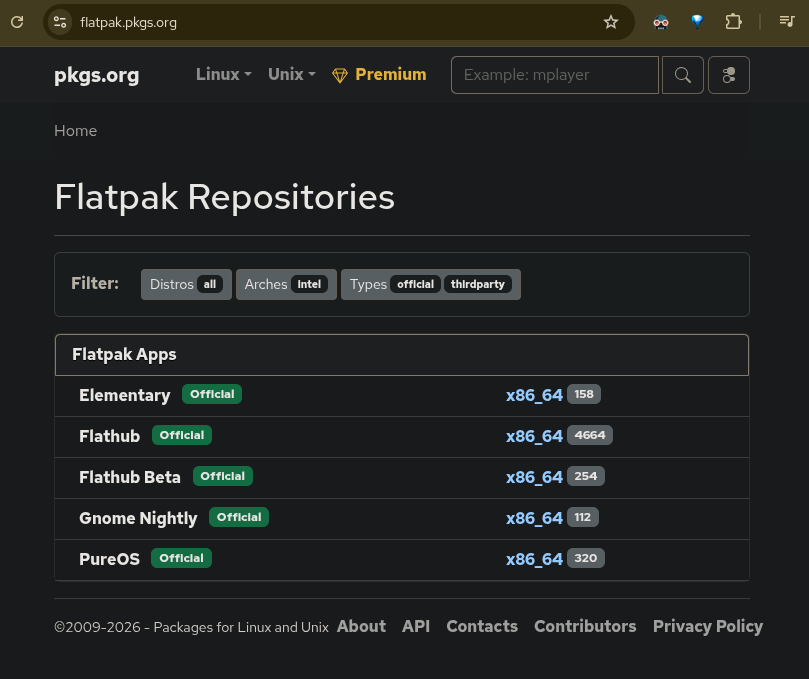
Clicking on any Flatpak app lands on its installation page. The URL for the Elementary Flatpak is mentioned in the ‘Install Howto’ section:
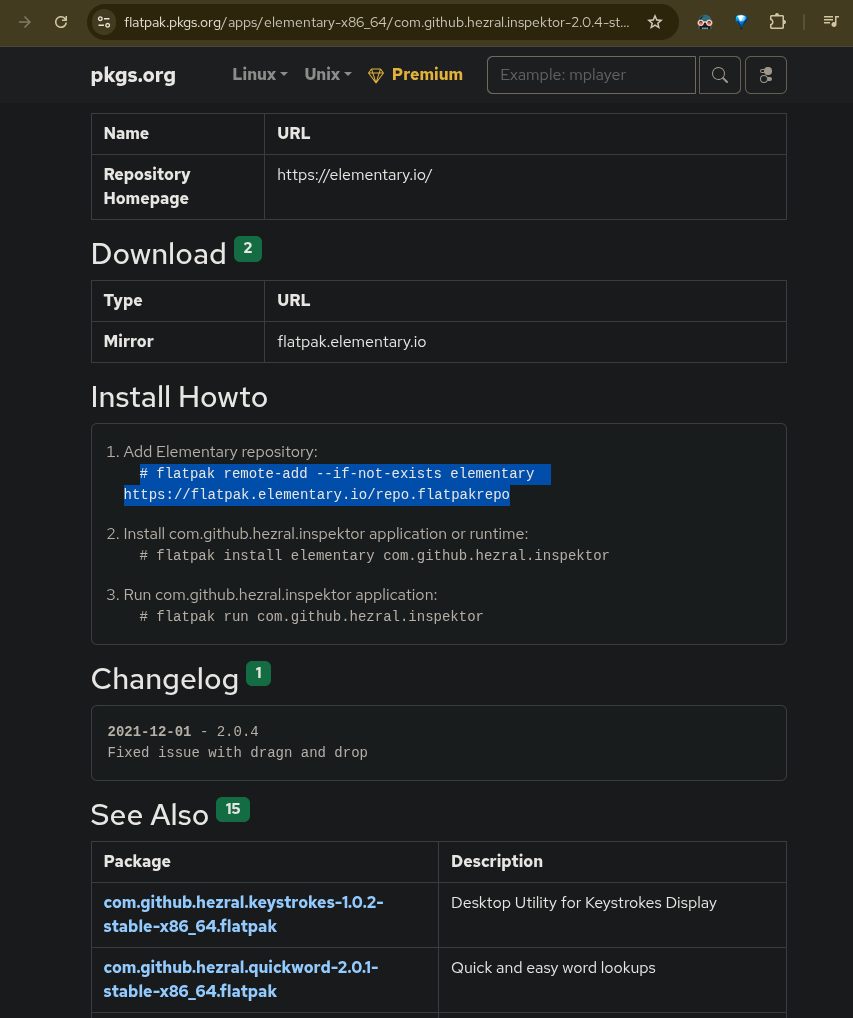
user1@rhel10-vm2:~$ sudo flatpak remote-add --system test-elementary https://flatpak.elementary.io/repo.flatpakrepo
user1@rhel10-vm2:~$
user1@rhel10-vm2:~$ flatpak remotes
Name            Options
flathub         system
test-elementary system
user1@rhel10-vm2:~$
Add a Flatpak remote for the RHEL Flatpak repository#
A similar procedure is followed to add the Red Hat official Flatpak remote:
user1@rhel10-vm2:~$ flatpak remote-add --if-not-exists rhel \
> https://flatpaks.redhat.io/rhel.flatpakrepo
user1@rhel10-vm2:~$
user1@rhel10-vm2:~$ flatpak remotes
Name            Options
flathub         system
rhel            system,oci,no-gpg-verify
test-elementary system
user1@rhel10-vm2:~$
Searching for a Flatpak app#
To search for a Flatpak app in the configured flatpak remotes, use the flatpak search {APP-Name} command. The command is case insensitive and will prompt for administrative privileges:
user1@rhel10-vm2:~$ flatpak search gEdiT
Name       Description      Application ID       Version      Branch     Remotes
gedit      Text editor      org.gnome.gedit      50.0         stable     flathub
user1@rhel10-vm2:~$
user1@rhel10-vm2:~$ flatpak search gedit
Name                    Description                         Application ID                           Version         Branch         Remotes
gedit                   Text editor                         org.gnome.gedit                          50.0            stable         flathub
ThemeGenerator          Generate Styles with Style.         io.github.thiefmd.themegenerator         0.1.3           stable         flathub
user1@rhel10-vm2:~$
user1@rhel10-vm2:~$ flatpak search --system Thunderbird
Name     Description                            Application ID      Version     Branch Remotes
Thunder… Thunderbird is a free and open source… …ozilla.Thunderbird 140.13.0    stable rhel
Thunder… Thunderbird is a free and open source… …la.thunderbird_esr 140.13.0esr stable flathub
Thunder… Thunderbird is a free and open source… …ozilla.thunderbird 153.0.1     stable flathub
user1@rhel10-vm2:~$
Listing apps and runtimes contained in a Flatpak remote#
List the count of apps in the ‘flathub’ Flatpak remote:
user1@rhel10-vm2:~$ flatpak remote-ls flathub --app | wc -l
3445
Listing the count of runtimes in the ‘flathub’ Flatpak remote:
user1@rhel10-vm2:~$ flatpak remote-ls flathub --runtime | wc -l
2327
The sum of them gives the total count of elements in the ‘flathub’ Flatpak remote:
Wassim@linux:~$ flatpak remote-ls | wc -l
5772
List all runtimes stored on the ‘flathub’ Flatpak remote, in a pagination format:
user1@rhel10-vm2:~$ flatpak remote-ls flathub --runtime | more
HEIC	app.fotema.Fotema.HEIC		stable
Fightcade SteamOS Addon	com.fightcade.Fightcade.Steamos		stable
Wine	com.fightcade.Fightcade.Wine		stable
Clapper Enhancers	com.github.rafostar.Clapper.Enhancers		stable
OCR Afrikaans	com.github.unrud.djpdf.OCR.Afr		stable
OCR Amharic	com.github.unrud.djpdf.OCR.Amh		stable
OCR Arabic	com.github.unrud.djpdf.OCR.Ara		stable
OCR Assamese	com.github.unrud.djpdf.OCR.Asm		stable
OCR Azerbaijani	com.github.unrud.djpdf.OCR.Aze		stable
OCR Azerbaijani - Cyrilic	com.github.unrud.djpdf.OCR.AzeCyrl		stable
OCR Belarusian	com.github.unrud.djpdf.OCR.Bel		stable
OCR Bengali	com.github.unrud.djpdf.OCR.Ben		stable
OCR Tibetan	com.github.unrud.djpdf.OCR.Bod		stable
OCR Bosnian	com.github.unrud.djpdf.OCR.Bos		stable
OCR Breton	com.github.unrud.djpdf.OCR.Bre		stable
OCR Bulgarian	com.github.unrud.djpdf.OCR.Bul		stable

<output omitted>
List metadata of a Flatpak app#
Listing the metadata of a specific app using the flatpak remote-info command.
The metadata is stored in the Flatpak remotes.
In the following example, the Flatpak remote is ‘flathub’. The metadata is extracted on the basis of the app ID; To find out the app ID, launch the flatpak remote-ls flathub --app command and observe the second column int the output:
user1@rhel10-vm2:~$ flatpak remote-ls --app | more
Jan	ai.jan.Jan	0.8.4	stable	x86_64
LM Studio	ai.lmstudio.lm-studio	0.4.18-1	stable	x86_64
OpenCode	ai.opencode.opencode	1.18.8	stable	x86_64
AuthPass	app.authpass.AuthPass	1.9.6_1904	stable	x86_64
Blackboard Sync	app.bbsync.BlackboardSync	0.18.0	stable	x86_64
BlueBubbles	app.bluebubbles.BlueBubbles	2.0.0.0	stable	x86_64
Cantara	app.cantara.Cantara	2.7.1	stable	x86_64
CoMaps	app.comaps.comaps	2026.06.15	stable	x86_64
CrankBoy Manager	app.crankboy.crankboy-manager	1.1.0	stable	x86_64
Curo Calculator	app.curocalc.calculator	2.6.2	stable	x86_64
Ptyxis	app.devsuite.Ptyxis	50.1	stable	x86_64
Schemes	app.devsuite.Schemes	46.0	stable	x86_64
Biblioteca	app.drey.Biblioteca	1.7	stable	x86_64
Blurble	app.drey.Blurble	0.4.0	stable	x86_64
Damask	app.drey.Damask	0.3.2	stable	x86_64
Dialect	app.drey.Dialect	2.6.1	stable	x86_64
Ear Tag	app.drey.EarTag	1.0.2	stable	x86_64
Elastic	app.drey.Elastic	1.0.3	stable	x86_64

<output omitted>

user1@rhel10-vm2:~$
List the metadata of a Flatpak app, given its Flatpak app ID and Flatpak repo:
user1@rhel10-vm2:~$ flatpak remote-info flathub app.bluebubbles.BlueBubbles

BlueBubbles - BlueBubbles client for Linux

        ID: app.bluebubbles.BlueBubbles
       Ref: app/app.bluebubbles.BlueBubbles/x86_64/stable
      Arch: x86_64
    Branch: stable
   Version: 2.0.0.0
   License: Apache-2.0
Collection: org.flathub.Stable
  Download: 32.1 MB
 Installed: 84.0 MB
   Runtime: org.gnome.Platform/x86_64/50
       Sdk: org.gnome.Sdk/x86_64/50

    Commit: faea5eb7c4ed3a53ffcdc668f79ed46b97310799e2569eb6094a184b5140bc7f
    Parent: c8a413a540f8e411b72d9803aa61a49d648eba5ec8c4f12cf69bba939acd10b4
   Subject: Merge pull request #87 from flathub/beta (ac4a61f1feb8)
      Date: 2026-07-24 17:50:21 +0000
user1@rhel10-vm2:~$
Using application names does not work with flatpak remote-info; Application IDs must be used:
user1@rhel10-vm2:~$ flatpak search gedit
Name                    Description                         Application ID                           Version         Branch         Remotes
gedit                   Text editor                         org.gnome.gedit                          50.0            stable         flathub
ThemeGenerator          Generate Styles with Style.         io.github.thiefmd.themegenerator         0.1.3           stable         flathub
user1@rhel10-vm2:~$
user1@rhel10-vm2:~$ flatpak remote-info org.gnome.gedit
error: REMOTE and REF must be specified

See 'flatpak remote-info --help'
user1@rhel10-vm2:~$ flatpak remote-info flathub org.gnome.gedit

gedit - Text editor

        ID: org.gnome.gedit
       Ref: app/org.gnome.gedit/x86_64/stable
      Arch: x86_64
    Branch: stable
   Version: 50.0
   License: GPL-2.0+
Collection: org.flathub.Stable
  Download: 3.3 MB
 Installed: 9.5 MB
   Runtime: org.gnome.Platform/x86_64/50
       Sdk: org.gnome.Sdk/x86_64/50

    Commit: 05bd2e8bbdaf3da2507502bab7c0d5fc192450b5855edeea2325bea17e7d3ade
    Parent: 493ed6521257010bca525cb6530dcb27a9b2391c6f733d0b30444c94df0ea90f
   Subject: Update dependencies (824a6b87a759)
      Date: 2026-06-26 17:20:55 +0000
user1@rhel10-vm2:~$
List Metadata of a Flatpak runtime#
Listing metadata of a runtime using its ID:
user1@rhel10-vm2:~$ flatpak remote-info flathub com.github.unrud.djpdf.OCR.Ara

OCR Arabic - OCR extension for Arabic (ara)

        ID: com.github.unrud.djpdf.OCR.Ara
       Ref: runtime/com.github.unrud.djpdf.OCR.Ara/x86_64/stable
      Arch: x86_64
    Branch: stable
   License: GPL-3.0-or-later
Collection: org.flathub.Stable
  Download: 1.7 MB
 Installed: 2.5 MB

    Commit: 20eae68c9687ee5ff5dc5c08d89210862acd1f671835db8b80f130032f925d62
    Parent: 0996ad1305a94caa2920a240b0d3c13f780f4c7d76ad75c5aec5ba4732a160b8
   Subject: Update runtime and dependencies (8ce3fb81efdd)
      Date: 2026-07-26 04:07:12 +0000
user1@rhel10-vm2:~$
Installing a Flatpak app#
Installing a flatpak app using its name:
user1@rhel10-vm2:~$ rpm -qa gedit
user1@rhel10-vm2:~$
user1@rhel10-vm2:~$ flatpak install flathub gedit
Looking for matches…
Found ref ‘app/org.gnome.gedit/x86_64/stable’ in remote ‘flathub’ (system).
Use this ref? [Y/n]: Y
Required runtime for org.gnome.gedit/x86_64/stable (runtime/org.gnome.Platform/x86_64/50) found in remote flathub
Do you want to install it? [Y/n]: n
error: The application org.gnome.gedit/x86_64/stable requires the runtime org.gnome.Platform/x86_64/50 which is not installed
user1@rhel10-vm2:~$
Installing a flatpak app using the app ID:
user1@rhel10-vm2:~$ flatpak install flathub org.gnome.gedit
Looking for matches…
Required runtime for org.gnome.gedit/x86_64/stable (runtime/org.gnome.Platform/x86_64/50) found in remote flathub
Do you want to install it? [Y/n]: n
error: The application org.gnome.gedit/x86_64/stable requires the runtime org.gnome.Platform/x86_64/50 which is not installed
user1@rhel10-vm2:~$
user1@rhel10-vm2:~$ flatpak install flathub org.gnome.gedit
Looking for matches…
Required runtime for org.gnome.gedit/x86_64/stable (runtime/org.gnome.Platform/x86_64/50) found in remote flathub
Do you want to install it? [Y/n]: Y

org.gnome.gedit permissions:
    ipc    fallback-x11    wayland    file access [1]    dbus access [2]

    [1] host, xdg-run/gvfsd
    [2] org.gtk.vfs.*


        ID                                                Branch                 Op            Remote             Download
 1. [✗] org.freedesktop.Platform.GL.default               25.08                  i             flathub            142.9 MB / 143.9 MB
 2. [✓] org.freedesktop.Platform.GL.default               25.08-extra            i             flathub            142.9 MB / 144.0 MB
 3. [✓] org.freedesktop.Platform.codecs-extra             25.08-extra            i             flathub             14.2 MB / 14.4 MB
 4. [✓] org.gnome.Platform.Locale                         50                     i             flathub             18.7 kB / 384.8 MB
 5. [/] org.gnome.Platform                                50                     i             flathub              1.0 kB / 409.7 MB
 6. [ ] org.gnome.gedit.Locale                            stable                 i             flathub            < 3.3 MB (partial)
 7. [ ] org.gnome.gedit                                   stable                 i             flathub            < 3.3 MB

Warning: Flatpak system operation Deploy not allowed for user


                                                          ==== AUTHENTICATING FOR org.freedesktop.Flatpak.app-install ====
Authentication is required to install software
Authenticating as: user1
Password:

Warning: Failed to get revokefs-fuse socket from system-helper: Flatpak system operation GetRevokefsFd not allowed for user
Warning: Failed to get revokefs-fuse socket from system-helper: Flatpak system operation GetRevokefsFd not allowed for user
Warning: Failed to get revokefs-fuse socket from system-helper: Flatpak system operation GetRevokefsFd not allowed for user
Both methods lead to installing the app. The first has an extra step which is to search on all remotes. The second method is interactive heavy; At many steps the user is prompted to enter his password.
Running flatpak install does not fail without sudo; The command will prompt for the password of the user account that launched the flatpak install command. Depending on the privileges of the user account, the installation of apps and runtime might or might not succeed.
Launching a Flatpak installation with ‘sudo’, while making sure that the app has been removed before:
user1@rhel10-vm2:~$ sudo flatpak install -y flathub org.gnome.gedit
[sudo] password for user1:
Looking for matches…
Required runtime for org.gnome.gedit/x86_64/stable (runtime/org.gnome.Platform/x86_64/50) found in remote flathub

org.gnome.gedit permissions:
    ipc    fallback-x11    wayland    file access [1]    dbus access [2]

    [1] host, xdg-run/gvfsd
    [2] org.gtk.vfs.*


        ID                                             Branch            Op           Remote            Download
 1. [✓] org.freedesktop.Platform.GL.default            25.08             i            flathub           26.6 MB / 143.9 MB
 2. [/] org.gnome.Platform                             50                i            flathub           < 409.7 MB
 3. [ ] org.gnome.gedit.Locale                         stable            i            flathub             < 3.3 MB (partial)
 4. [ ] org.gnome.gedit                                stable            i            flathub             < 3.3 MB

Installing 2/4… █████▊                29%  1.6 MB/s  02:02
Listing installed apps and runtimes from the ‘flathub’ Flatpak remote#
List everything that was installed locally using Flatpak from the Flatpak remotes:
user1@rhel10-vm2:~$ flatpak list
Name                                             Application ID                                   Version            Branch                 Installation
Mesa                                             org.freedesktop.Platform.GL.default              26.1.5             25.08                  system
Mesa (Extra)                                     org.freedesktop.Platform.GL.default              26.1.5             25.08-extra            system
Codecs Extra Extension                           org.freedesktop.Platform.codecs-extra                               25.08-extra            system
GNOME Application Platform version 50            org.gnome.Platform                                                  50                     system
gedit                                            org.gnome.gedit                                  50.0               stable                 system
user1@rhel10-vm2:~$
user1@rhel10-vm2:~$ flatpak list --columns=application
Application ID
org.freedesktop.Platform.GL.default
org.freedesktop.Platform.GL.default
org.freedesktop.Platform.codecs-extra
org.gnome.Platform
org.gnome.gedit
user1@rhel10-vm2:~$ flatpak list --columns=application,name,version
Application ID                                      Name                                                Version
org.freedesktop.Platform.GL.default                 Mesa                                                26.1.5
org.freedesktop.Platform.GL.default                 Mesa (Extra)                                        26.1.5
org.freedesktop.Platform.codecs-extra               Codecs Extra Extension
org.gnome.Platform                                  GNOME Application Platform version 50
org.gnome.gedit                                     gedit                                               50.0
user1@rhel10-vm2:~$
List Flatpak apps, runtimes and the sizes they occupy on the disk:
user1@rhel10-vm2:~$ flatpak list --columns=name,installation,size
Name                                             Installation            Installed size
Mesa                                             system                  457.0 MB
Mesa (Extra)                                     system                  457.1 MB
Codecs Extra Extension                           system                   43.4 MB
Calculator                                       system                    4.7 MB
Calendar                                         system                   15.8 MB
GNOME Application Platform version 50            system                    1.1 GB
user1@rhel10-vm2:~$
List a specific installed app, e.g. ‘gedit’. Notice it is possible to combine --system and --app arguments in the same command:
user1@rhel10-vm2:~$ flatpak list --system --app
Name       Application ID       Version      Branch
gedit      org.gnome.gedit      50.0         stable
user1@rhel10-vm2:~$
List only the apps or only the runtimes that were installed using Flatpak tool from the ‘flathub’ remote:
user1@rhel10-vm2:~$ flatpak list --app
Name       Application ID       Version      Branch      Installation
gedit      org.gnome.gedit      50.0         stable      system
user1@rhel10-vm2:~$ flatpak list --runtime
Name                                             Application ID                                   Version            Branch                 Installation
Mesa                                             org.freedesktop.Platform.GL.default              26.1.5             25.08                  system
Mesa (Extra)                                     org.freedesktop.Platform.GL.default              26.1.5             25.08-extra            system
Codecs Extra Extension                           org.freedesktop.Platform.codecs-extra                               25.08-extra            system
GNOME Application Platform version 50            org.gnome.Platform                                                  50                     system
user1@rhel10-vm2:~$
Displaying info on an installed Flatpak app#
user1@rhel10-vm2:~$ flatpak info org.gnome.gedit

gedit - Text editor

          ID: org.gnome.gedit
         Ref: app/org.gnome.gedit/x86_64/stable
        Arch: x86_64
      Branch: stable
     Version: 50.0
     License: GPL-2.0+
      Origin: flathub
  Collection: org.flathub.Stable
Installation: system
   Installed: 9.5 MB
     Runtime: org.gnome.Platform/x86_64/50
         Sdk: org.gnome.Sdk/x86_64/50

      Commit: 05bd2e8bbdaf3da2507502bab7c0d5fc192450b5855edeea2325bea17e7d3ade
      Parent: 493ed6521257010bca525cb6530dcb27a9b2391c6f733d0b30444c94df0ea90f
     Subject: Update dependencies (824a6b87a759)
        Date: 2026-06-26 17:20:55 +0000
user1@rhel10-vm2:~$
Running an installed Flatpak app#
Wassim@linux:~$ flatpak list --app
Name                   Application ID              Version         Branch       Installation
Ptyxis                 app.devsuite.Ptyxis         50.1            stable       system
Brave                  com.brave.Browser           1.93.129        stable       system
Sticky Notes           com.vixalien.sticky         0.2.7           stable       system
Cameractrls            hu.irl.cameractrls          0.6.10          stable       system
Document Viewer        org.gnome.Evince            48.4            stable       system
Extensions             org.gnome.Extensions        50.0            stable       system
Geary                  org.gnome.Geary             46.0            stable       system
VLC                    org.videolan.VLC            3.0.23          stable       system
Wassim@linux:~$ flatpak run 'Sticky Notes'
error: Invalid id Sticky Notes: Name can't contain
Wassim@linux:~$ flatpak run com.vixalien.sticky
Gjs-Console-Message: 12:11:52.589: Storing Notes at: /home/Wassim/.var/app/com.vixalien.sticky/data/com.vixalien.sticky/notes

(com.vixalien.sticky:2): Adwaita-WARNING **: 12:11:52.641: The resource style-dark.css is deprecated and shouldn't be used anymore. Use style.css with media queries instead.
As a result, the Sticky Notes app is launched and brought to the foreground.
#observation The flatpak run command requires the app ID to launch the app.
Open another shell and verify the Flatpak app process, process ID and runtime are readable:
Wassim@linux:~$ flatpak ps
Instance   PID   Application         Runtime
2644966368 5131  hu.irl.cameractrls  org.gnome.Platform
4272357336 14777 com.vixalien.sticky org.gnome.Platform
Wassim@linux:~$
It is worth noticing that the Flatpak tool is installing Gnome as part of installing graphical tools like ‘gedit’; The reason is that the guest VM has been initially installed without a GUI.
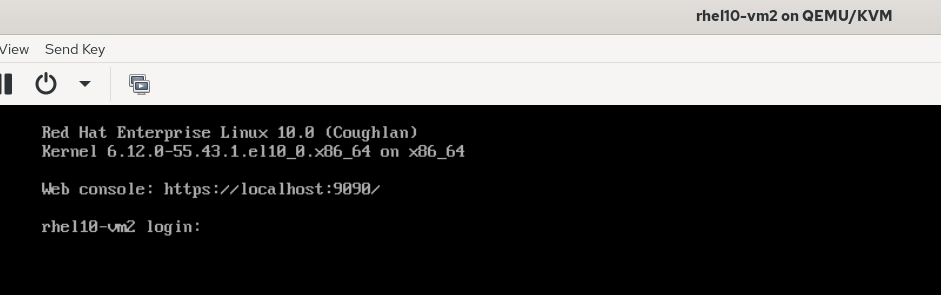
Trying to run the installed Flatpak app on a non-GUI machine generates an error:
user1@rhel10-vm2:~$ flatpak run org.gnome.gedit

(gedit:2): Gtk-WARNING **: 11:55:08.232: cannot open display:
user1@rhel10-vm2:~$
Terminating a Flatpak app#
Find the ID of the running Flatpak app, then terminate it:
Wassim@linux:~$ flatpak list --app | grep Note
Sticky Notes	com.vixalien.sticky	0.2.7	stable	system
Wassim@linux:~$
Wassim@linux:~$ flatpak ps | grep sticky
1287171304	16006	com.vixalien.sticky	org.gnome.Platform
Wassim@linux:~$
There are two methods to kill the Flatpak app.
Method 1: using the Flatpak app ID#
Wassim@linux:~$ flatpak kill com.vixalien.sticky
Wassim@linux:~$
Method 2: using the Flatpak app instance number#
Wassim@linux:~$ flatpak ps
Instance   PID   Application         Runtime
4156922352 5049  hu.irl.cameractrls  org.gnome.Platform
78581066   16320 com.vixalien.sticky org.gnome.Platform
Wassim@linux:~$
Trying to kill the Flatpak app with its PID does not work:
Wassim@linux:~$ flatpak kill 16320
error: 16320 is not running
The instance number, which corresponds to the first column of the output of flatpak ps command, is used to kill the app:
Wassim@linux:~$
Wassim@linux:~$ flatpak kill 78581066
Wassim@linux:~$
Wassim@linux:~$ flatpak ps | grep sticky
Wassim@linux:~$
Wassim@linux:~$
Updating flatpak apps and runtimes#
Check for updates for all installed Flatpak apps and runtimes:
Wassim@linux:~$ flatpak update
Looking for updates…

Nothing to do.
Wassim@linux:~$
To look for updates for a specific app; the Flatpak app ID, not the app name, is required. The flatpak update {App_ID} gives a hint on the status of the requested app ID, i.e. whether the app is installed or not:
Wassim@linux:~$ flatpak update gedit
Looking for updates…
error: Invalid id gedit: Names must contain at least 2 periods
Wassim@linux:~$ flatpak update org.gnome.gedit
Looking for updates…
error: org.gnome.gedit not installed
Wassim@linux:~$
Managing Flatpak runtimes#
#observation Runtimes that are installed as part of a Flatpak app are not automatically removed by the Flatpak tool when the app is removed; This is an extra manual step.
user1@rhel10-vm2:~$ sudo flatpak install flathub io.github.zyedidia.micro
[sudo] password for user1:
Looking for matches…
Required runtime for io.github.zyedidia.micro/x86_64/stable (runtime/org.freedesktop.Platform/x86_64/25.08) found in remote flathub
Do you want to install it? [Y/n]: y

io.github.zyedidia.micro permissions:
    ipc     network     fallback-x11     wayland     x11     file access [1]     dbus access [2]

    [1] /tmp, /var/tmp, host
    [2] org.freedesktop.Flatpak


        ID                                        Branch           Op           Remote            Download
 1. [✓] org.freedesktop.Platform.Locale           25.08            i            flathub            18.6 kB / 379.4 MB
 2. [✓] org.freedesktop.Platform                  25.08            i            flathub           116.4 MB / 253.4 MB
 3. [✓] io.github.zyedidia.micro                  stable           i            flathub             6.1 MB / 6.2 MB

Installation complete.
user1@rhel10-vm2:~$
user1@rhel10-vm2:~$ flatpak uninstall io.github.zyedidia.micro


        ID                              Branch        Op
 1. [-] io.github.zyedidia.micro        stable        r

Uninstall complete.
user1@rhel10-vm2:~$
user1@rhel10-vm2:~$ sudo flatpak install io.github.zyedidia.micro
Looking for matches…

io.github.zyedidia.micro permissions:
    ipc     network     fallback-x11     wayland     x11     file access [1]     dbus access [2]

    [1] /tmp, /var/tmp, host
    [2] org.freedesktop.Flatpak


        ID                                Branch          Op          Remote           Download
 1. [✓] io.github.zyedidia.micro          stable          i           flathub          6.1 MB / 6.2 MB

Installation complete.
user1@rhel10-vm2:~$
The runtimes that were installed as part of the installation of the example Flatpak app, ‘Micro’ are visible in the output of the flatpak list --runtime command.
user1@rhel10-vm2:~$ flatpak list --runtime
Name                                               Application ID                                     Version                               Branch                  Installation
Freedesktop Platform                               org.freedesktop.Platform                           freedesktop-sdk-25.08.15              25.08                   system
Mesa                                               org.freedesktop.Platform.GL.default                26.1.5                                25.08                   system
Mesa (Extra)                                       org.freedesktop.Platform.GL.default                26.1.5                                25.08-extra             system
Codecs Extra Extension                             org.freedesktop.Platform.codecs-extra                                                    25.08-extra             system
GNOME Application Platform version 50              org.gnome.Platform                                                                       50                      system
user1@rhel10-vm2:~$
Uninstall unused Flatpak runtimes#
Uninstall any currently unused runtimes:
user1@rhel10-vm2:~$ flatpak uninstall --unused
Nothing unused to uninstall
user1@rhel10-vm2:~$
Uninstall a Flatpak app then repeat the flatpak uninstall --unused command:
user1@rhel10-vm2:~$ sudo flatpak uninstall io.github.zyedidia.micro
[sudo] password for user1:


        ID                              Branch        Op
 1. [-] io.github.zyedidia.micro        stable        r

Uninstall complete.
user1@rhel10-vm2:~$
user1@rhel10-vm2:~$
user1@rhel10-vm2:~$ sudo flatpak uninstall --runtime --unused


        ID                                              Branch                Op
 1. [-] org.freedesktop.Platform                        25.08                 r
 2. [-] org.freedesktop.Platform.Locale                 25.08                 r
 3. [-] org.freedesktop.Platform.codecs-extra           25.08-extra           r

Uninstall complete.
user1@rhel10-vm2:~$
user1@rhel10-vm2:~$ sudo flatpak uninstall --runtime --unused
Nothing unused to uninstall
user1@rhel10-vm2:~$
#observation The flatpak uninstall --runtime --unused command acts as a manual cleaner of all Flatpak runtimes deemed unused at the time of execution of the command.
Removing a Flatpak app#
user1@rhel10-vm2:~$ sudo flatpak remove org.gnome.gedit
[sudo] password for user1:


        ID                            Branch        Op
 1. [-] org.gnome.gedit               stable        r
 2. [-] org.gnome.gedit.Locale        stable        r

Uninstall complete.
user1@rhel10-vm2:~$
Updating appstream metadata#
Flatpak applications are described with a standard format called Appstream. This is not to be confused with the AppStream DNF repo.
The flatpak update --appstream updates the metadata of the applications that are contained in the Flatpak remote servers that are referenced in the output of flatpak remotes. The appstream data is for instance the description of the applications that are managed by the local software center.
The following example displays the configured flatpak remote ‘flathub’ then updates the appstream metadata its applications:
user1@rhel10-vm2:~$ flatpak remotes
Name    Options
flathub system
user1@rhel10-vm2:~$
user1@rhel10-vm2:~$ flatpak update --appstream
Updating appstream data for remote flathub
Error updating: Flatpak system operation DeployAppstream not allowed for user
user1@rhel10-vm2:~$
user1@rhel10-vm2:~$ sudo flatpak update --appstream
[sudo] password for user1:
Updating appstream data for remote flathub
user1@rhel10-vm2:~$