ACI Bridge Domains
Table of Contents
Bridge Domains and Subnets#
A bridge domain can be configured with an IP subnet; it is then called a layer-3 bridge domain. The BD subnet is aka ACI internal subnet.
The IP address that we configure under the bridge domain is the IP default gateway of the IP subnet. The IP address is configured using a CIDR notation.
Subnets configured under bridge domains are added to the leaf’s routing table as static routes.
Defining Bridge Domains#
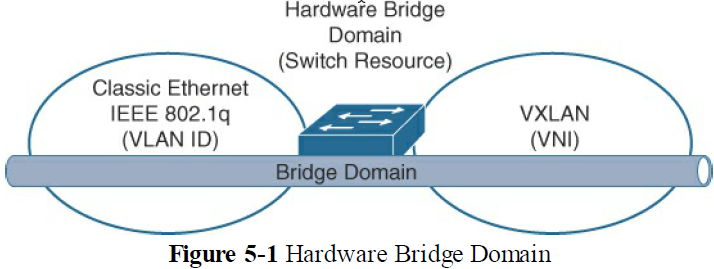
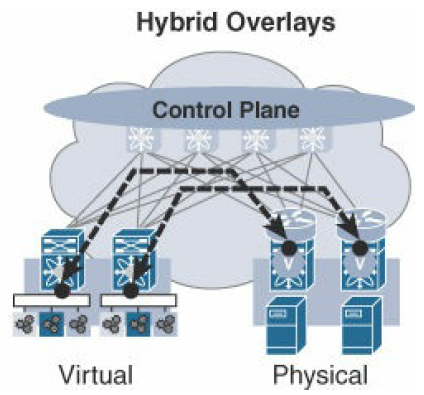
A bridge domain builds a single layer-2 broadcast domain using different layer-2 encapsulation technologies like VLAN, VXLAN, NVGRE, etc. For example, in a virtualization data center overlay context, a bridge domain can encompass both VLAN and VXLAN namespaces.
A bridge domain can either be hardware based, when provided by a switch, or software based, when provided by a virtual switch on a virtualized server.
BD in Flood-and-Learn (F&L) mode can be emulated with these settings:
- L2_Unknown_Unicast_Flood == True
- ARP_Flooding == True
Regular bridge domains are also known as tenant bridge domains, because a bridge domain exists within a tenant.
BD Subnet Scope#
such as “Advertise Externally”
inb#
is the default name of the BD that can be used for in-band management or in-band connectivity.
Under the mgmt tenant, the distinction must be made between the inb default BD and the inb VRF.
BD GIPo#
When overlay multi-destination traffic within the bridge domain boundary is generated, ACI switches use multicast transmission in the ACI underlay as the only mechanism to propagate it. Any switch that has the BD instantiated on it participates in this multicast transmission (see Overlay Data Plane). Specifically, ACI builds a routed multicast tree in the ACI underlay for that BD. And the routed multicast tree has an associated multicast group address. This multicast group address, that is unique to each BD, is called Group IP outer, or flood GIPo, or BD GIPo. So a leaf switch, when presented with overlay multi-destination traffic, encapsulates the traffic in a VXLAN packet with outer dst_IP_addr == BD GIPo.
For multicast to work, a multicast tree is required.
The GIPo is a /15 address from the multicast group address range 225.0.0.0/15 - 231.254.0.0/16. We do not configure individual GIPo addresses; We configure a multicast group address range instead (i.e. the GIPo range), and APIC dynamically selects a GIPo address for each BD. #QA how to verify the GIPo for each BD? #QA BD GIPo vs VRF GIPo? The BD can be instantiated on more than one ACI leaf. That is why the scope of GIPo is the whole ACI fabric:
- ACI Multi-Pod: the scope of GIPo is all the Pods
- ACI Multi-Site: the scope of GIPo is each ACI Site
Layer-3 Bridge Domains#
A bridge domain can be configured with an IP subnet and Unicast Routing scope set; it is then called a layer-3 bridge domain.
Unicast Routing#
Activating the scope Unicast Routing is necessary to create a layer-3 bridge domain. Unicast Routing is by default enabled:
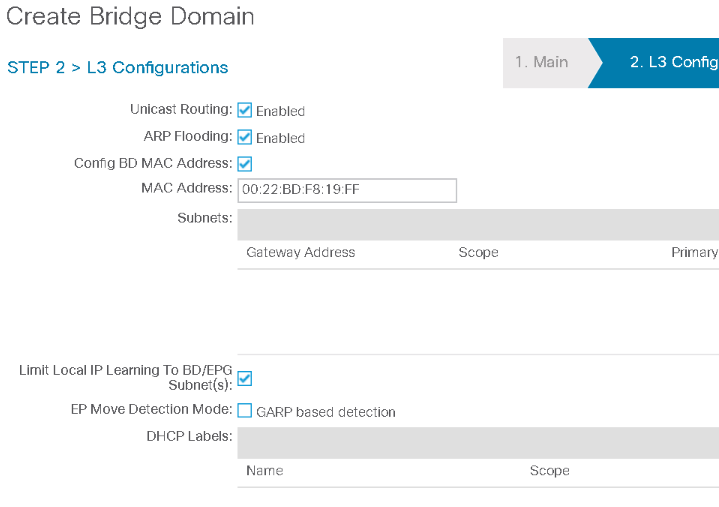
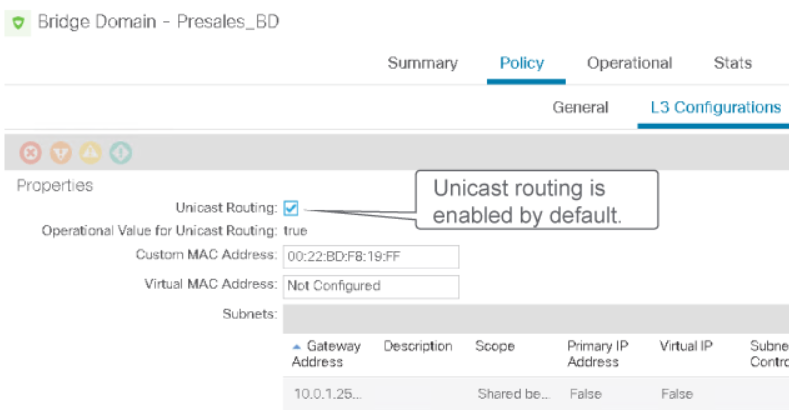
The BD subnet is aka ACI internal subnet. Cisco does not recommend to activate the Bridge Domain’s Unicast Routing option when no subnets are configured under the bridge domain. #QA why? Disabling Unicast Routing from a BD that is configured with a subnet ‘A’ will flush the IP addresses from local and Remote Learn endpoint entries related to subnet ‘A’, but has no impact on the learned MAC addresses related to subnet ‘A’.
#QA When a layer-3 BD is instantiated on a border leaf: is the next hop of the static route always the spine? #QA What is the point of having the IP subnet on a BD that does not have Unicast Routing?
BD Deployment on a Leaf#
A BD is said to be instantiated/deployed on a leaf when:
- an endpoint in the application EPG associated with the BD is physically attached to the leaf, or
- the leaf is a Border Leaf and a contract is created between the application EPG of the BD and an L3Out EPG.
In both cases, the BD IP subnet is added to the leaf’s RIB in the tenant user VRF as a static route. See the section ‘Verify BD Instantiation on Leaves’.
BD Design Considerations#
As soon as we configure a BD subnet, ACI creates a SVI for that tenant subnet. The IP address that we configure under the bridge domain is typically the default gateway of the IP subnet. The IP address is configured using a CIDR notation. There are some cases where the IP default gateway of the subnet resides outside of ACI (e.g. a firewall is the IP default gateway) although the bridge domain SVI is configured. A bridge domain can be configured with more than one IP address. One such design can be where we know that two or more IP subnets are always going communicating together, so we can for example put them in a same EPG and same BD, or in different EPGs but same BD. Controlling the behaviour of flooding multi-destination traffic in ACI takes place at the BD level.
BD Flooding Settings#
L2 Unknown Unicast Options#
These settings suggest to the leaves what to do when they receive a packet for which they do not know how to reach the destination [[MAC]] address.
L2 Unknown Unicast = ‘Flood’#

When a leaf receives a frame whose destination [[MAC]] address is not in its endpoint table, the leaf floods the frame.
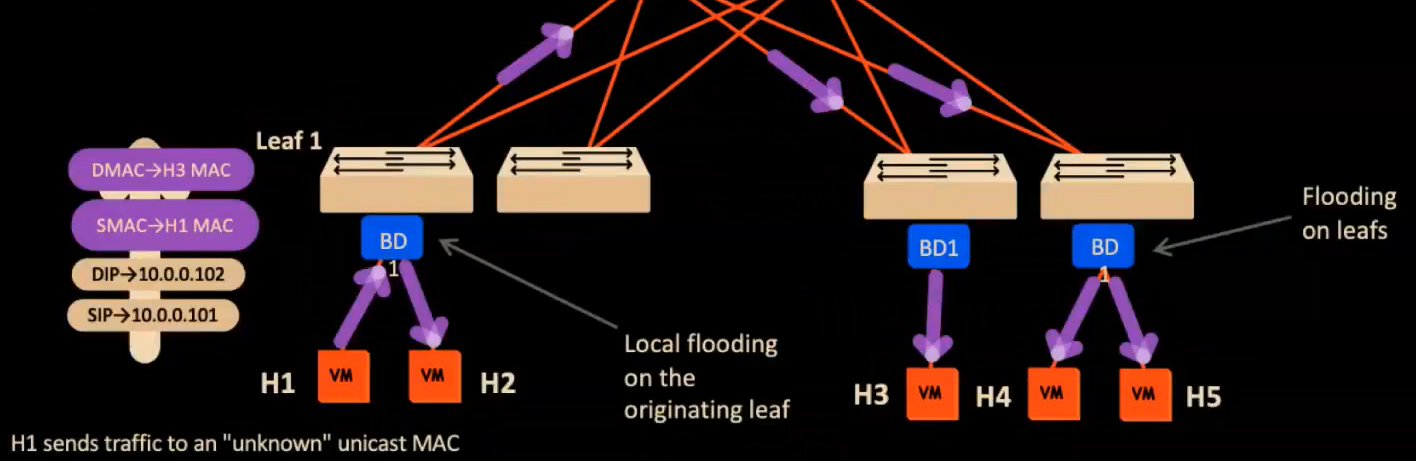
Where to flood the frame depends on the setting in [[#Multi-Destination Flooding Options]].
When to enable it#
Cisco recommends
- for migration scenarios, where ACI works as a pure L2 big switch,
- the IP default gateway is external to the fabric
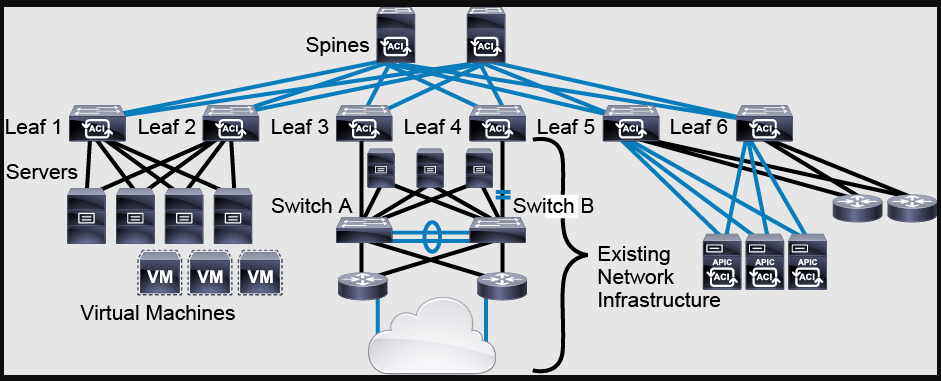
- Your ACI fabric physically connects to an external layer-2 network, and ACI endpoints need to communicate with the external hosts. Example:
L2 Unknown Unicast = ‘Hardware Proxy’#

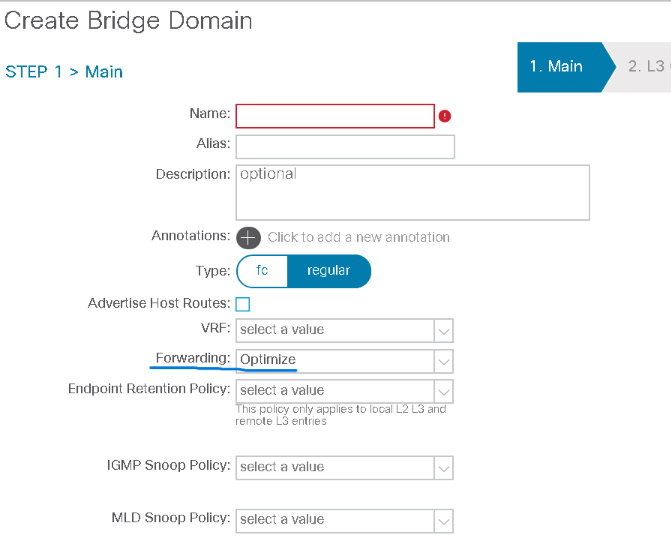
The Forwarding field ise set by default to Optimize, which refers to Hardware Proxy mode.
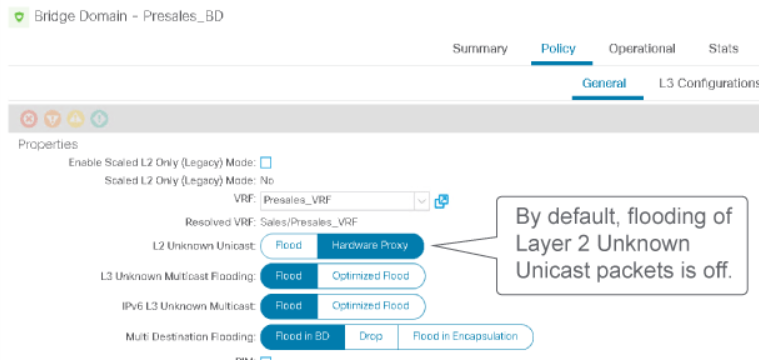
If the destination MAC address of an ingress frame is unknown, the lookup is “proxied” to to the spines by sending the frame to the ACI Anycast Proxy TEP:
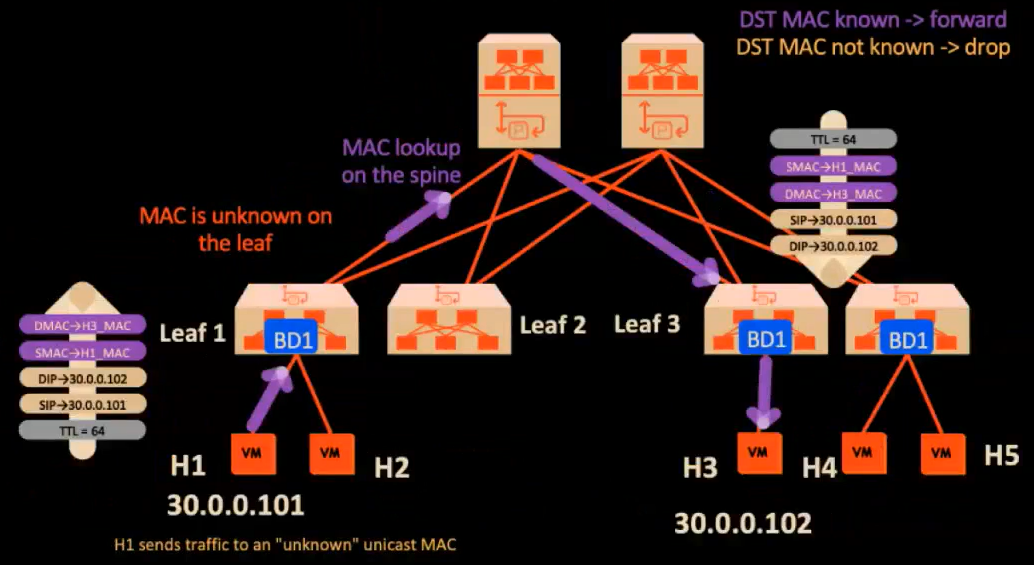
The following two flow charts describe the packet forwarding process when BD L2 Unknown Unicast is set to Hardware Proxy:
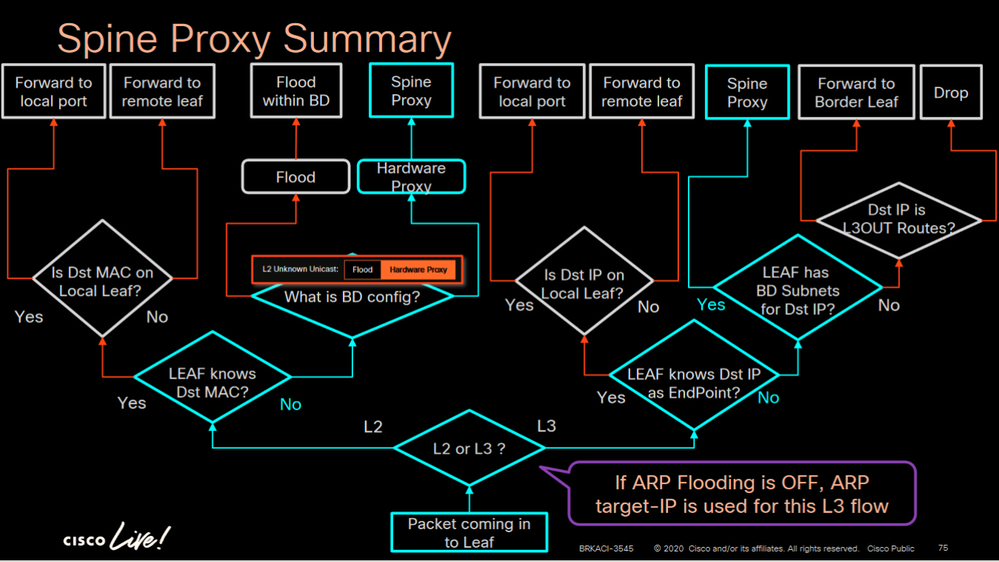
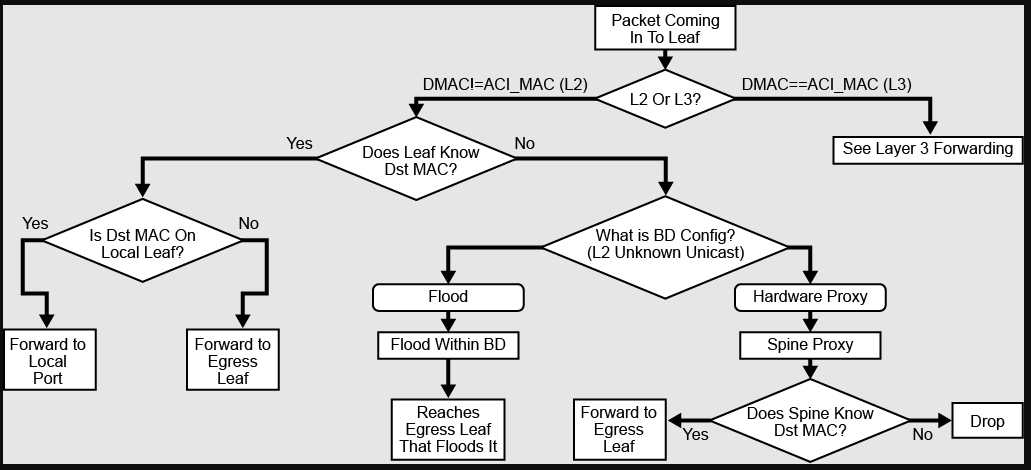
Setting the L2 Unknown Unicast mode to Hardware Proxy does not guarantee the delivery of the packet; If the destination MAC is not in the COOP database, the packet is dropped.
When to use it#
For a network whose IP default gateway has been migrated to ACI, Cisco recommends to change the BD flooding setting to Hardware Proxy. The communication required between leaves and spines in the BD Hardware Proxy mode takes place in tunnels built in the IS-IS protocol in overlay-1. The leaf uses its PTEP and the spine uses the Anycast Proxy TEP. #verifyThis Regardless whether the Hardware Proxy mode is selected or not, leaves send ACI COOP updates to the Anycast Proxy TEP.
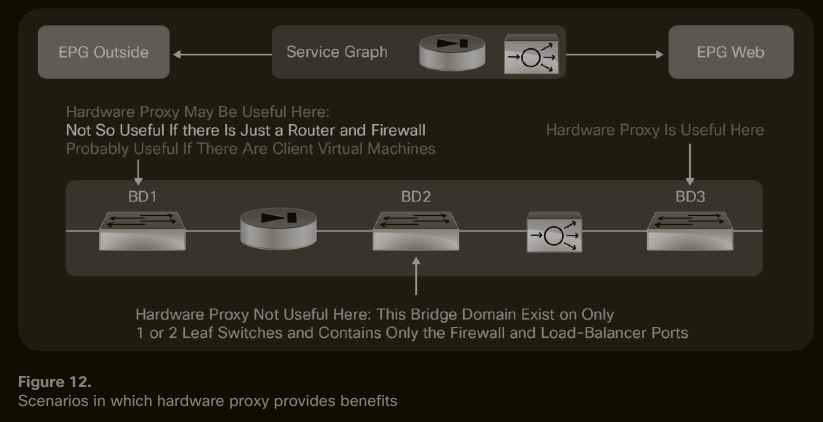
Not every situation benefits from BD Flooding Optimization measures - L2 Unknown Unicast Flooding method, ARP Flooding flag -. For example, in a BD where only one firewall interface is attached, there is no real gain from optimizing BD flooding:
Multi-Destination Flooding Options#
This setting suggest to the leaves how to flood a packet that is destined to multiple destinations within the bridge domain. The reason of the flooding can be:
- due to a broadcast,
- due to L2 Unknown unicast,
- due to Multicast
Multi-Destination Flooding = “Flood in BD”#
 Result:
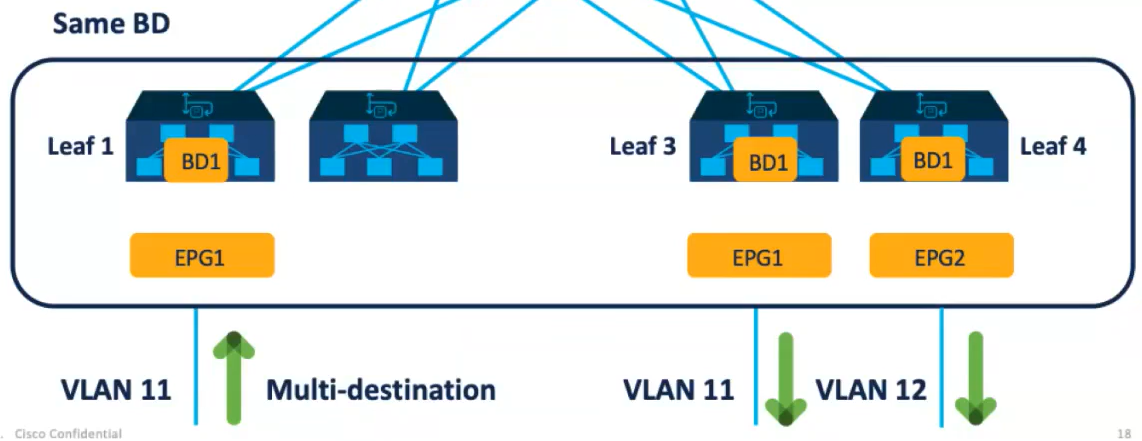
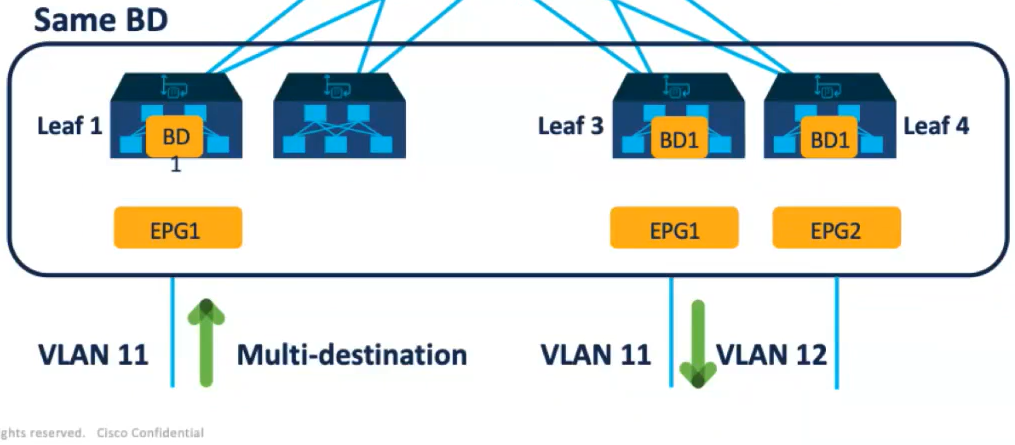
Multi-Destination Flooding = “Flood in Encapsulation”#

Result: the packet is flooded in the BD and only in the VLAN encap that received the multi-destination packet initially.
Optimizing ARP Flooding#
This setting suggests to the leaves what to do when a leaf receives an ARP request from an endpoint.
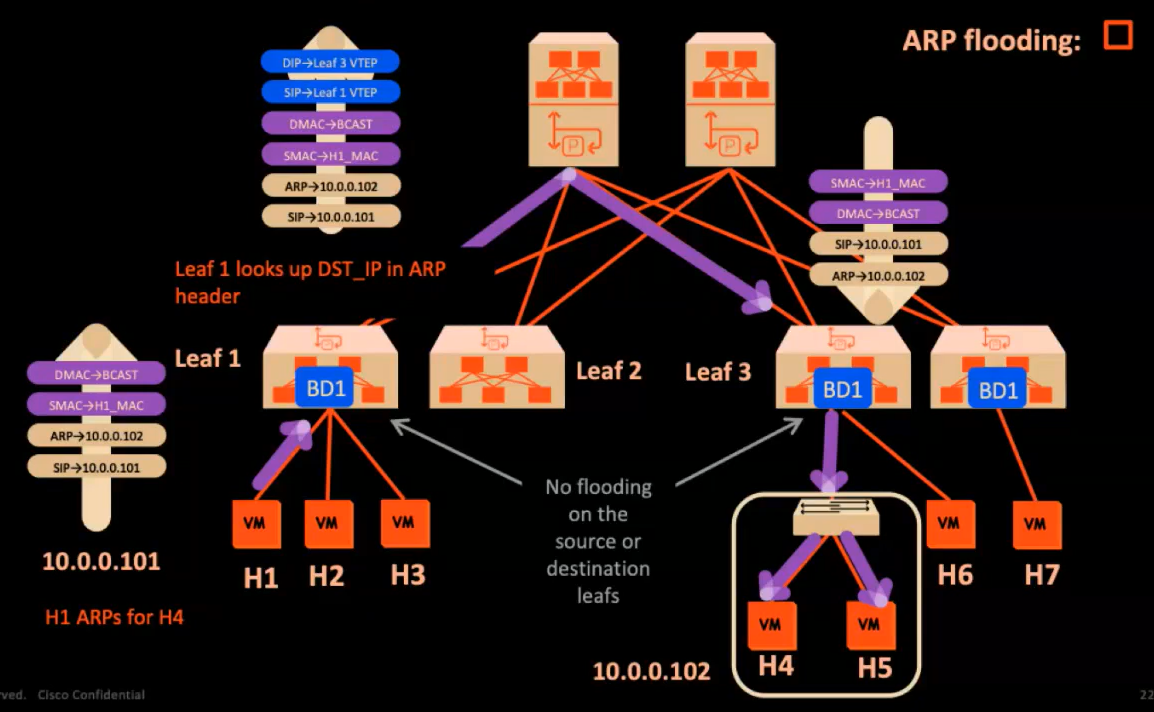
ARP Flooding disabled#
Requirements#
L2 Unknown Unicast = ‘Hardware Proxy’ Unicast Routing If one of the above requirements is not enabled, then ARP flooding can not be disabled.
Target Protocol Address != BD SVI#
i.e. the endpoint is trying to resolve the IP address of another endpoint into a MAC addr.

#QA can we have ARP Flood disabled and L2 Unknown Unicast Flood disabled? What would be the impact?
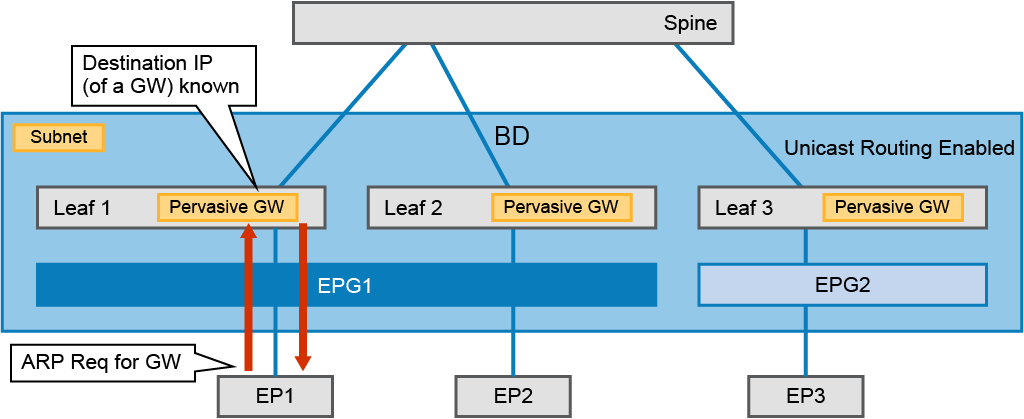
Target Protocol Address == BD SVI#
i.e the endpoint is trying to resolve the IP addr of the default gateway into its MAC addr.
#QA when is it recommended to disable ARP flooding❓When is it mandatory to disable ARP flooding❓
ARP Flooding enabled#
This is the default setting when creating a new BD:

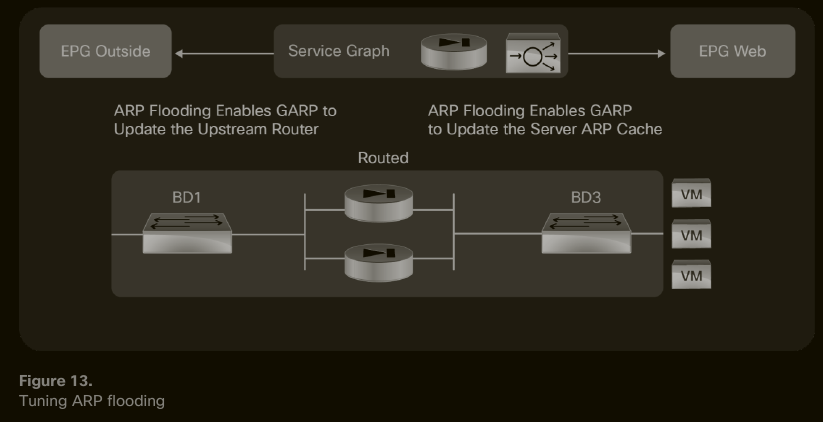
Scenarios requiring ARP flooding enabled#
- NIC Teaming
- an active-standby external firewall pair has the IP default gateway; A failover should not disrupt traffic because the new active node will send a GARP and the endpoints in the BD will get it and update their ARP tables
- a Service Graph where a node failover leads to a change in the <MAC,IP> value pair; Without ARP Flooding, the endopints downstream will not get the information about the new <MAC, IP> value pair.
BD Settings for silent hosts#
#TBC
BD Settings for HA firewalls#
#TBC
BD Settings for integration with legacy networks#
#TBC
External Bridge Domains#
The external bridge domain is created automatically and can neither be changed, nor be seen in the GUI.
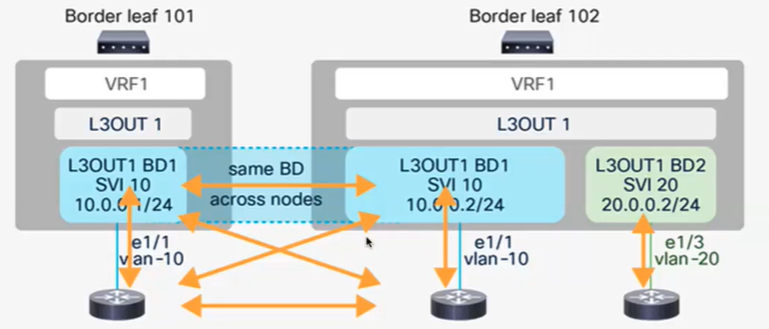
On the external bridge domain:
- Local endpoint learning is disabled,
- remote endpoint IP learning is disabled,
- MAC and IP addresses of directly connected hosts in the L3Out will be learned in the ARP table only.
Limit IP Learning to Subnet#
BD LimitLearningToSubnets property means: endpoint’s IP learning is performed only when:
- the endpoint’s IP belongs to a subnet which is defined under the BD, or
- the endpoint’s IP address is part of the IP subnet defined at the EPG level - which is the Shared Services design.
Advertising ACI BD Subnets inside the fabric#
When an BD subnet is deployed and an endpoint is attached to it (through an EPG) then all leaf switches must have a static route to that BD in their user tenant VRF RIB. #QA what about in VRF overlay-1, will the BD subnet be advertised there? #lab
Advertising ACI BD Subnets Outside the Fabric#
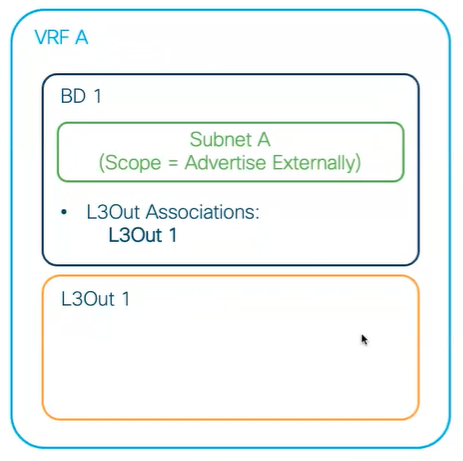
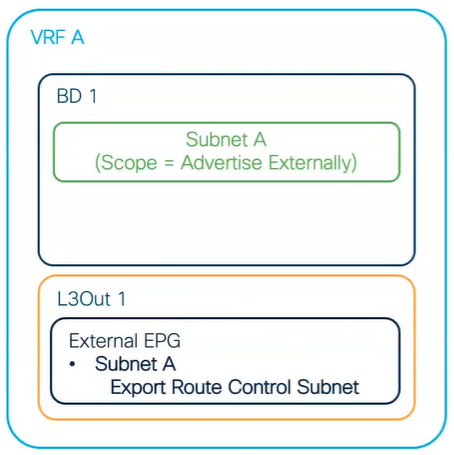
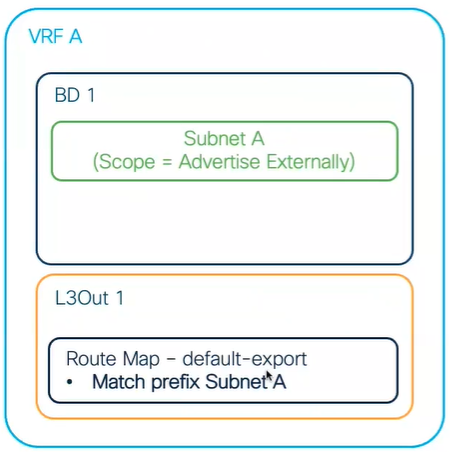
Two steps required: 1- Define the relationship between the BD subnet and the ACI L3Out. 2- define the contract between the BD EPG and the external EPG.
Define the Relationship Between The BD Subnet And The L3Out#
There are three methods for that. From customer to customer, the implemented method could vary. For greenfield deployments, Cisco recommends the third method.
Method 1#
| Pros | Contras |
|---|---|
| The easiest to configure. | Not easy to find out which subnets are advertised from the L3Out object’s perspective. |
| Advertisement control is located at the bridge domain level. |
Method 2#
| Pros | Contras |
|---|---|
| relatively easy to configure | We are using the external EPG for route control functions, which is something Cisco is not recommending when we don’t have transit routing design scenarios. |
Method 3#
| Pros | Contras |
|---|---|
| flexibility in defining which internal BD subnets to advertise and in which order. | the not-so-easy method of the three. |
| the method recommended by Cisco for greenfield L3Out deployments (aka do not mix methods) |
Define The Contract Between The L3Out EPG And The App EPG#
For a BD subnet to be advertised outside, through an L3Out, having the BD-to-L3Out association or the route-map default-export is not enough; there should be a contract binding the EPG that is associated with the subnet of the bridge domain and the external EPG.
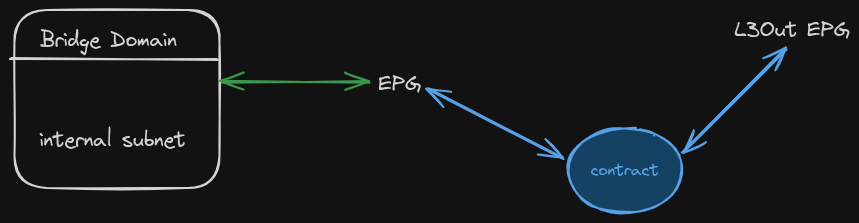 The contract must contain at least one valid filter. If no filters are present, the behaviour of the ACI fabric is non deterministic. #customerProject (tested with customer Conti, ACI Multi-Pod fabric in EQX, where a BD subnet is advertised on two BLs but not advertised on the other two BLs. It was solved by adding the filter default to the contract.)
Stretching Flooding-Enabled Bridge Domains Across Sites in ACI Multi-Site#
When a BD that has flooding enabled is stretched across sites in a ACI multi-site design, layer-2 BUM traffic within the BD must be carried across the sites too. This is done, in ACI multi-site designs, using ingress replication; the spines attached to ISN of a site A use ingress replication to send layer-2 BUM packets to individual remote ACI sites.
Service Bridge Domains#
The L4-7 Service Graph Template Interfaces might be attached to ==dedicated== BDs that are different from the BDs of the (Provider, Consumer) pair; Such a BD is called a ==Service BD==. There might be one or two Service BDs deployed for each L4-7 Device, depending on whether the L4-7 Device is a Two-arm or one-arm design. 🚫 When L4-7 Device interfaces share a BD with one of the (Provider, Consumer) pair, then this BD is not a Service Bridge Domain.
Considerations#
When I have a HA firewall in ACI Multi-Pod design then I must set the Disable IP Data-Plane Learning for PBR Node to Yes.
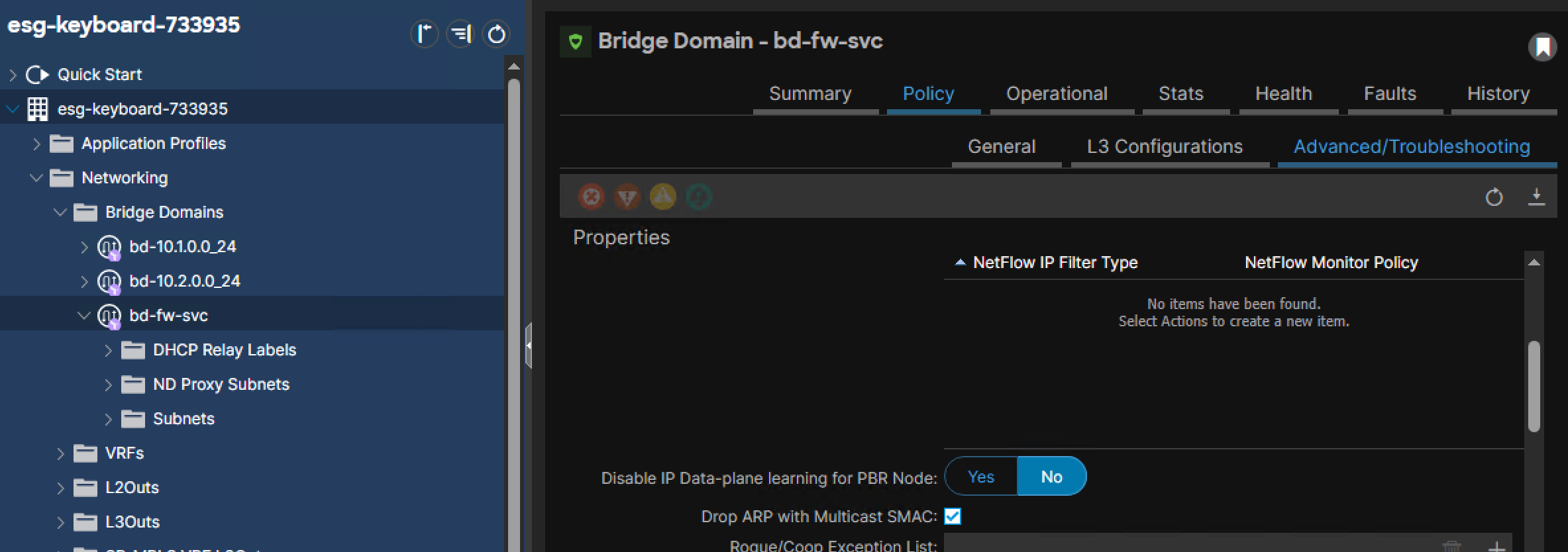 See the document Service Graph Design Guide for ACI 5.2 and Later.pdf, page=17.
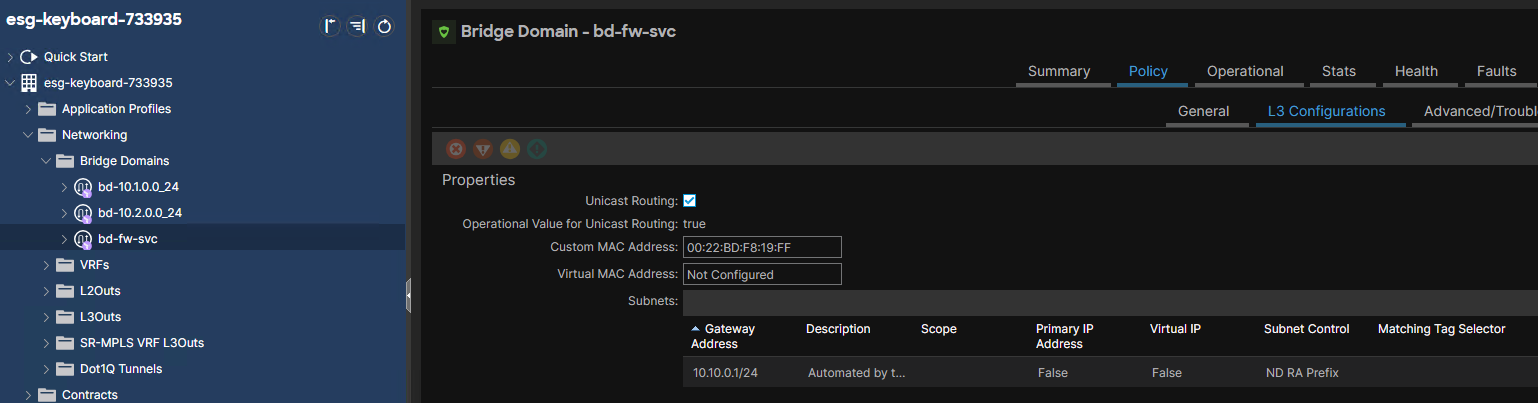
Unicast Routing must be enabled on the Service BDs.
The Service BD must be configured with the IP subnet of the interconnection between ACI and the HA firewall, when the SG node is in Go-To mode:
See the document Service Graph Design Guide for ACI 5.2 and Later.pdf, page=17.
Unicast Routing must be enabled on the Service BDs.
The Service BD must be configured with the IP subnet of the interconnection between ACI and the HA firewall, when the SG node is in Go-To mode:
 IP routing must be configured on the L4-7 Device toward the BD subnets of the (Provider, Consumer) pair, whether we have one-arm or two-arm design. The IP address of the next hop is then the Service BD’s IP address.
🍓 IP routing on a firewall in two-arm design: see document BRKDCN-2992, page=54.
IP routing must be configured on the L4-7 Device toward the BD subnets of the (Provider, Consumer) pair, whether we have one-arm or two-arm design. The IP address of the next hop is then the Service BD’s IP address.
🍓 IP routing on a firewall in two-arm design: see document BRKDCN-2992, page=54.
Inter-Site Layer-2 Connectivity With Flooding#
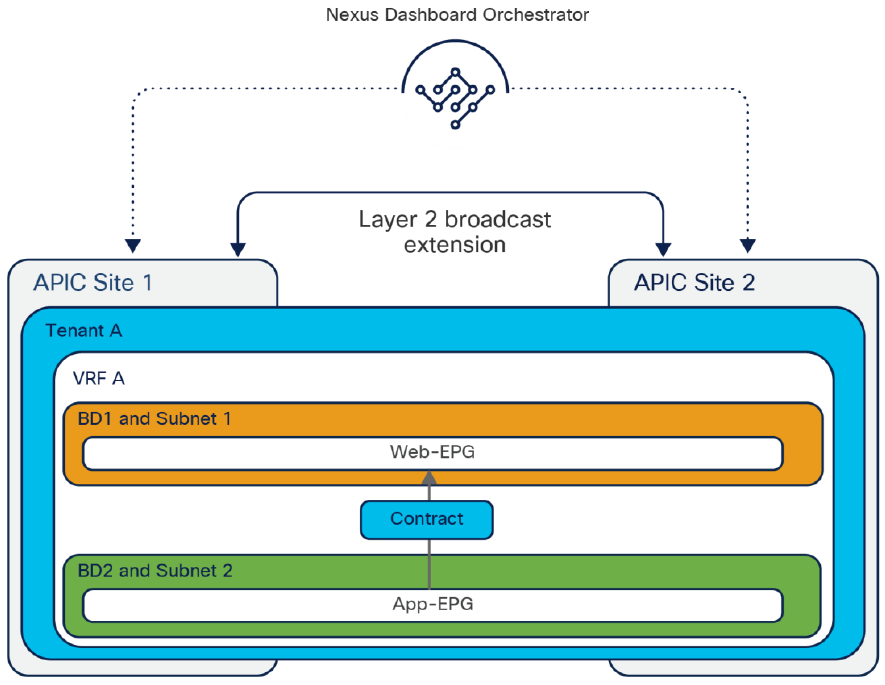
Inter-Site Layer-2 Connectivity Without Flooding#
#QA no BUM traffic crosses the ACI border?