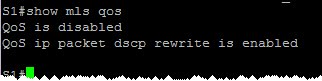
First, let’s see if QoS is enabled on the switch:
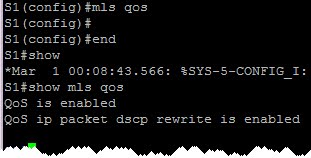
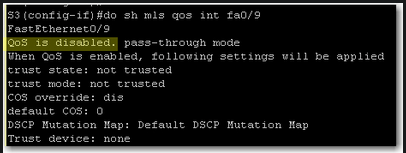 QoS is disabled. We should enable it on global configuration level:
 If we want to display QoS settings for an interface, we do a show mls qos interface command:
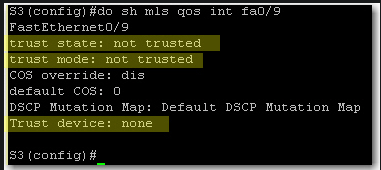 At this stage we still did not define trust boundaries. That’s why Trust State and Trust Mode say “not trusted”. And we did not specify whether we’ll trust a device or not.
To define trust boundary with auto-qos, we either trust all CoS values coming on the switch interface or we trust CoS values only if an ip phone is connected to the switch port.
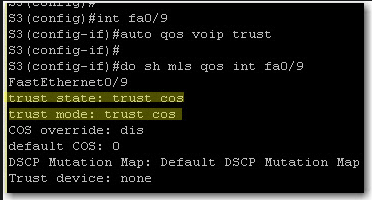
With auto qos voip trust, we tell the switch to trust CoS on each packet coming on the switch interface:
At this stage we still did not define trust boundaries. That’s why Trust State and Trust Mode say “not trusted”. And we did not specify whether we’ll trust a device or not.
To define trust boundary with auto-qos, we either trust all CoS values coming on the switch interface or we trust CoS values only if an ip phone is connected to the switch port.
With auto qos voip trust, we tell the switch to trust CoS on each packet coming on the switch interface:
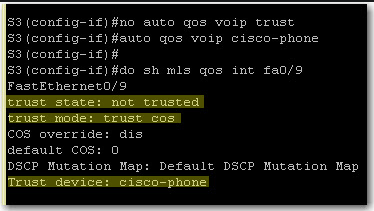
 If we want to further limit trust boundary, we can tell the switch to trust CoS values only if a Cisco ip phone is detected on the port:
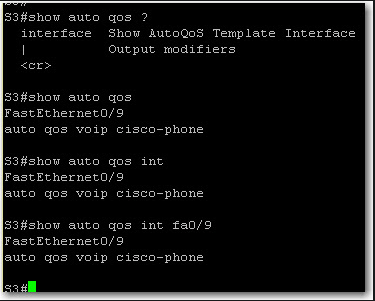
 Finally, on a 3550 switch, show auto qos and show auto qos interface give the same output:
TSHOOT Exam Strategy Notes
I gathered these notes to mentally prepare my Troubleshooting methodology on the exam day:
- Follow the path
- divide and conquer
- Move the problem
- Bottom up
- Top down After watching Kevin Wallace Bull’s Eye videos and INE Tshoot Exam Demo video, the best method is to use a combination of Divide and Conquer-Bottom up/Top Down-Follow the path. There’s not really one single method that will lead to finding where the problem lies.
This is a collection of possible troubleshooting tips I collected over my studies. They are organized by OSI layer:
IPSec VPN Notes
Steps to create IPSEC VPN:
- define ISAKMP Policies
- define ISAKMP preshared key (if authentication method is Pre-share)
- define IPSEC Transform Sets
- define IPSEC security associations
- define interesting traffic through Proxy Identity (or crypto ACL)
- link crypto ACL and IPSEC TS with a Crypto Map
- put the crypto map under the Internet-facing interface
configuring IPSEC VPN between R2 and R3
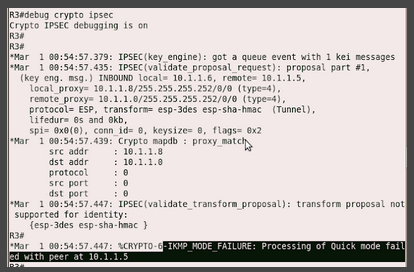
There was a problem at first. Debug command helped see the error:
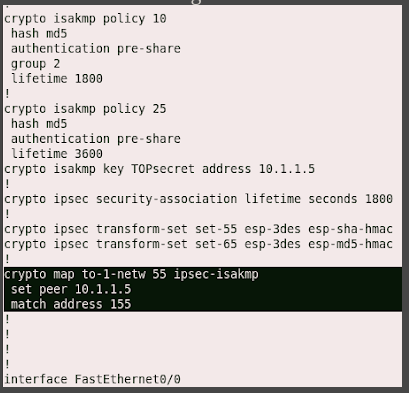
 We look back at the configuration on both R2 and R3 and discover that “set transform-set” is missing on R3:
Dot1x and AAA Notes
dot1x
- dot1x can work with DHCP address assignment
- only EAPOL is allowed before a port is authorized
- Vlan Assignment (by a RADIUS server) depends on the result of dot1x authentication
- RADIUS server- the dot1x authentication server- is the one which verifies the identity of the client connected to a dot1x port
AAA
- there are named method lists (simply method lists)
- once AAA is enabled, the default method list is applied to console, VTY access, enable mode…
Loop Guard on Cisco IOS
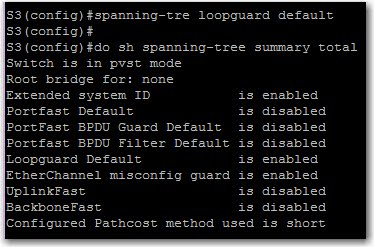
Enabling Loop Guard on an interface level does not enable it for the whole system. In fact, a “show spanning-tree summary total” is a bit misleading in this case.
To configure loop guard on an interface:
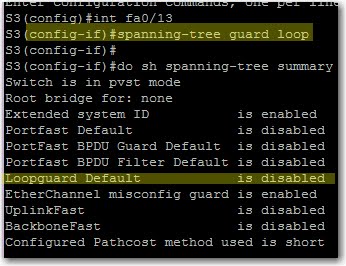
“loop guard default” is disabled because we haven’t issued a “spanning-tree loopguard default”. Easy:
QoS Configuration and Verification on Cisco IOS
verify that QoS is enabled:
Enable QoS:
At this stage, all interfaces are by default untrusted. This means that any frame with a priority value will be remarked as CoS/IP Precedence/DSCP value = 0.
Trust CoS values of incoming frames. Useful for trunks:

Trust CoS values only if an attached Cisco ip phone exists (conditional trust):

At this stage, the trust boundary moves to the IP phone. Any priority value of any attached PC frames is untrused, thus remarked with priority 0.
Multicast PIM-SM
PIM-SM requires the following components: a Rendez-vous Point, shared trees, source trees.
PIM Register and Register Stop messages
PIM register messages are sent by a PIM router to the Rendez-vous Point when it [the PIM router] receives multicast traffic from a streaming source.
PIM RP sends a PIM register stop message to signal to the PIM router that it [the RP] has received the PIM register message.
Incoming Interfaces vs Outgoing Interface List
Incoming Interface
The PIM router’s interface that receives – or is supposed to receive – multicast traffic from the multicast source.
Introduction to multicast communication
Reminder Of The Communication Models
client/server behind-NAT devices Point-to-point Hybrid Unicast Multicast
Multicast concepts
Multicast clients must join multicast groups in order to receive multicast traffic.
- IP host: an IP endpoint that is connected to a multicast router.
- Multicast router: a router that supports multicast protocols such as PIM and IGMP.
- upstream router
- downstream router
- multicast group
- nulticast (source, group) pair
- multicast group membership
- interested node
- Host Membership Query
- Host Membership Query
- Host Membership Report
- random report delay timer
- shared tree
- source-rooted spanning tree
- Multicast Distribution Tree
- parent link
- child link
- active branches
- multicast leaf router: is connected to leaf sub-networks
- Leaf sub-network: some have group members, some do not.
- DVMRP
Advantages of Multicast Communication
Routers process one packet instead of many (in case of multiple unicast transmissions) Routers do not have to determine the destination address to send the packet to, in contrast to unicast transmission. Reduced usage of resources: router CPU and memory, network bandwidth.
HSRP Interface Tracking
In this lab, I learned the following:
- configuring a HSRP group on physical interfaces,
- testing how a PC can reach a remote subnet through a redundant gateway, by configuring its default gateway as the HSRP virtual address,
- testing how the second router becomes Active,
- testing interface tracking.
For interface tracking, at first, I thought there was a problem with the lab.
Topology:
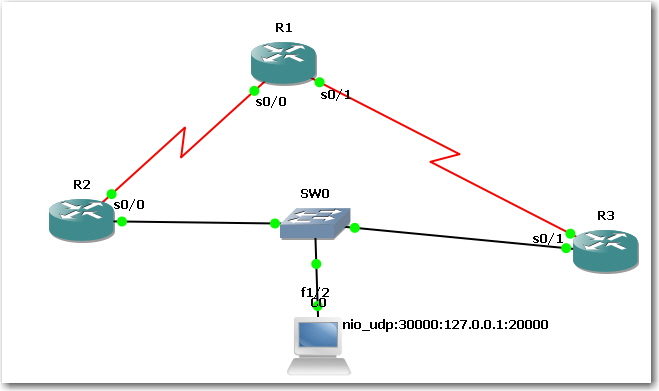 configure interface tracking and a decrement value:
 When I shut down ser0/0 on R2, I expected R2 to become Standby router. But reality bites:
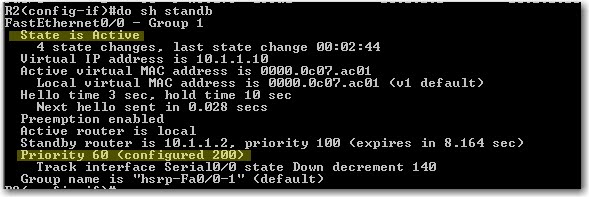 Then I checked on R3. R3 is still Standby, not Active !
 So what’s wrong? Here’s what Cisco says:
How Object Tracking Affects the Priority of an HSRP Router
So what’s wrong? Here’s what Cisco says:
How Object Tracking Affects the Priority of an HSRP Router
Cisco BSCI Exam
Score is 822. Passing score was 790. It came after four days of reviewing IPv6, Route maps, BGP,… In the beginning of the test I was taking enough time to read and answer the questions. However I lost much time in my first lab simulation. The scenarion wasn’t clear to me. And each time I had to click on the console button to reach a router. And I was not seeing changes in the routing table so it confused me a lot. I began to worry about my score. And I got my second lab simulation. And immediately after, the third. I told to myself: “man, what did I do to Cisco to treat me this way?” So I had almost 38 minutes to do the third lab sim and 32 questions ! Besides, the test supervisor was tearing papers on her desk. And the other guy in the room was complaining about the bug in his exam. I was going to scream. At the end, I was almost flipping through the questions. I finished the test. The test supervisor told me “congratulations!”.