There are times when you want to schedule a router reload, but you don’t want to stay late or come to the office during weekends. “Reload at” is your friend.
How to reload your router at a predefined time
You want to reload your router (or switch) at 7pm, but at the same time, you’ll be having a coffee with your friend and you don’t want to have this discussion: “- Sorry guys, I have a router to reboot. I’ll be back in 30mn.
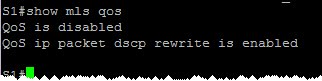
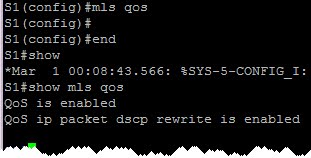
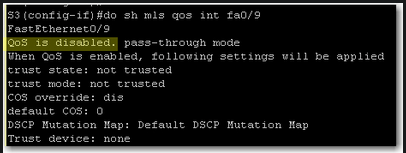 QoS is disabled. We should enable it on global configuration level:
 If we want to display QoS settings for an interface, we do a show mls qos interface command:
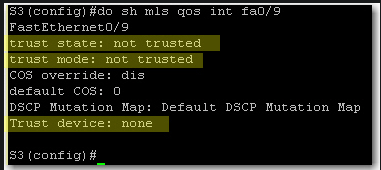 At this stage we still did not define trust boundaries. That’s why Trust State and Trust Mode say “not trusted”. And we did not specify whether we’ll trust a device or not.
To define trust boundary with auto-qos, we either trust all CoS values coming on the switch interface or we trust CoS values only if an ip phone is connected to the switch port.
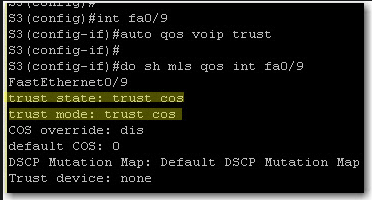
With auto qos voip trust, we tell the switch to trust CoS on each packet coming on the switch interface:
At this stage we still did not define trust boundaries. That’s why Trust State and Trust Mode say “not trusted”. And we did not specify whether we’ll trust a device or not.
To define trust boundary with auto-qos, we either trust all CoS values coming on the switch interface or we trust CoS values only if an ip phone is connected to the switch port.
With auto qos voip trust, we tell the switch to trust CoS on each packet coming on the switch interface:
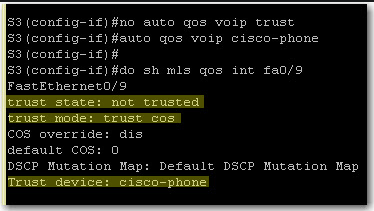
 If we want to further limit trust boundary, we can tell the switch to trust CoS values only if a Cisco ip phone is detected on the port:
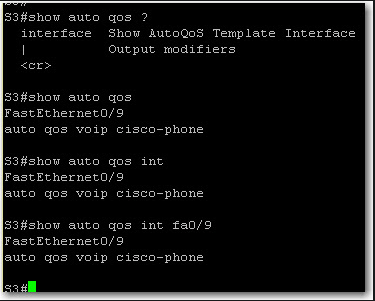
 Finally, on a 3550 switch, show auto qos and show auto qos interface give the same output:


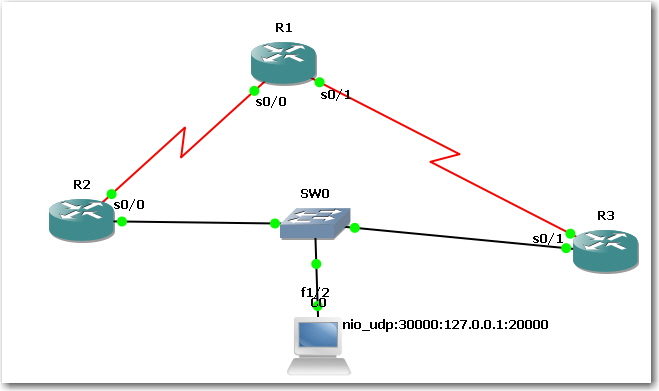 configure interface tracking and a decrement value:
 When I shut down ser0/0 on R2, I expected R2 to become Standby router. But reality bites:
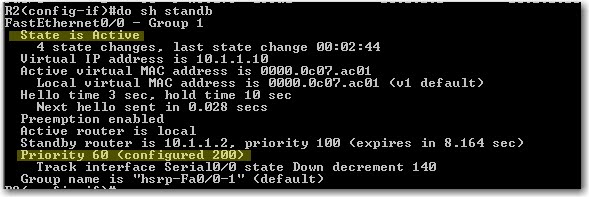 Then I checked on R3. R3 is still Standby, not Active !
 So what’s wrong? Here’s what Cisco says:
How Object Tracking Affects the Priority of an HSRP Router
So what’s wrong? Here’s what Cisco says:
How Object Tracking Affects the Priority of an HSRP Router