Cisco Auto Qos Configuration
Table of Contents
First, let’s see if QoS is enabled on the switch:
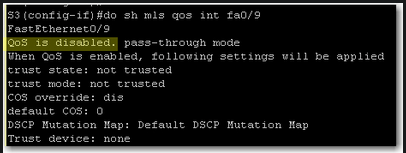 QoS is disabled. We should enable it on global configuration level:
 If we want to display QoS settings for an interface, we do a show mls qos interface command:
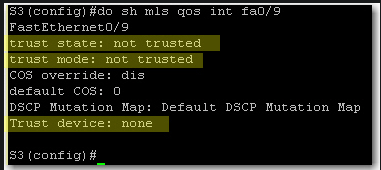 At this stage we still did not define trust boundaries. That’s why Trust State and Trust Mode say “not trusted”. And we did not specify whether we’ll trust a device or not.
To define trust boundary with auto-qos, we either trust all CoS values coming on the switch interface or we trust CoS values only if an ip phone is connected to the switch port.
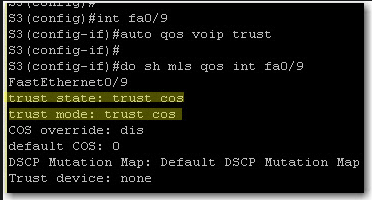
With auto qos voip trust, we tell the switch to trust CoS on each packet coming on the switch interface:
At this stage we still did not define trust boundaries. That’s why Trust State and Trust Mode say “not trusted”. And we did not specify whether we’ll trust a device or not.
To define trust boundary with auto-qos, we either trust all CoS values coming on the switch interface or we trust CoS values only if an ip phone is connected to the switch port.
With auto qos voip trust, we tell the switch to trust CoS on each packet coming on the switch interface:
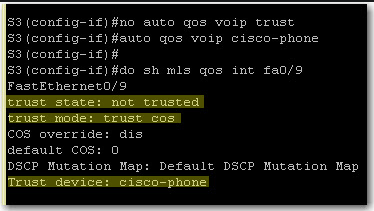
 If we want to further limit trust boundary, we can tell the switch to trust CoS values only if a Cisco ip phone is detected on the port:
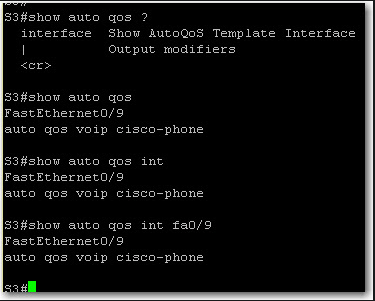
 Finally, on a 3550 switch, show auto qos and show auto qos interface give the same output: