Posts for: #Networking

Troubleshooting Junos

Notes from a Juniper Junos troubleshooting course

Packets reaching the irb interface trigger a routing lookup.

When using vMX, typically in a lab, then there should be two VMs: one for the control plane and one for the forwarding plane, named something like vmx1-vcp and vmx1-vfp respectively.

When pinging the IP address of an aggregate Ethernet interface, the ICMP Echo Reply packets are duplicated:

lab@vEX> ping 172.16.200.2 count 3    
PING 172.16.200.2 (172.16.200.2): 56 data bytes
64 bytes from 172.16.200.2: icmp_seq=0 ttl=63 time=3.034 ms
64 bytes from 172.16.200.2: icmp_seq=0 ttl=63 time=3.209 ms (DUP!)
64 bytes from 172.16.200.2: icmp_seq=0 ttl=63 time=3.251 ms (DUP!)
64 bytes from 172.16.200.2: icmp_seq=0 ttl=63 time=3.295 ms (DUP!)
64 bytes from 172.16.200.2: icmp_seq=0 ttl=63 time=3.346 ms (DUP!)
64 bytes from 172.16.200.2: icmp_seq=0 ttl=63 time=3.387 ms (DUP!)
64 bytes from 172.16.200.2: icmp_seq=0 ttl=63 time=3.418 ms (DUP!)
64 bytes from 172.16.200.2: icmp_seq=0 ttl=63 time=3.448 ms (DUP!)
64 bytes from 172.16.200.2: icmp_seq=1 ttl=63 time=3.641 ms
64 bytes from 172.16.200.2: icmp_seq=1 ttl=63 time=3.688 ms (DUP!)
64 bytes from 172.16.200.2: icmp_seq=1 ttl=63 time=3.711 ms (DUP!)
64 bytes from 172.16.200.2: icmp_seq=1 ttl=63 time=3.717 ms (DUP!)
64 bytes from 172.16.200.2: icmp_seq=1 ttl=63 time=3.871 ms (DUP!)
64 bytes from 172.16.200.2: icmp_seq=1 ttl=63 time=3.883 ms (DUP!)
64 bytes from 172.16.200.2: icmp_seq=1 ttl=63 time=3.919 ms (DUP!)
64 bytes from 172.16.200.2: icmp_seq=1 ttl=63 time=3.923 ms (DUP!)
64 bytes from 172.16.200.2: icmp_seq=2 ttl=63 time=2.626 ms

--- 172.16.200.2 ping statistics ---
3 packets transmitted, 3 packets received, +14 duplicates, 0% packet loss
round-trip min/avg/max/stddev = 2.626/3.492/3.923/0.343 ms

lab@vEX> 

The ‘hot swappable’ and ‘hot pluggable’ are chassis capabilities and are not the same.
[Read]

Junos firewall filters

Definition

Firewall filters in Juniper Junos are stateless packet filters that act pretty much like the access lists in Cisco IOS, IOS XE and NX-OS. Once configured, they must be assigned in the input or output direction of one or more interfaces to become effective.

Example scenario: preventing ping packets to be initiated from one direction while allowing the other direction

Topology

R1:ge-0/0/5(.1) <— 10.10.7.0/30 —> (.2)ge-0.0.1:R5

Configuration

On R5:

[Read]

OSPF

OSPF in Junos

lab@vSRX> show configuration interfaces ge-0/0/2 
unit 0 {
    family inet {
        address 192.168.11.2/24;
    }
}

lab@vSRX> show configuration protocols ospf 
area 0.0.0.0 {
    interface ge-0/0/2.0;
}

lab@vSRX> 
lab@vSRX> show ospf interface 
Interface           State   Area            DR ID           BDR ID          Nbrs
ge-0/0/2.0          BDR     0.0.0.0         192.168.1.1     192.168.31.1       1

lab@vSRX> 
lab@vSRX> show ospf neighbor 
Address          Interface              State           ID               Pri  Dead
192.168.11.1     ge-0/0/2.0             Full            192.168.1.1      128    39

lab@vSRX>

lab@vSRX> show route protocol ospf  

inet.0: 24 destinations, 38 routes (24 active, 0 holddown, 0 hidden)
+ = Active Route, - = Last Active, * = Both

192.168.1.1/32     *[OSPF/10] 01:58:32, metric 1
                    >  to 192.168.11.1 via ge-0/0/2.0
224.0.0.5/32       *[OSPF/10] 01:58:42, metric 1
                       MultiRecv

inet6.0: 1 destinations, 1 routes (1 active, 0 holddown, 0 hidden)

lab@vSRX>

MTU mismatch


lab@vSRX> show ospf neighbor 
Address          Interface              State           ID               Pri  Dead
192.168.11.1     ge-0/0/2.0             ExStart         192.168.1.1      128    35

lab@vSRX>
lab@vSRX> show interfaces ge-0/0/2 | match mtu 
  Link-level type: Ethernet, MTU: 1400, LAN-PHY mode, Link-mode: Full-duplex, Speed: 10Gbps,
    Protocol inet, MTU: 1386

lab@vSRX> show configuration interfaces ge-0/0/2 | display inheritance 
##
## '1400' was inherited from group 'group1'
##
mtu 1400;
unit 0 {
    family inet {
        ##
        ## 'no-neighbor-learn' was inherited from group 'group1'
        ##
        no-neighbor-learn;
        address 192.168.11.2/24 {
            arp 192.168.11.1 mac 00:50:56:a9:50:92;
        }
    }
}

lab@vSRX> 
lab@vMX-2> show interfaces ge-0/0/2 | match mtu 
  Link-level type: Ethernet, MTU: 1514, MRU: 1522, LAN-PHY mode, Speed: 1000mbps, BPDU Error: None,
    Protocol inet, MTU: 1500
    Protocol multiservice, MTU: Unlimited

lab@vMX-2> 

lab@vMX-2> show configuration interfaces ge-0/0/2 | display inheritance 
description "vr1 to vsrx1";
unit 0 {
    family inet {
        address 192.168.11.1/24;
    }
}

lab@vMX-2> 

The solution in this case is to change the MTU value of the physical interface on either side of the link:

[Read]

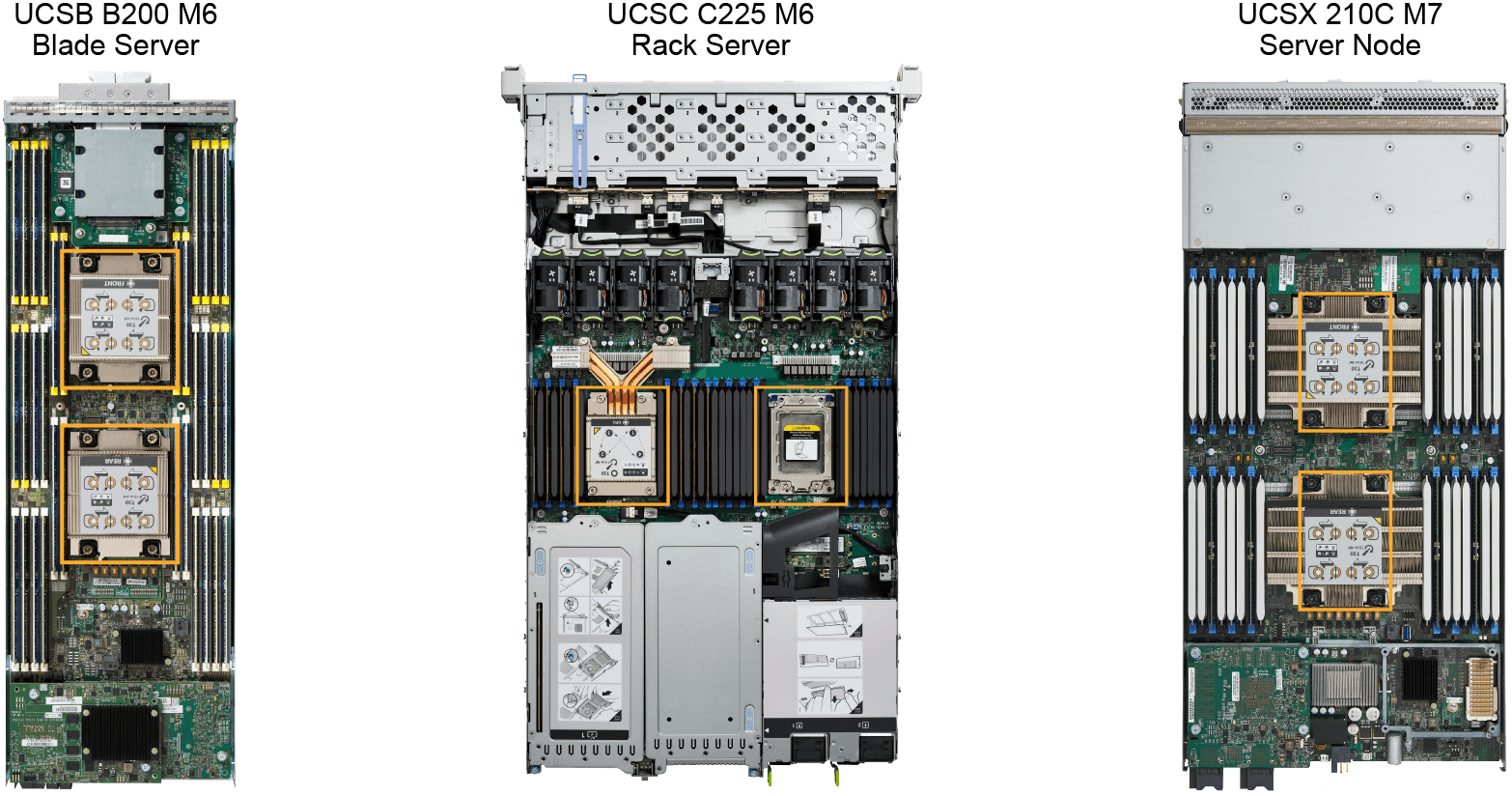
Server Hardware and Cisco UCS

sc1

sc2

replacing UCS B-series blade servers that are managed by UCSM requires their decommission and deletion from the inventory of UCSM first. The new blade servers must be commissioned with UCSM.

Note: CIMC vs UCSM and Intersight

  • When a UCS C-series rackmount server is managed by UCSM, it can no longer be managed by CIMC.
  • Only UCS C-series rackmount servers that are in standalone mode can be managed through CIMC.

Register a UCS C-series rackmount server in UCSM

A new UCS C-series rackmount server comes pre-configured to integrate with UCSM through the connection to the FIs. Once the UCS C-series server is cabled to the FIs, I wait for some minutes and I will see the server pop up in the UCSM page:

[Read]

Firewall Manual Stitching in ACI

aka Network Stitching. This is the manual method to insert L4-7 services; VLANs, EPGs and bridge domains are manually created, and EPGs are manually assigned to the L4-7 device interfaces, statically with Static Path Binding or dynamically with a VMM domain. If we have to insert more than one L4-7 device, repeat the above process as much as there are devices to integrate.

L4-7 device vs L4-7 Device

An L4-7 device in the manual stitching context is one firewall, one ADC, etc. A L4-7 Device in Service Graphs is the Logical Device, which might contain one or more Concrete Devices.

[Read]

How to Steer Traffic to a Firewall Using ACI L4-7 Service Insertion

If I configure the IP default gateways of the (Provider, Consumer) pair on ACI and attach an L4-7 Device to ACI, IP routing traffic involving the (Provider, Consumer) pair will bypass the Service Device due to routing in ACI itself. To circumvent that, there are three known methods to force traffic toward the L4-7 Device.

Method 1: NAT on the L4-7 Device

Method 2: SGR (no NAT on the L4-7 Device)

Method 3: VRF Sandwich and L3Outs

No NAT on the L4-7 Device.

[Read]

ACI L4-7 Logical Device

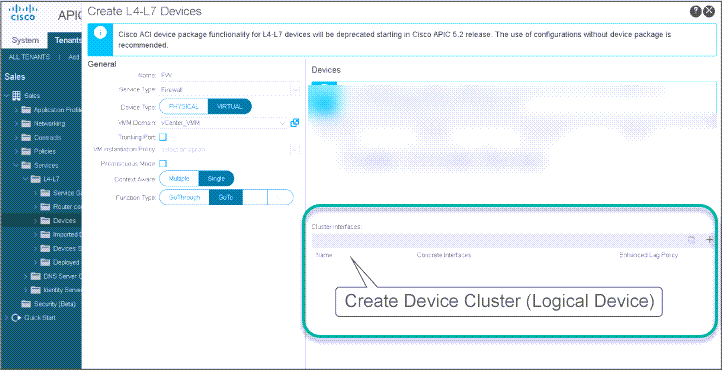
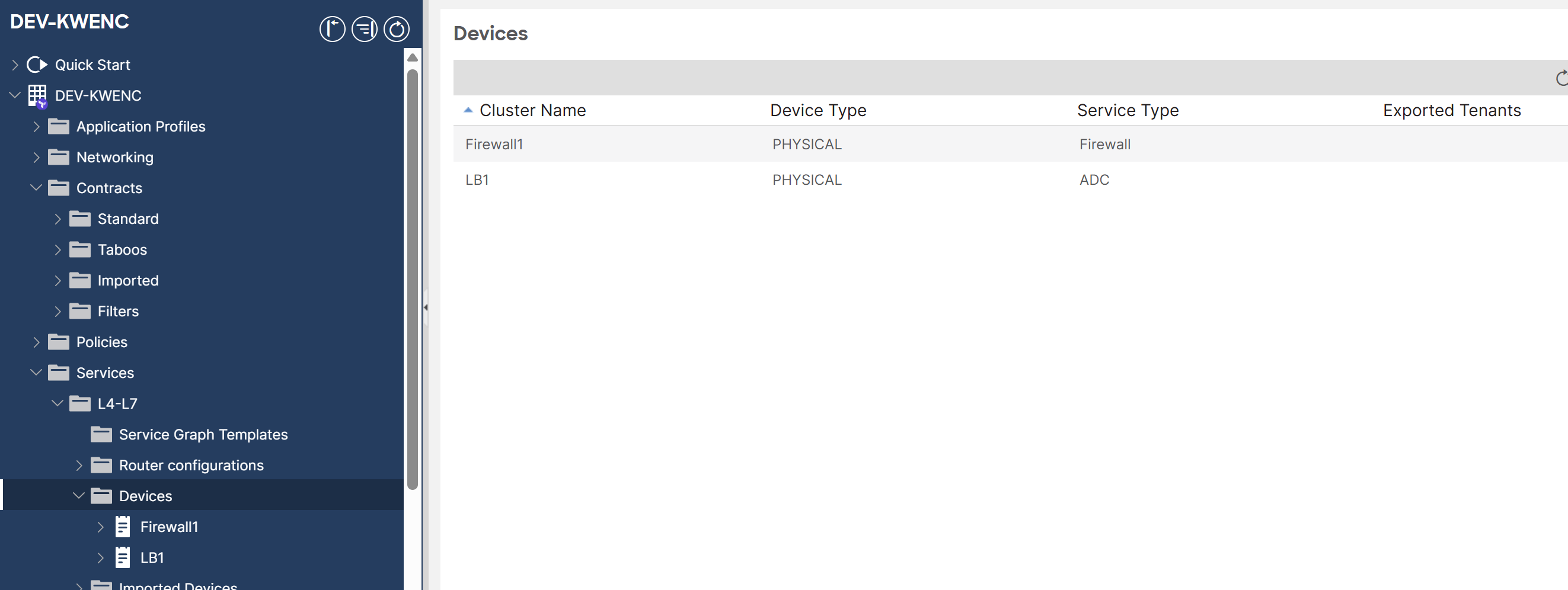
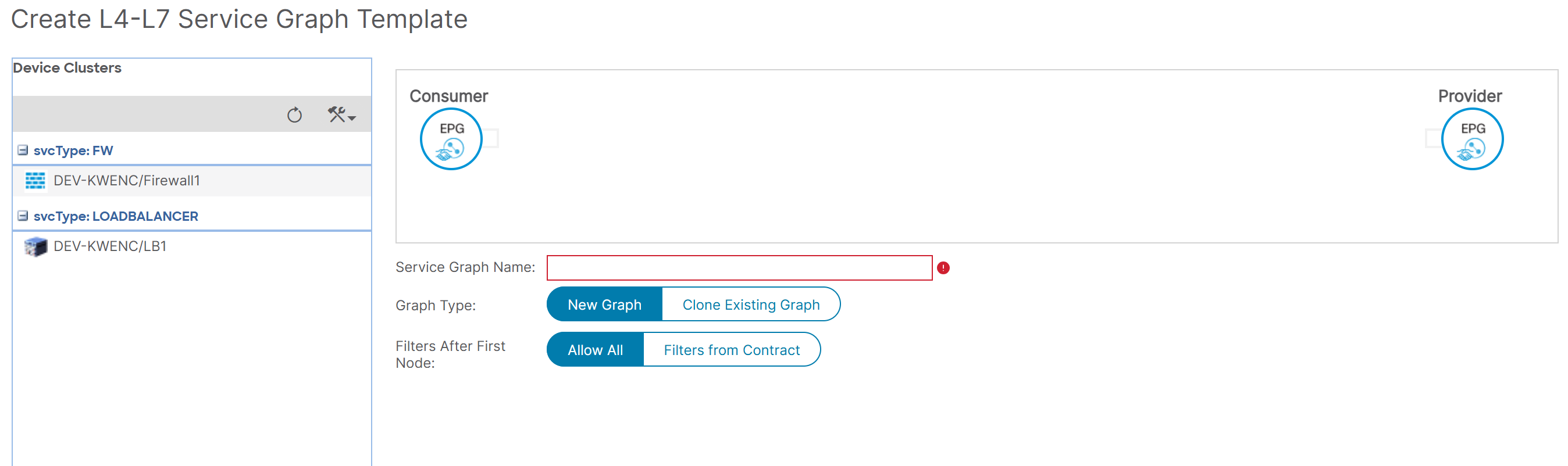
L4-7 Device == L4-7 Cluster Device == Logical Device. This is where we inform ACI about our firewall, ADC, etc. ACI considers service devices as part of application design. That is why we place their functions in EPG pairs or ESG pairs. sc1 The L4-7 Device == the Cluster Device == Logical Device: the ACI logical representation of one or more Concrete Devices that perform the same Service Type. Re-use of a L4-7 Device is possible, whether using its same Cluster interfaces or additional ones.
[Read]

ACI L4-7 Cluster Interfaces

is the logical interfaces of a L4-7 Device Cluster Device. We distinguish Provider Cluster Interfaces and Consumer Cluster Interfaces. The ACI administrator must define them under the Create L4-7 Device page. sc4

Consumer-Side Interface

The Cluster Interface that will attach directly (or indirectly, in case this is not the first L4-7 Device in the Service Graph Template) to the Consumer-side BD.

Provider-Side Interface

The Cluster Interface that will attach directly (or indirectly, in case this is not the first L4-7 Device in the Service Graph Template) to the Provider-side BD. Any Cluster Device will appear as a draggable element when creating a Service Graph Template. sc4 sc5 ❗ ACI does not detect duplicate IP addresses when two Cluster Devices have the same management IP address or VIP.

[Read]

Common Concepts For Cisco ACI Standard Service Graphs and Service Graph Redirects

These are common concepts for Standard Service Graphs and Service Graph Redirects. Service Graph with L4-7 Device in Go-To mode == L3 Service Graph. L4-7 Device in Go-To mode and the SGT has PBR enabled == L3 PBR Node.

Concepts

L4-7 Service Graph

A Service Graph requires the existence of one or more [[ACI Contracts|Contract]]s between a (Provider, Consumer) pair, whether they are EPGs or ESGs. Service Graphs are extensions of ACI Contracts; They leverage the concept of Provider EPG and Consumer EPG. Instead of manual stitching of L4-7 services, ACI can manage service devices just like it manages network policies, including automatic provisioning and removal of services when needed. Service Graph is a concept. requires the Service Graph Template

[Read]

Configuring PKI

Technology Definitions
CSR Certificate Signing Request

Certificates

Issuing a Digital Certificate

Certificate server, Certificate Authority. The entities that want the CA to issue a digital certificate for them must send their public key, their IP address and their FQDN to the CA. The CA replies with a digital certificate, aka identity certificate, aka public key certificate which means ‘I certify that the entity named in this certificate own the public key mentioned in this digital certificate.’ The digital certificate does not last forever; It has a validity period. The digital certificate is a file with the extension .cer.

[Read]