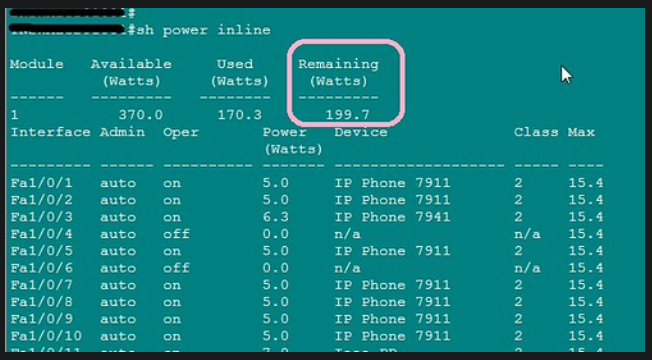
Players: Catalyst switch with PoE support, Cisco IP phones
Script: We want to check whether there still is enough amount of PoE energy, on a Catalyst switch.
Solution: do a “show power inline”, check the “Remaining” column.
Posts for: #Networking
Registering MGCP Gateways
Situation
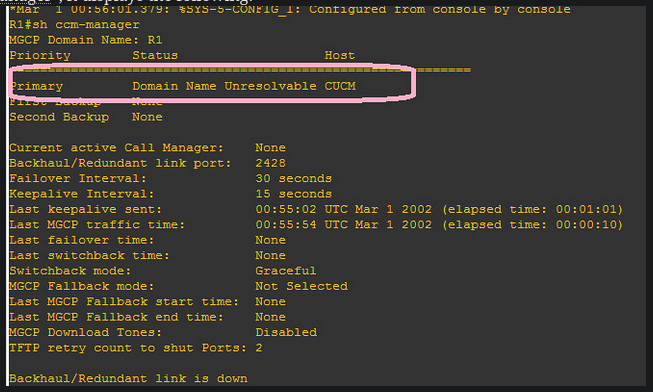
I tried to register my MGCP gateway to my CUCM, but everytime I did a “show ccm-manager”, it displays the following:
 Troubleshooting
I first thought about an issue about DNS on CUCM. I remembered that, during the CUCM installation, I put CUCM somewhere.
So I went to every corner of CUCM admin pages, where I could find the “CUCM” keyword.
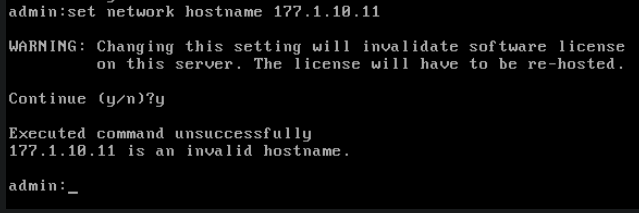
I changed some settings in Entreprise Parameters. I even tried to change the hostname under the CUCM CLI mode:
Troubleshooting
I first thought about an issue about DNS on CUCM. I remembered that, during the CUCM installation, I put CUCM somewhere.
So I went to every corner of CUCM admin pages, where I could find the “CUCM” keyword.
I changed some settings in Entreprise Parameters. I even tried to change the hostname under the CUCM CLI mode:
 Then, I examined what’s happening at the router level, with “debug mgcp events”. I noticed this line:


Reading List for the Cisco CIPT1 Exam
Studying for Cisco certifications not enough with only official Cisco Press books. We got to supplement our reading with other documents. for CIP1 exam, I decided to heavily rely on reading from the screen. Why? because a network engineer does not often have the luxury to print all the documents he works with.
Documents I’m reading to supplement my CIPT1 studies:
- IOS 15.2M&T configuration guides
- Configuring H.323 gateways
- Cisco Unified Communications Manager Session Management Edition Deployment Guide Release 8.x, page 13
- H.323 Slow Start and Fast Start
- Cisco IOS Voice Command Reference, S Commands
- Media Termination Points
Cisco CIPT1 Student Guide
For example, let’s take Call Survivability. In the Student Guide, it says that call survivability is maintaining the RTP stream between two IP endpoints when the CUCM fails. However, the foundation Guide and I agree that call survivability involves TDM-to-IP-calls too.
Another exemple: does MGCP support call survivability? the Student Guide says no. Maybe it was supported in a later release, you’ll probably say. Read the following line: “Media Gateway Control Protocol has supported call survivability (call preservation) since it was introduced on the gateway routers, but H.323 gateways did not support this feature until Cisco IOS 12.4(9T)”.
CUCM, VMware and GNS3
I found some interesting blogs about this topic:
Notes:
- Router IOS should support voice. I’m using 12.4 Advanced Entreprise IOS version,
- Vmware network adapter: set to “host only” mode. Remember that during the installation of CUCM on Vmware, we set the network adapter to “bridged”, so it can connect to Internet and contact an NTP server,
- After adding the cloud component in GNS3, you may find that no adapter is seen under NIO Ethernet. GNS3 mentions that it needs “Administrator or root access”. Solution: close GNS3, right click and choose “run as administrator”. Then you’ll see the list of adapters under NIO Ethernet.
Install CUCM on VMware
I struggled a couple of weeks before I came across a great post about installing CUCM on a vmware workstation. I needed this for CIPT1 labs.
Strangely, the website has been taken down due to a hacking attempt.
Well, everything seemed to work fine until the NTP configuration step. Here, I’ve discovered that , when configuring NTP server, make sure your guest machine can connect to the internet and check the public NTP server. So if you have a computer firewall, disable it.
How to Reload Your Cisco Router While Asleep
There are times when you want to schedule a router reload, but you don’t want to stay late or come to the office during weekends. “Reload at” is your friend.
How to reload your router at a predefined time
You want to reload your router (or switch) at 7pm, but at the same time, you’ll be having a coffee with your friend and you don’t want to have this discussion: “- Sorry guys, I have a router to reboot. I’ll be back in 30mn.
Managing Endpoints and Endusers with CME
Preparing router to act as a CME:
- configure ip address on interface.
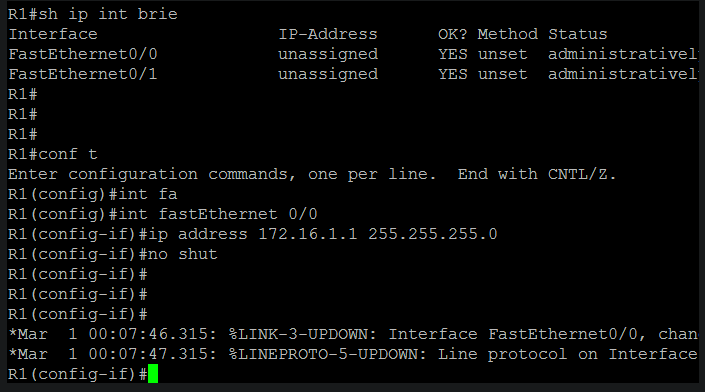
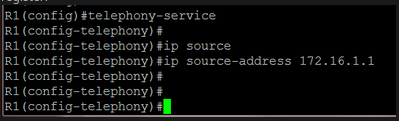
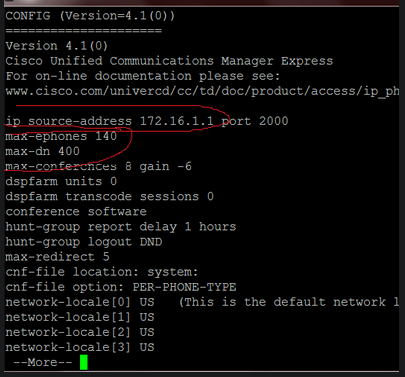
- Configure the source address, the IP address to which ip phones will register:
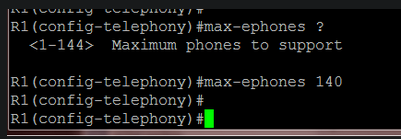
- specify the maximum number of phones that CME can handle. This will affect the router performance:
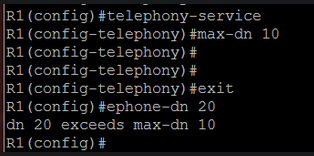
- configure the maximum number of ephone-dns:
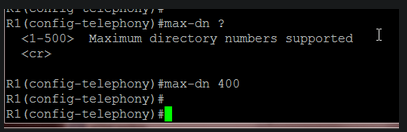 Later, I will change these values because my router lacked memory resources.
To verify the aforementioned settings:
Later, I will change these values because my router lacked memory resources.
To verify the aforementioned settings:
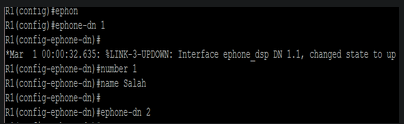
 Let’s create our first ephone-dn:
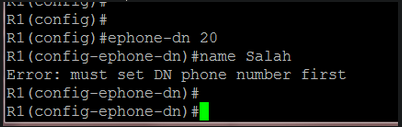
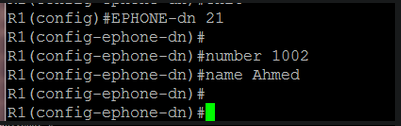
 At this point, my router displayed an error message indicating a lack of memory. I increased its memory size in GNS3:
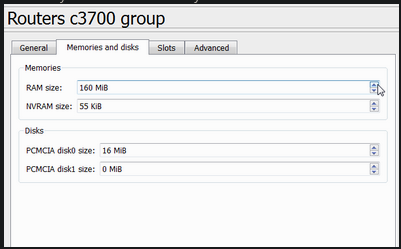 After a reload, things went ok
I also reduced the max-ephone and max-dn values:
After a reload, things went ok
I also reduced the max-ephone and max-dn values:
 Now we can add ephone-dns without problems:
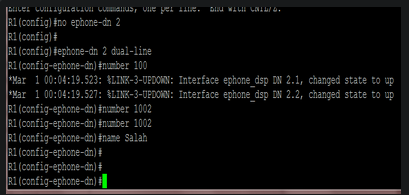
 When I create a dual-line ephone-dn, two “sub-ephone-dn” are created:
 To verify ephone-dns:
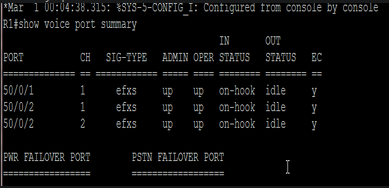 another way to verify it:
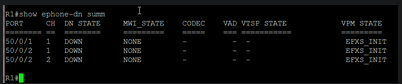 Notice that there are two channels for ephone-dn 2, which is a dual-line ephone-dn.
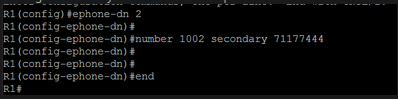
Adding a secondary line to a dual-line ephone-dn:
Cisco Switching Notes
- a 3750 can act as a layer3 switch by adding the “ip routing” command.
- It can automatically route between locally created vlans because it considers them as connected interfaces (given that the SVIs are created).
- on a device, there are 3 types of traffic: control, management, end user.
- Control traffic such as CDP, DTP, PAgP goes through vlan1 between Cisco switches, even if you clear it from trunks.
- By default, native vlan traffic is untagged. But there’s a Cisco command that tells the switch to tag all vlans.
- by default, native vlan = vlan1. If we set the native vlan to vlan100, then vlan100 frames will be untagged on trunks, and vlan1 frames will be tagged.
- SMI: Standard Multilayer Image
- EMI: Enhanced Multilayer Image
- if switch is acting L2, then we should set a Default Gateway on it to make the management vlan reachable remote ; if it is acting L3, it will have routes instead.
- switch and Management vlan
- the management IP address must be reachable from remote
- best practice: use a same subnet to manage all network devices
- on L2 SW: only one SVI is up at a time
Cisco Auto Qos Configuration
First, let’s see if QoS is enabled on the switch:
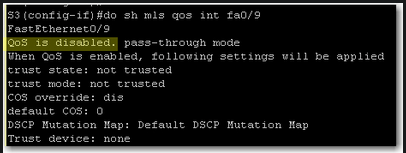 QoS is disabled. We should enable it on global configuration level:
 If we want to display QoS settings for an interface, we do a show mls qos interface command:
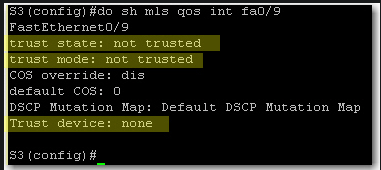 At this stage we still did not define trust boundaries. That’s why Trust State and Trust Mode say “not trusted”. And we did not specify whether we’ll trust a device or not.
To define trust boundary with auto-qos, we either trust all CoS values coming on the switch interface or we trust CoS values only if an ip phone is connected to the switch port.
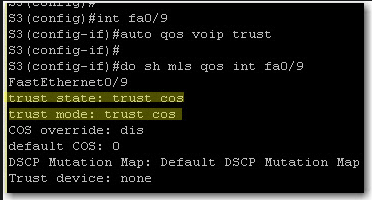
With auto qos voip trust, we tell the switch to trust CoS on each packet coming on the switch interface:
At this stage we still did not define trust boundaries. That’s why Trust State and Trust Mode say “not trusted”. And we did not specify whether we’ll trust a device or not.
To define trust boundary with auto-qos, we either trust all CoS values coming on the switch interface or we trust CoS values only if an ip phone is connected to the switch port.
With auto qos voip trust, we tell the switch to trust CoS on each packet coming on the switch interface:
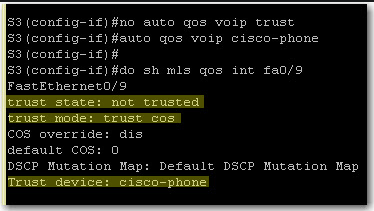
 If we want to further limit trust boundary, we can tell the switch to trust CoS values only if a Cisco ip phone is detected on the port:
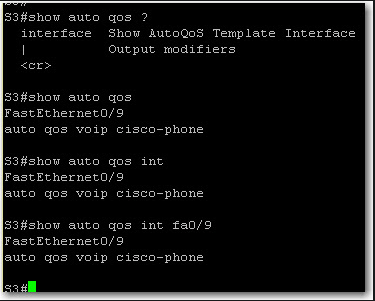
 Finally, on a 3550 switch, show auto qos and show auto qos interface give the same output: